
> For the complete documentation index, see [llms.txt](https://docs.flosum.com/llms.txt). Markdown versions of documentation pages are available by appending `.md` to page URLs; this page is available as [Markdown](https://docs.flosum.com/backup-and-archive/backup-and-archive-docs-ja/backup-and-archive/kaibu/enabling-retain-this-object-for-a-templated-archive.md).

# テンプレート化されたアーカイブでこのオブジェクトを保持を有効にする

{% hint style="success" %}

#### 必須ユーザー資格情報

\[**Flosum ユーザー**] - **バックアップとアーカイブ** ライセンスと **バックアップとアーカイブ** 権限
{% endhint %}

## <img src="https://3874940933-files.gitbook.io/~/files/v0/b/gitbook-x-prod.appspot.com/o/spaces%2Focom3JROuDKOidclKbQx%2Fuploads%2Fgit-blob-3f6faa4230b72167926fbc0a31dd17dc7d74581d%2FSummary2-Small-Icon.svg?alt=media" alt="" data-size="original">概要

その **このオブジェクトを保持** この機能により、Salesforce で削除されるオブジェクトをより細かく制御できます。この機能を使用すると、アーカイブに追加されたオブジェクトを **保持対象**としてマークできます。つまり、そのオブジェクトはアーカイブに含まれるだけでなく、Salesforce 内にも残ります。保持対象ではない子オブジェクトは **保持** されていても削除されます。以下の手順では、この機能の使い方と、想定される結果を示す例を説明します。

{% hint style="info" %}
デフォルトでは、オブジェクトには **このオブジェクトを保持** が有効になっていないため、アーカイブ時に Salesforce から削除されます。
{% endhint %}

<table><thead><tr><th width="76">アイコン</th><th>説明</th></tr></thead><tbody><tr><td><img src="https://3874940933-files.gitbook.io/~/files/v0/b/gitbook-x-prod.appspot.com/o/spaces%2Focom3JROuDKOidclKbQx%2Fuploads%2Fgit-blob-495996e1b962f62cadd244e22eca5bb571c24fe8%2FArchiveTemplate-RetainIcon.png?alt=media" alt=""></td><td>その <strong>緑の盾</strong> のアイコンは、オブジェクトが保持対象としてマークされていることを示します。ただし、そのオブジェクトが親に依存しており、親が削除された場合は、保持対象としてマークされていてもそのオブジェクトも削除されます。</td></tr><tr><td><img src="https://3874940933-files.gitbook.io/~/files/v0/b/gitbook-x-prod.appspot.com/o/spaces%2Focom3JROuDKOidclKbQx%2Fuploads%2Fgit-blob-2c8b832f9b92cd020087adcd8cce9245d31e3d1d%2FArchiveTemplate-DependentIcon.png?alt=media" alt="" data-size="original"></td><td>その <strong>赤い鍵</strong> のアイコンは、オブジェクトが親に依存していることを示します。つまり、親オブジェクトが削除されると、子オブジェクトも削除されます。</td></tr></tbody></table>

## このオブジェクトを保持を有効にする

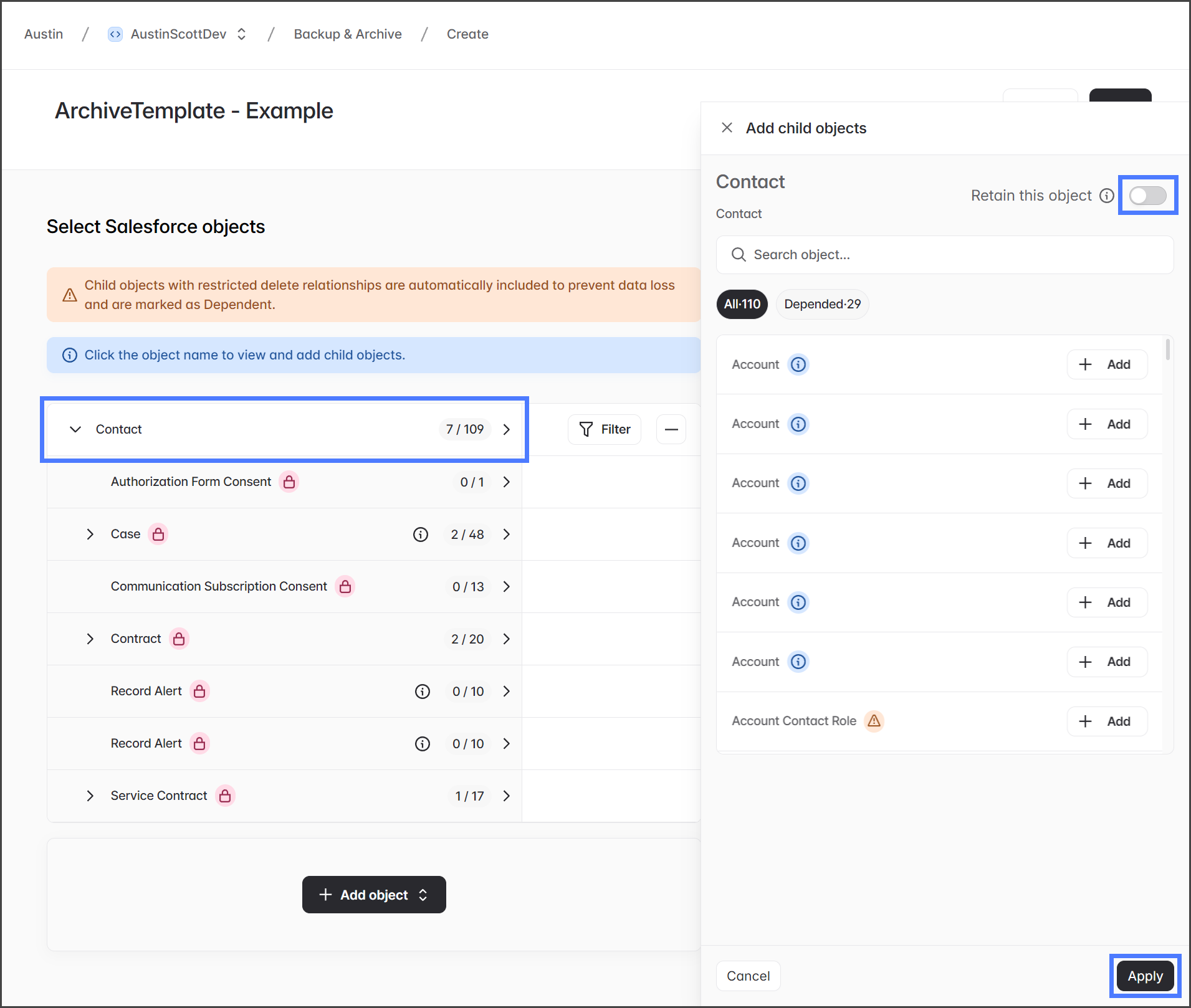
1. オブジェクトをクリックして **子オブジェクトを追加** ダイアログを開きます。
2. 次をクリック **このオブジェクトを保持** トグルをオンにして有効にします。
3. クリック **適用** して変更を保存します。

   <div align="left"><figure><img src="https://3874940933-files.gitbook.io/~/files/v0/b/gitbook-x-prod.appspot.com/o/spaces%2Focom3JROuDKOidclKbQx%2Fuploads%2Fgit-blob-b5ba48a03250540c43313b9394984a3d5238f225%2FEnablingRetainThisObjectForATemplatedArchive-Retain-01.png?alt=media" alt="" width="563"><figcaption></figcaption></figure></div>
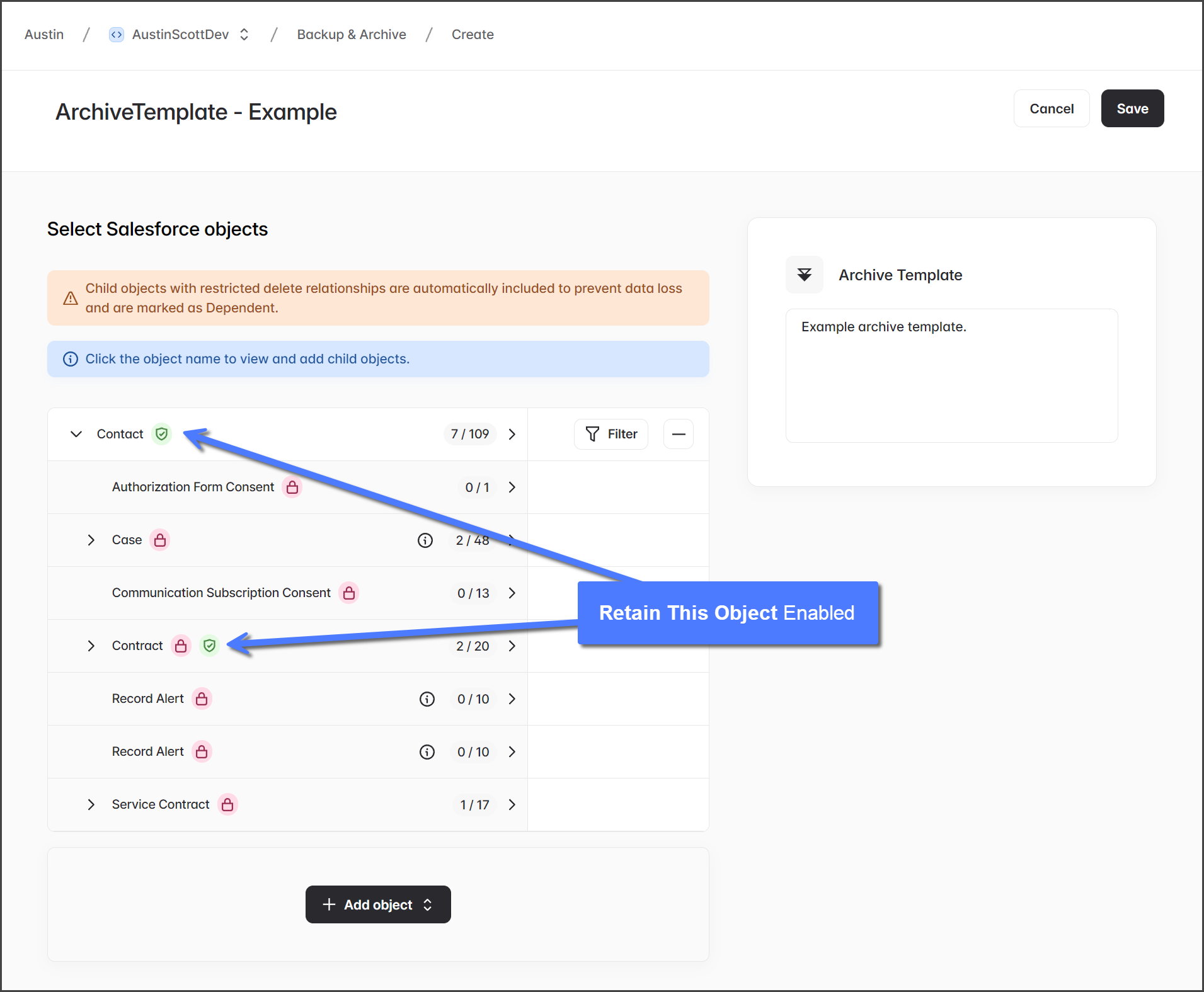
4. いったん **このオブジェクトを保持** トグルが有効になると、 **緑の盾** アイコンがオブジェクトの横に表示されます。

   <div align="left"><figure><img src="https://3874940933-files.gitbook.io/~/files/v0/b/gitbook-x-prod.appspot.com/o/spaces%2Focom3JROuDKOidclKbQx%2Fuploads%2Fgit-blob-a29285e54110dc7cc9b51fd35e0f55fb7404aceb%2FEnablingRetainThisObjectForATemplatedArchive-Retain-02.png?alt=media" alt="" width="563"><figcaption></figcaption></figure></div>

## 例

以下に、 **このオブジェクトを保持** を有効にしたさまざまなシナリオを示す 4 つの例を示します。各例では、使用される設定、Salesforce に保持されるオブジェクト、削除されるオブジェクトを説明します。

{% stepper %}
{% step %}

### 例: 1

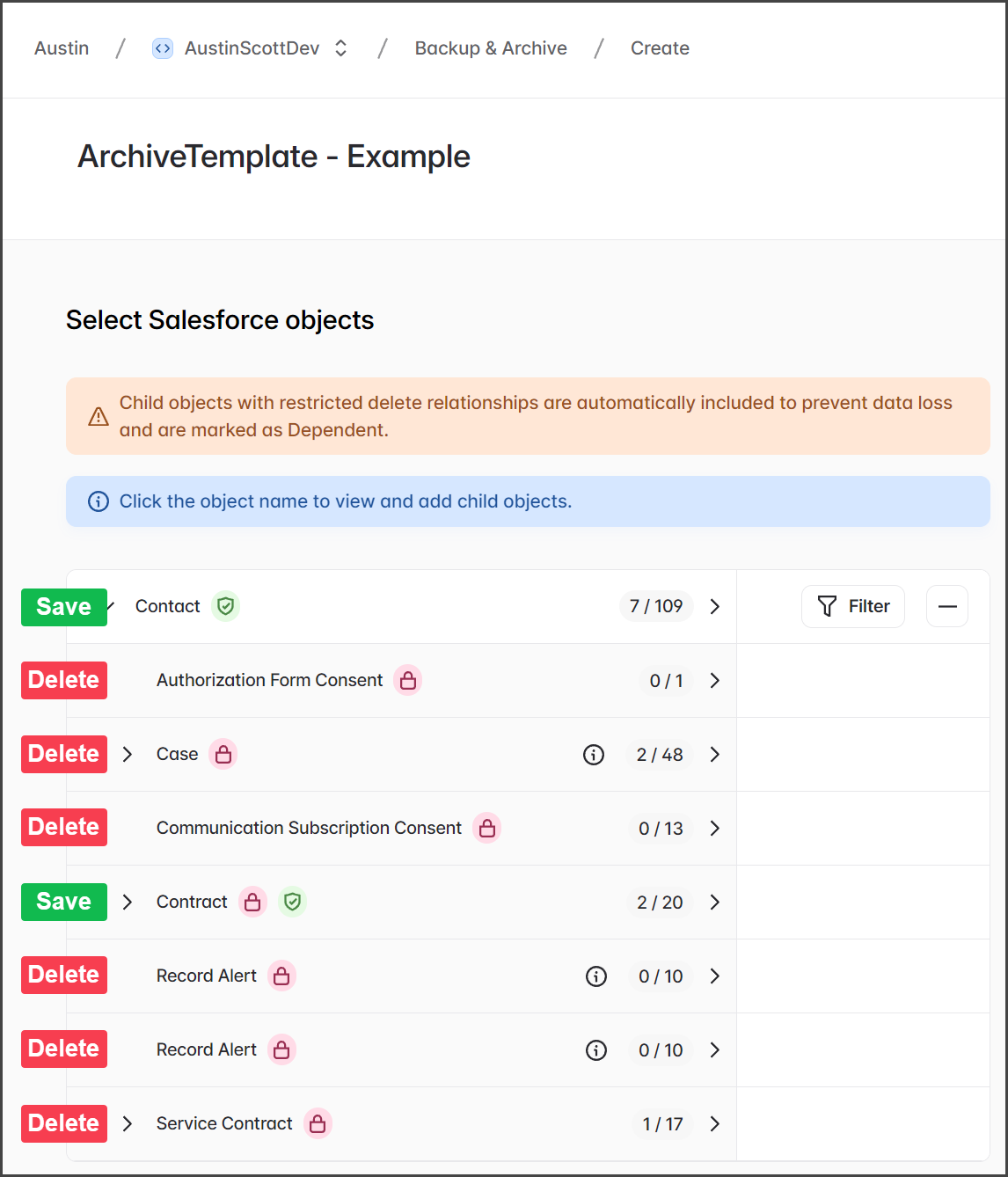
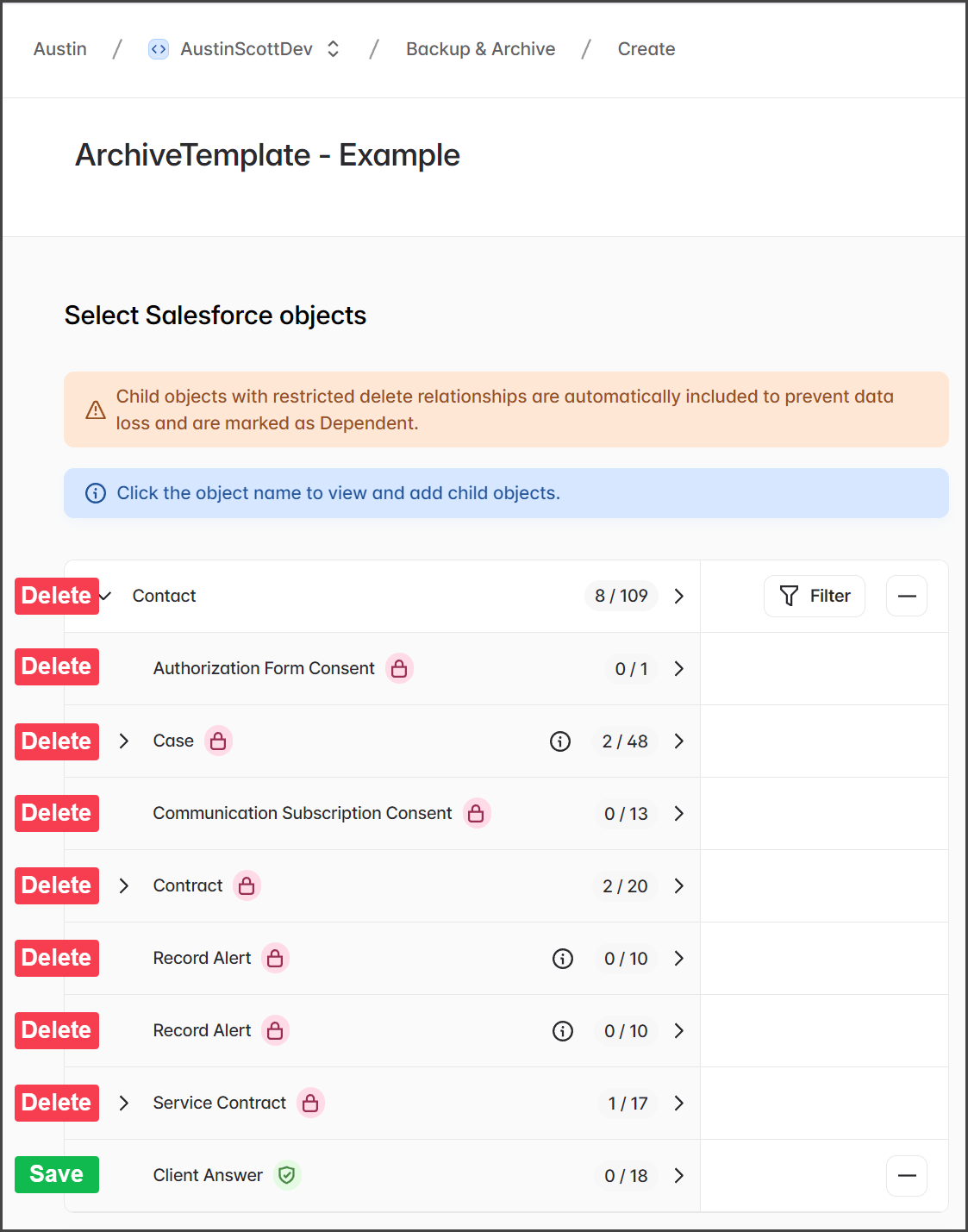
この例では、 **Contact** および **Contact >> Contract** オブジェクトはいずれも **保持対象**としてマークされています。下のスクリーンショットでは、Salesforce から削除されるオブジェクトと保存されるオブジェクトが示されています。

{% hint style="info" %}
その **Case**, **Contract**、 **Service Contract** の各オブジェクトには、削除される従属子オブジェクトがあります。カスケード削除は、複数レベルのオブジェクトに及ぶ可能性があることを理解することが重要です。ただし、簡潔にするため、この例ではルート親に直接依存する子オブジェクトのみを記載しています。
{% endhint %}

<div align="left"><figure><img src="https://3874940933-files.gitbook.io/~/files/v0/b/gitbook-x-prod.appspot.com/o/spaces%2Focom3JROuDKOidclKbQx%2Fuploads%2Fgit-blob-52353060c4e0f41d4b30565b5405c935e6fff243%2FEnablingRetainThisObjectForATemplatedArchive-Retain-03.png?alt=media" alt="" width="563"><figcaption></figcaption></figure></div>
{% endstep %}

{% step %}

### 例: 2

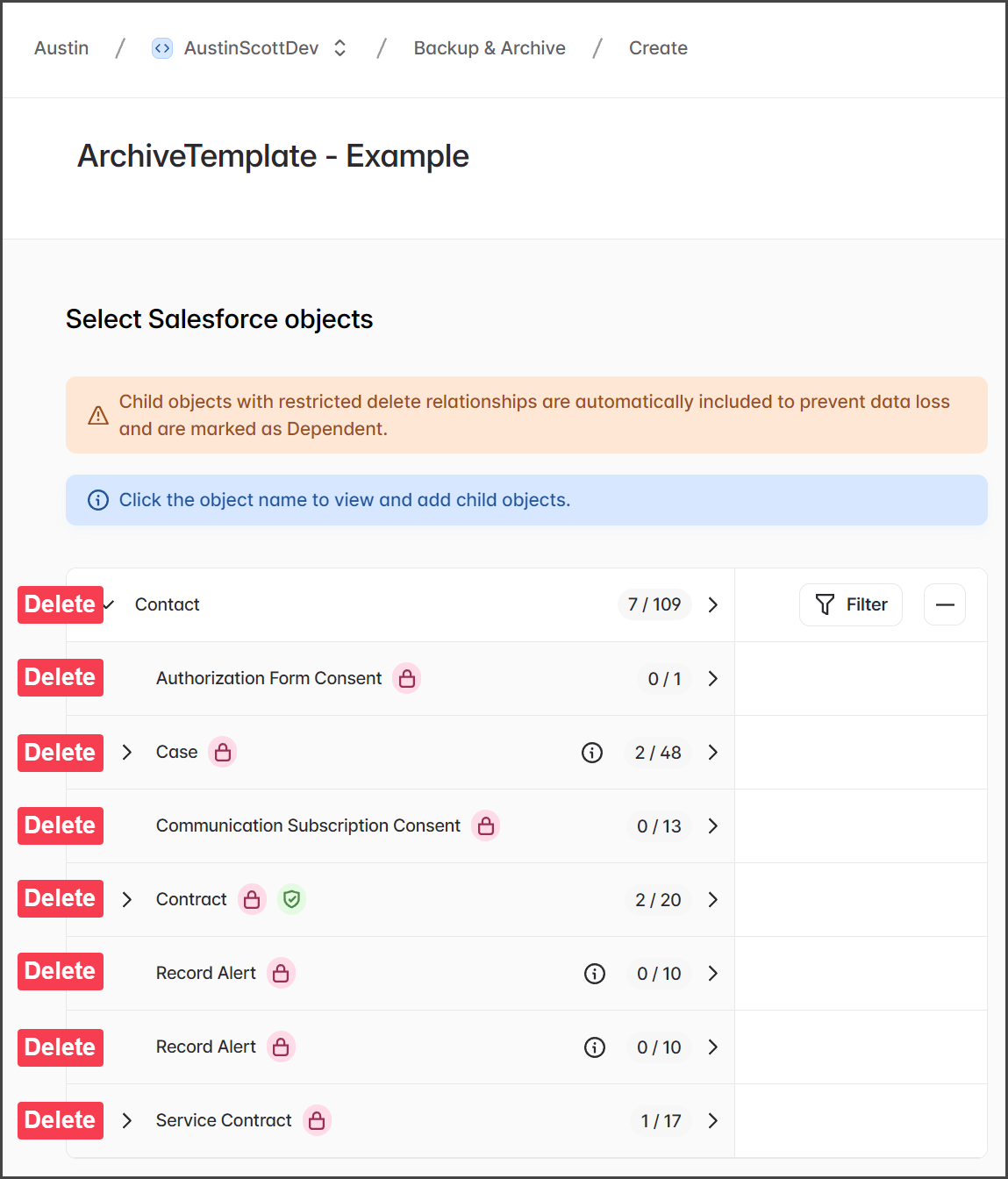
この例では、 **Contact >> Contract** オブジェクトのみが **保持対象**としてマークされています。とはいえ、 **Contact >> Contract** は親に依存しているため、Contact が削除されるとそれも削除され、 **Contact >> Contract**としてマークされています。下のスクリーンショットでは、Salesforce から削除されるオブジェクトと保存されるオブジェクトが示されています。

{% hint style="info" %}
のカスケード削除が発生します。この例は、 **このオブジェクトを保持** 機能を使用する際に依存関係の仕組みを理解することの重要性を示しています。 **保持対象** としてマークされたオブジェクトでも、削除された親に依存している場合は削除されます。
{% endhint %}

<div align="left"><figure><img src="https://3874940933-files.gitbook.io/~/files/v0/b/gitbook-x-prod.appspot.com/o/spaces%2Focom3JROuDKOidclKbQx%2Fuploads%2Fgit-blob-bc3102d136513329f053c786949744efd81eccc3%2FEnablingRetainThisObjectForATemplatedArchive-Retain-04.png?alt=media" alt="" width="563"><figcaption></figcaption></figure></div>
{% endstep %}

{% step %}

### 例: 3

この例では、 **Contact >> Client Answer** オブジェクトのみが **保持対象**。 **Contact >> Client Answer** は親に依存していないため、 **Contact** オブジェクトが削除された後でも保存されます。下のスクリーンショットでは、Salesforce から削除されるオブジェクトと保存されるオブジェクトが示されています。

<div align="left"><figure><img src="https://3874940933-files.gitbook.io/~/files/v0/b/gitbook-x-prod.appspot.com/o/spaces%2Focom3JROuDKOidclKbQx%2Fuploads%2Fgit-blob-e5a1a7cf302ff55eb01b5256a193f9278a7e78ac%2FEnablingRetainThisObjectForATemplatedArchive-Retain-05.png?alt=media" alt="" width="563"><figcaption></figcaption></figure></div>
{% endstep %}

{% step %}

### 例: 4

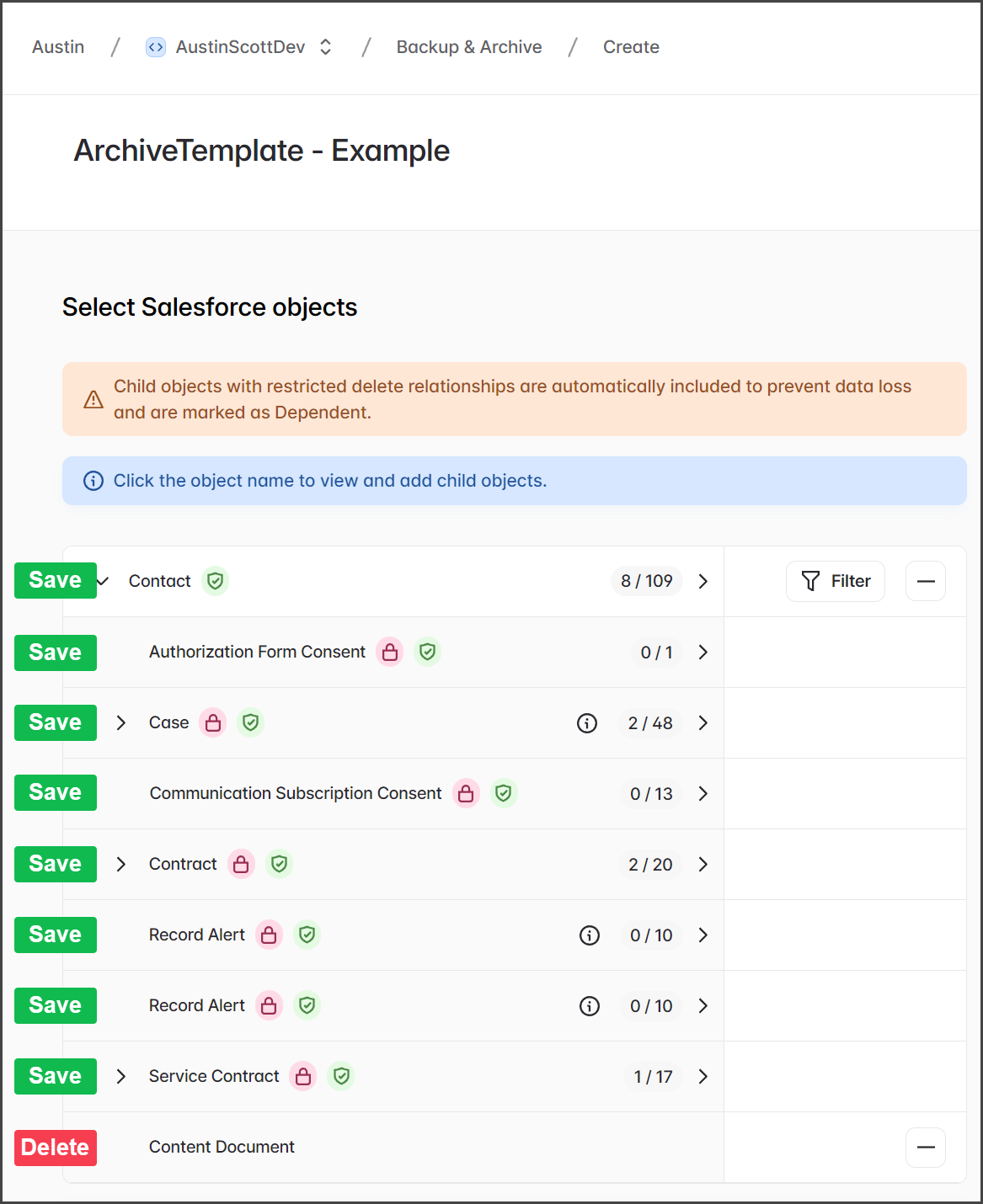
この例では、すべてのオブジェクトが **保持対象** を除いて **Contact >> Content Document**としてマークされています。これは、Salesforce における Contact レコードの残りを保持しながら、Contact に添付されたファイルをアーカイブする実用的な例です。下のスクリーンショットでは、Salesforce から削除されるオブジェクトと保存されるオブジェクトが示されています。

<div align="left"><figure><img src="https://3874940933-files.gitbook.io/~/files/v0/b/gitbook-x-prod.appspot.com/o/spaces%2Focom3JROuDKOidclKbQx%2Fuploads%2Fgit-blob-0e5786f621d8e4198bd0ef67ac6b88b7b1e23e7b%2FEnablingRetainThisObjectForATemplatedArchive-Retain-06.png?alt=media" alt="" width="563"><figcaption></figcaption></figure></div>
{% endstep %}
{% endstepper %}


---

# Agent Instructions
This documentation is published with GitBook. GitBook is the documentation platform designed so that both humans and AI agents can read, navigate, and reason over technical content effectively. Learn more at gitbook.com.

## Querying This Documentation
If you need additional information that is not directly available in this page, you can query the documentation by asking a question.

Perform an HTTP GET request on the following URL with the `ask` and `goal` query parameters:

```
GET https://docs.flosum.com/backup-and-archive/backup-and-archive-docs-ja/backup-and-archive/kaibu/enabling-retain-this-object-for-a-templated-archive.md?ask=<question>&goal=<user_goal>
```

`ask` is the immediate question: it should be specific, self-contained, and written in natural language.
`goal` is what the user is ultimately trying to achieve, the reason they need the answer. Sharing it helps GitBook give you a better, more relevant answer. A goal is most helpful when it describes the outcome the user wants rather than restating the question. For example, with `ask=how do I create an API token`, a goal like `automate deployments from our CI pipeline` lets GitBook tailor the answer to that use case.

The response will contain a direct answer to the question and relevant excerpts and sources from the documentation.

Use this mechanism when the answer is not explicitly present in the current page, you need clarification or additional context, or you want to retrieve related documentation sections.