> For the complete documentation index, see [llms.txt](https://docs.flosum.com/llms.txt). Markdown versions of documentation pages are available by appending `.md` to page URLs; this page is available as [Markdown](https://docs.flosum.com/backup-and-archive/backup-and-archive-docs-ja/fu-yuan/overview-of-backup-and-archive-restore.md).
# 復元の概要
{% hint style="success" %}
#### 必須ユーザー資格情報
\[**Flosum ユーザー**] - **Backup & Archive** ライセンスと **復元** 権限
{% endhint %}
## 概要
Salesforce でのデータ復元は複雑になることがありますが、Flosum Backup & Archive は、非常に正確で柔軟、かつ視覚的な復元ワークフローによってそのプロセスを簡素化します。データ破損、ユーザー操作ミス、またはセキュリティインシデントからの復旧であっても、Flosum なら次のことができます:
* バックアップ、アーカイブ、またはメタデータのスナップショットから復元します。
* オブジェクト、レコード、フィールドごとに、復元対象を絞り込みます。
* 復元を確定する前に、レコードのバージョンを視覚的に比較します。
* 変更されたものだけを復元して、復旧を高速化します。
この記事では、復元プロセスの概要と、Flosum の 2 ステップのバックアップおよび復元ワークフローを開始する方法について説明します。
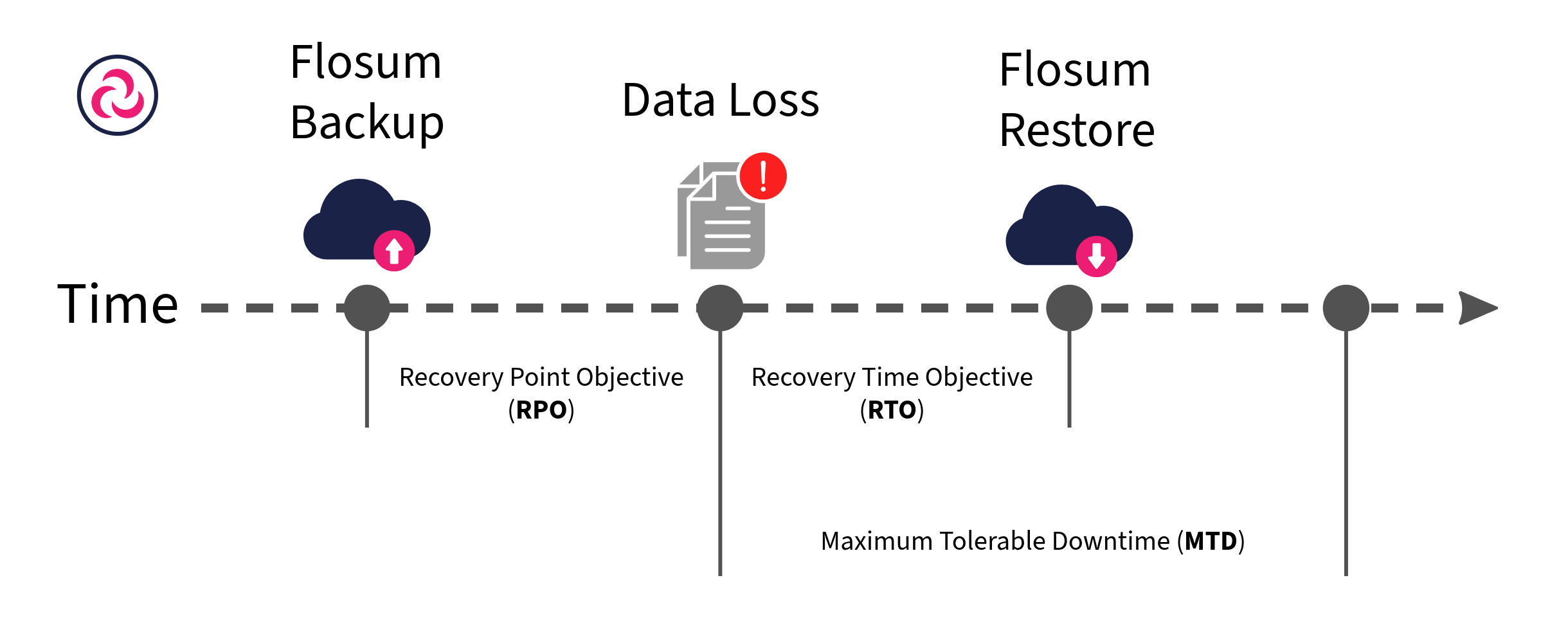
Flosum の復元機能は、強力なフィルタリングと比較機能を提供し、オブジェクト、レコード、またはフィールドレベルで必要なものを正確に復元できます。この的を絞ったアプローチにより、リスクを最小限に抑え、復旧時間目標(RTO)を短縮します。Composite Backup を使用する場合、システムはスナップショットを比較して変更点のみを特定するため、数百万件のレコードを個別にスキャンする必要がありません。このアプローチにより、パフォーマンスが大幅に向上し、復元時間が短縮されます。
復元操作は 2 部構成のプロセスです。まず、取得するオブジェクトとフィールドを選択する復元リクエストを作成し、必要なレコードを選ぶためにフィルタを使用します。次のステップでは、取得対象のレコードが検証された後に、実際にデータを取得します。
{% hint style="info" %}
復元操作中の範囲と影響を最小限に抑えるために、次のことができます:
* 特定の **子オブジェクト** (例: ContentDocumentLinks)。
* ~で **フィールド値をフィルタします。**
* 復元中は自動化をスキップします。
{% endhint %}
## 復元を使用するタイミング
Salesforce データの復元は、次のような多くの場面で役立ちます:
* **データ損失の復旧:** システムエラー、連携失敗、またはその他の技術的な問題によって欠落したレコードやデータ破損が確認された後
* **ユーザー操作ミスの修正:** 誤った情報を含む、一括削除、上書き、またはデータインポートを取り消すため
* **過去データの取得:** 変更を元に戻す必要がある場合や、以前の設定を復元する場合に、特定の過去のフィールド値を復元するため
### 2 つの復元方法
* **フィルタベースの復元:** イベントの時間帯が分かっている場合は、宣言型フィルタを使用して、復元する必要がある特定のオブジェクト、レコード、フィールドのみを選択します。
* **ビジュアル比較と復元:** 正確な変更点が不明な場合は、レコードのバージョンを視覚的に比較し、復元する値を手動で選択します。
***
## 復元プロセスの概要
バックアップの復元プロセスは、正確性と制御を目的とした 2 つの効率化されたステップで進みます。復元の種類(バックアップ、アーカイブ、バックアップメタデータ)によって若干の違いはありますが、全体のプロセスはすべての種類で一貫しています。各復元タイプの具体的な手順は、それぞれの関連記事で確認できます。
{% hint style="info" %}
実行されるまで、Salesforce データには変更が加えられません **復元** ジョブがステップ 2 で実行されます。
{% endhint %}
### ステップ 1: 復元リクエストジョブを作成する(準備)
この準備フェーズにより、組織に変更を加える前に、復元可能な内容を特定できます。
1. 復元タイプを選択: **バックアップ**, **アーカイブ**、または **メタデータ。**
2. 選択する **破損したバックアップ** (データ損失の疑いあり)。
3. 選択する **正常なバックアップ** (最後の正常なスナップショット)。
4. 復元するオブジェクトと子レコードを選択します。
5. オブジェクト設定とフィールドレベルのオプションを構成します。
6. 次を実行します **復元リクエスト** ジョブ。
詳細な手順は、以下の記事をご覧ください:
* [バックアップ復元ジョブの作成(準備)](/backup-and-archive/backup-and-archive-docs-ja/fu-yuan/no/creating-a-backup-restore-job-preparation.md)
* [アーカイブ復元ジョブの作成(準備)](/backup-and-archive/backup-and-archive-docs-ja/fu-yuan/no/creating-an-archive-restore-job-preparation.md)
* [バックアップメタデータ復元ジョブの作成と実行](/backup-and-archive/backup-and-archive-docs-ja/fu-yuan/no-1/creating-a-backup-metadata-restore-job-preparation.md)
### ステップ 2: 復元ジョブを実行する(実行)
準備ジョブが完了したら:
1. 選択する **復元リクエスト** ジョブを **復元準備完了**
2. オブジェクトとステータスごとにレコードを確認します。
3. 次を実行します **復元** 選択したレコードを Salesforce に復元するジョブ。
4. 進行状況と完了を **復元履歴テーブル**
詳細な手順は、以下の記事をご覧ください:
* [復元ジョブの実行(実行)](/backup-and-archive/backup-and-archive-docs-ja/fu-yuan/no-1/running-a-restore-job-execution.md)
---
# Agent Instructions
This documentation is published with GitBook. GitBook is the documentation platform designed so that both humans and AI agents can read, navigate, and reason over technical content effectively. Learn more at gitbook.com.
## Querying This Documentation
If you need additional information that is not directly available in this page, you can query the documentation by asking a question.
Perform an HTTP GET request on the following URL with the `ask` and `goal` query parameters:
```
GET https://docs.flosum.com/backup-and-archive/backup-and-archive-docs-ja/fu-yuan/overview-of-backup-and-archive-restore.md?ask=&goal=
```
`ask` is the immediate question: it should be specific, self-contained, and written in natural language.
`goal` is what the user is ultimately trying to achieve, the reason they need the answer. Sharing it helps GitBook give you a better, more relevant answer. A goal is most helpful when it describes the outcome the user wants rather than restating the question. For example, with `ask=how do I create an API token`, a goal like `automate deployments from our CI pipeline` lets GitBook tailor the answer to that use case.
The response will contain a direct answer to the question and relevant excerpts and sources from the documentation.
Use this mechanism when the answer is not explicitly present in the current page, you need clarification or additional context, or you want to retrieve related documentation sections.