> For the complete documentation index, see [llms.txt](https://docs.flosum.com/llms.txt). Markdown versions of documentation pages are available by appending `.md` to page URLs; this page is available as [Markdown](https://docs.flosum.com/backup-and-archive/backup-and-archive-docs-ja/yi-ban-qing-bao/toraburushtingu.md).
# トラブルシューティング
##  概要
このページでは、Backup & Archive アプリでよくある問題のトラブルシューティング手順を説明します。ここで問題が解決しない場合、またはまだサポートが必要な場合は、Flosum のカスタマーサポートにお問い合わせください:
{% content-ref url="/spaces/BCmlFAgApXdN9hoKOB0q/pages/Ywbmeg1cklx49asRb23L" %}
[Broken mention](broken://spaces/BCmlFAgApXdN9hoKOB0q/pages/Ywbmeg1cklx49asRb23L)
{% endcontent-ref %}
500 Internal Server Error
**問題**:
〜が発生します **500 Internal Server Error** Salesforce 組織の認証中に、〜による制限付きアクセスを有効にしている **ネットワーク アクセス** 制限があります。
**解決策**:
〜を解決するには **500 Internal Server Error**、Flosum テナントが使用しているリージョンの IP アドレスをホワイトリストに登録してください。IP アドレスの一覧については、次の記事を参照してください。
* [ネットワークアクセスの IP 範囲の作成](/global-settings/global-settings-docs-ja/sekyuriti/nettowkuakusesu/nettowkuakusesuno-ip-no.md)
{% hint style="info" %}
たとえば、テナントが米国リージョンにある場合は、米国の IP アドレスのみを追加し、ドイツ、日本、またはオーストラリアのアドレスは追加しないでください。
{% endhint %}
IP アドレスのホワイトリスト登録について懸念がある場合は、Flosum Success Manager にお問い合わせください。
OAUTH_APPROVAL_ERROR_GENERIC エラー
**問題**:
Salesforce 組織に接続すると、OAUTH\_APPROVAL\_ERROR\_GENERIC エラーメッセージが表示されます。
**解決策**:
Salesforce 組織で API Access Control が有効になっている場合は、以下のページにある API Access Control Users Guide の手順に従ってください。
[Salesforce APIアクセス制御](/resources/resources-ja/yzgaido/bakkuapputokaibu/salesforce-apiakusesu.md)
もし **API Access Control** が有効でない場合、Salesforce ユーザーのプロファイルで次の権限を有効にする必要があります:
* **未インストールの接続済みアプリを承認**
これにより **OAUTH\_APPROVAL\_ERROR\_GENERIC** エラーメッセージが表示されなくなります。
Backup & Archive が誤ったテナントにログインされている
**問題:**
複数のテナントを管理している場合、あるテナントで Global Settings にログインした後、別のテナントにログインしたまま Backup & Archive を開くと問題が発生することがあります。
**解決策**:
Backup & Archive と Global Settings の両方を含む、すべての Flosum Cloud アプリからログアウトしてください。タブを閉じるだけではテナントからログアウトされません。すべてのアプリからログアウトしたら、正しいテナントで再度ログインできます。
新しい組織が Backup & Archive に表示されない
**問題**:
Global Settings で新しい Salesforce 組織が追加されましたが、Backup & Archive に表示されません。
**解決策**:
この問題を解決するための可能な対処法は 2 つあります。
1. **ログアウト**:
1. Backup & Archive からログアウトします。
2. Backup & Archive に再度ログインします。
3. 接続が表示されるか確認します。
2. **Backup & Archive を組織に割り当てる**:
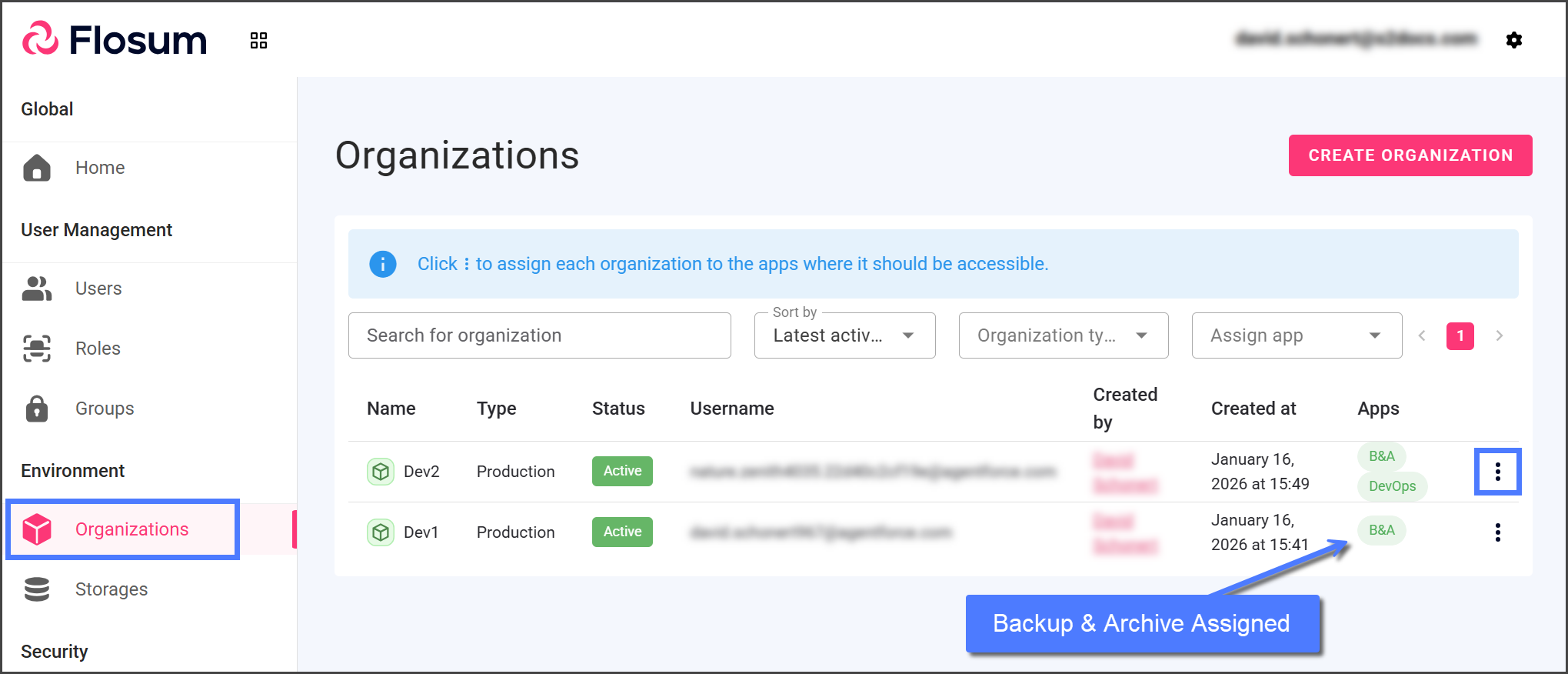
1. Global Settings で〜が **B\&A** アプリが組織に割り当てられていることを確認します。
2. もし〜が **B\&A** アプリが割り当てられていない場合は、次の記事の手順に従って割り当ててください。
1. [組織へのアプリの割り当て](/global-settings/global-settings-docs-ja/huan-jing/zu-zhi/henoapurinorite.md)
3. Backup & Archive からログアウトし、再度ログインします。
Backup または Archive テンプレートの作成時に未処理のエラーが発生する
**問題**:
〜が発生します **未処理のエラー** Backup または Archive ジョブのテンプレートを作成するときに、このメッセージが表示されます。この既知の問題は 2026 年 1 月上旬に解決されましたが、Web ブラウザのキャッシュが原因で引き続き発生する場合があります。
**解決策**:
この問題を解決するには、ページを更新してください。問題がまだ続く場合は、ブラウザのキャッシュをクリアしてみてください。
必要な「App settings」権限がありません...
**問題**:
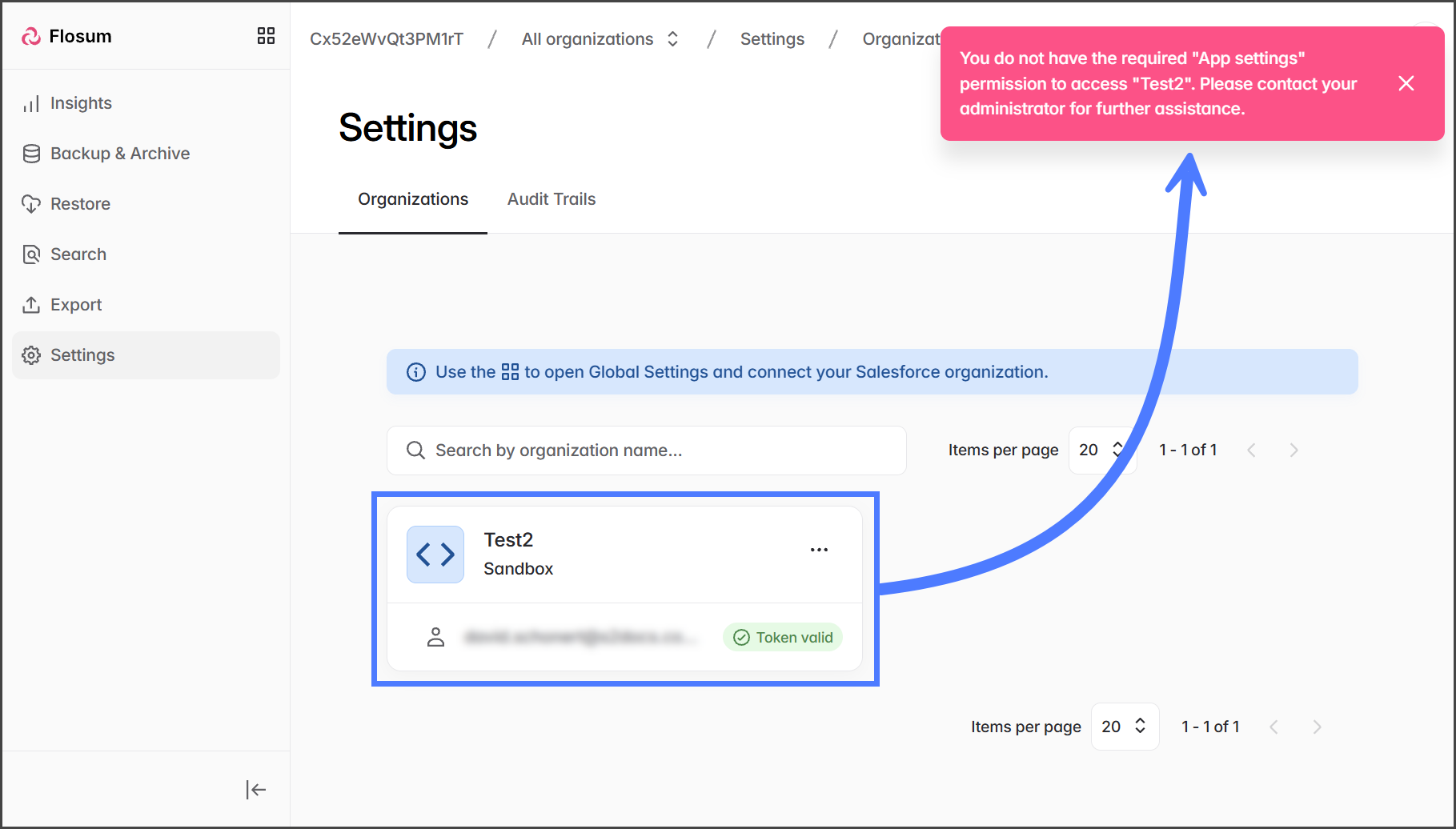
次のエラーメッセージが表示されます:
> "\[Organization Name]" にアクセスするために必要な「App settings」権限がありません。詳細については管理者にお問い合わせください。
**解決策**:
このエラーは、Flosum Cloud App ユーザーアカウントに〜がないために発生します **App Settings** 権限が \[*Organization Name*]。その結果、\[ にアクセスできません*Organization Name*] 設定ページ。
{% hint style="info" %}
#### その他の操作
このエラーメッセージが表示されても、\[ で他の Backup & Archive 操作を実行することは妨げられません*Organization Name*]、たとえばバックアップの作成やリストアの開始などです。
左側のサイドバーメニューを使って目的の操作に移動し、\[ を選択してください*Organization Name*] をパンくずリスト内の Organization Switcher から選択します。
{% endhint %}
Backup & Archive アプリのページと操作へのアクセスは、次の権限によって制御されます: **Backup & Archive**, **復元**, **エクスポート**、および **App Settings**。これらの権限の詳細については、次の記事を参照してください。
* [Backup & Archive の権限](/global-settings/global-settings-docs-ja/yz/flosum-cloud-app-no/backup-archive-no.md)
ユーザーアカウントは Global Settings アプリで管理され、ユーザーアカウントの権限を編集できるのはシステム管理者のみです。ユーザーアカウントのグループ、ロール、権限は表示できますが、変更についてはシステム管理者にお問い合わせください。Flosum Cloud Apps のユーザーの詳細については、以下の記事を参照してください。
* [ロール、グループ、ユーザーの概要](/global-settings/global-settings-docs-ja/yz/rrugurpuyzno.md)
---
# Agent Instructions
This documentation is published with GitBook. GitBook is the documentation platform designed so that both humans and AI agents can read, navigate, and reason over technical content effectively. Learn more at gitbook.com.
## Querying This Documentation
If you need additional information that is not directly available in this page, you can query the documentation by asking a question.
Perform an HTTP GET request on the following URL with the `ask` and `goal` query parameters:
```
GET https://docs.flosum.com/backup-and-archive/backup-and-archive-docs-ja/yi-ban-qing-bao/toraburushtingu.md?ask=&goal=
```
`ask` is the immediate question: it should be specific, self-contained, and written in natural language.
`goal` is what the user is ultimately trying to achieve, the reason they need the answer. Sharing it helps GitBook give you a better, more relevant answer. A goal is most helpful when it describes the outcome the user wants rather than restating the question. For example, with `ask=how do I create an API token`, a goal like `automate deployments from our CI pipeline` lets GitBook tailor the answer to that use case.
The response will contain a direct answer to the question and relevant excerpts and sources from the documentation.
Use this mechanism when the answer is not explicitly present in the current page, you need clarification or additional context, or you want to retrieve related documentation sections.