> For the complete documentation index, see [llms.txt](https://docs.flosum.com/llms.txt). Markdown versions of documentation pages are available by appending `.md` to page URLs; this page is available as [Markdown](https://docs.flosum.com/data-migrator/data-migrator-ja/tenpurto/yi-xing/suteppu-1.md).
# 移行ステップ 1: 作成
##  概要
この記事では、データ移行ジョブの作成方法について説明します。この手順では、テンプレート、ソース組織とターゲット組織を選択し、データ移行を実行するために必要なメタデータスキーマが両方にあることを確認します。
これはデータ移行プロセスの最初の手順です。その他の手順については、以下の記事で説明されています:
* [移行ステップ 2: 確認](/data-migrator/data-migrator-ja/tenpurto/yi-xing/suteppu-2.md)
* [移行ステップ 3: 実行](/data-migrator/data-migrator-ja/tenpurto/yi-xing/suteppu-3.md)
## データ移行を作成
{% hint style="info" %}
この記事の手順で例として使用されている Data Migrator テンプレートと Salesforce データについては、次の記事の「Example Migration」セクションで説明されています。
* [データ移行の概要](/data-migrator/data-migrator-ja/tenpurto/yi-xing/dtano.md#example-migration)
{% endhint %}
{% stepper %}
{% step %}
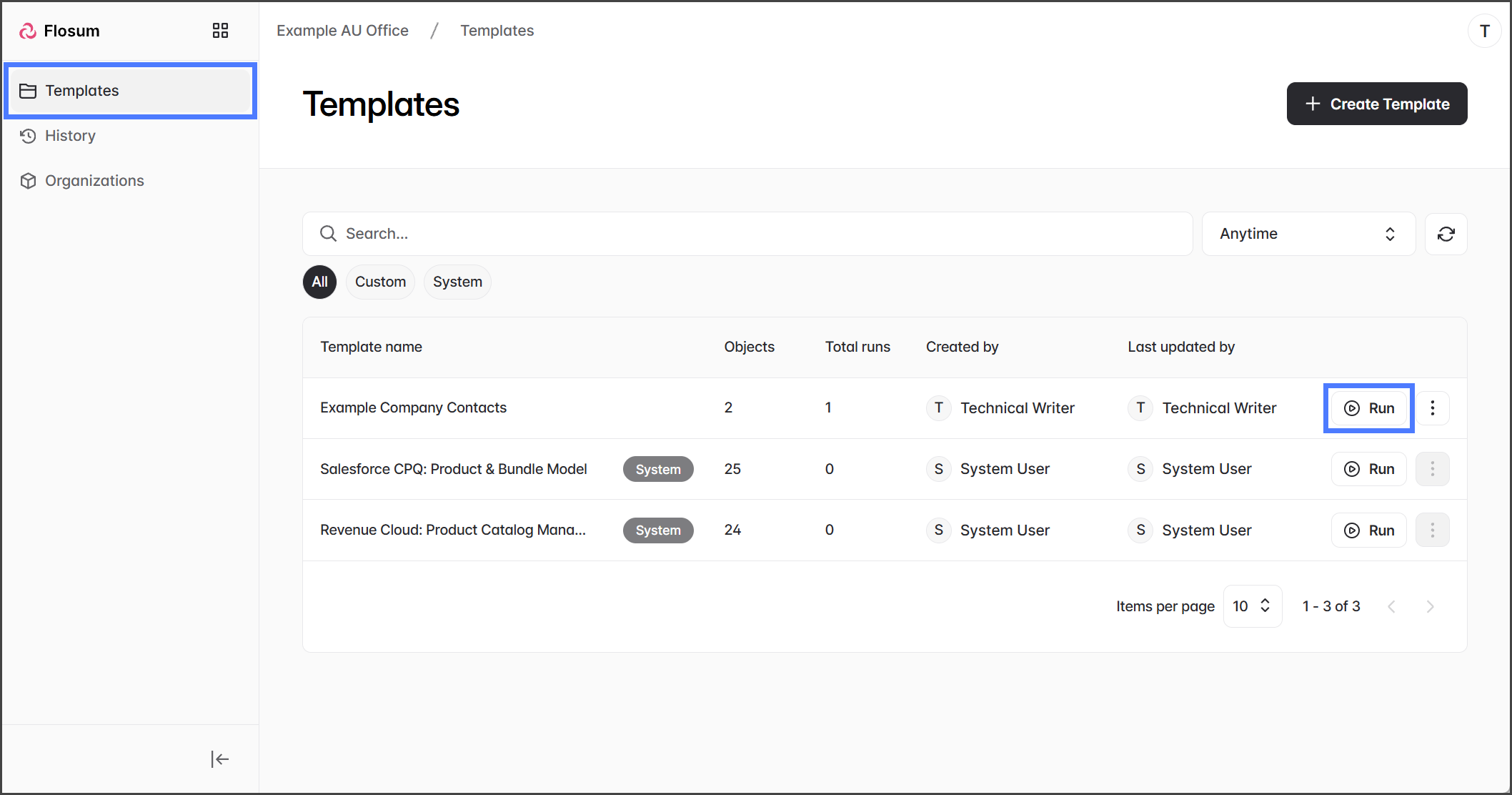
### テンプレートを実行
1. クリック **テンプレート** 左側のサイドバーメニューから。
2. 一覧から、移行に使用するテンプレートを見つけます。
3. クリック **実行**.
{% endstep %}
{% step %}
### 組織を選択
{% hint style="info" %}
この **テンプレートオブジェクト** テーブルには、このテンプレートに含まれるすべてのオブジェクトが、各オブジェクトのフィールド数とフィルター数とともに一覧表示されます。
{% endhint %}
1. をクリックします **ソース組織** ドロップダウン。
2. データの移行元にしたい組織を選択します。
3. をクリックします **ターゲット組織** ドロップダウン。
4. データの移行先にしたい組織を選択します。
5. クリック **次へ**.
{% endstep %}
{% step %}
### スキーマを比較
「スキーマを比較」手順では、ソース組織とターゲット組織の両方に、移行テンプレートに含まれるオブジェクトおよびフィールドと一致するメタデータスキーマがあることを確認します。たとえば、テンプレートとソース組織にはオブジェクトのカスタムフィールドが含まれているが、ターゲット組織には含まれていない場合、この手順では不一致としてフラグが付けられます。
**スキーマが一致しています**
ソース組織とターゲット組織のメタデータスキーマがテンプレートと一致している場合は、移行を続行できます。
1. クリック **リクエストを作成** して、データ移行のレビュー処理を開始します。
**スキーマエラー**
ソース組織またはターゲット組織のメタデータスキーマが、テンプレートに含まれるオブジェクトおよびフィールドと一致しない場合、スキーマ不一致が生成されます。スキーマ不一致のあるオブジェクトとフィールドの一覧が表示されます。データ移行を続行する前に、これらの不一致を解決する必要があります。
1. 各オブジェクトを展開して、どのフィールドが影響を受けるかを確認します。
2. 不一致を確認します。各オブジェクトとフィールドについて、ターゲット組織とソース組織の不一致を示すアイコンが表示されます:
1. **緑の丸のチェックマーク**: この組織のスキーマはテンプレートと一致しています。
2. **赤い八角形の感嘆符**: この組織のスキーマはテンプレートと一致していません。
3. 各不一致について、解決方法を選択します:
1. データ移行テンプレートからフィールドを削除します。
2. 不足しているフィールドを、不一致のあるSalesforce組織に追加します。
4. クリック **キャンセル** して、データ移行をキャンセルします。
5. 不一致を解決します。
6. 新しいデータ移行を実行します。
{% endstep %}
{% step %}
### 次の手順
移行リクエストを作成すると、 **履歴** ページに移動し、そこでステータスを確認できます。この段階では、まだデータは移行されていません。ソース組織からターゲット組織へデータを移行する前に、リクエストを確認してください。データ移行のレビュー方法については、次の記事に進んでください。
{% content-ref url="/pages/e63b2c5212e90d415d8026798399ac76b0017466" %}
[移行ステップ 2: 確認](/data-migrator/data-migrator-ja/tenpurto/yi-xing/suteppu-2.md)
{% endcontent-ref %}
{% endstep %}
{% endstepper %}
---
# Agent Instructions
This documentation is published with GitBook. GitBook is the documentation platform designed so that both humans and AI agents can read, navigate, and reason over technical content effectively. Learn more at gitbook.com.
## Querying This Documentation
If you need additional information that is not directly available in this page, you can query the documentation by asking a question.
Perform an HTTP GET request on the following URL with the `ask` and `goal` query parameters:
```
GET https://docs.flosum.com/data-migrator/data-migrator-ja/tenpurto/yi-xing/suteppu-1.md?ask=&goal=
```
`ask` is the immediate question: it should be specific, self-contained, and written in natural language.
`goal` is what the user is ultimately trying to achieve, the reason they need the answer. Sharing it helps GitBook give you a better, more relevant answer. A goal is most helpful when it describes the outcome the user wants rather than restating the question. For example, with `ask=how do I create an API token`, a goal like `automate deployments from our CI pipeline` lets GitBook tailor the answer to that use case.
The response will contain a direct answer to the question and relevant excerpts and sources from the documentation.
Use this mechanism when the answer is not explicitly present in the current page, you need clarification or additional context, or you want to retrieve related documentation sections.