> For the complete documentation index, see [llms.txt](https://docs.flosum.com/llms.txt). Markdown versions of documentation pages are available by appending `.md` to page URLs; this page is available as [Markdown](https://docs.flosum.com/data-migrator/templates/template-designer/overview-of-templates.md).
# Overview of Templates
##  Overview
In Data Migrator, templates are the foundation of your data migration strategy. They define which objects to migrate, preserve relationships between records, specify which fields to include or exclude, and apply filters to control which data is transferred.
Templates are created using a visual Template Designer that helps you quickly build data migrations. Before creating a template, understand how objects connect to each other. This ensures your migrated records don't miss critical data. See the [#object-connections](#object-connections "mention") section below for details.
#### Templates
To build your first template, follow the instructions in the articles listed below.
* Basic Template Features
* [Creating a Template](/data-migrator/templates/template-designer/creating-a-template.md)
* [Adding Objects to a Template](/data-migrator/templates/template-designer/adding-objects-to-a-template.md)
* [Adding Fields to Objects](/data-migrator/templates/template-designer/adding-fields-to-objects.md)
* [Preserving Object Relationships](/data-migrator/templates/template-designer/preserving-object-relationships.md)
* Advanced Template Features
* [Adding Filters to Objects](/data-migrator/templates/template-designer/adding-filters-to-objects.md)
* [Applying Data Masking to Fields](/data-migrator/templates/template-designer/applying-data-masking-to-fields.md)
* [Setting Migration Record Limits](/data-migrator/templates/template-designer/setting-migration-record-limits.md)
* [Setting Object Record Mapping](/data-migrator/templates/template-designer/setting-object-record-mapping.md)
#### Migration
Once your template is completed, you can begin migrating data by following the instructions in the article below.
* [Overview of Data Migration](/data-migrator/templates/migration/overview-of-data-migration.md)
## Object Connections
In a Template, objects define which records are transferred between Salesforce orgs during a migration. This section explains how objects in a template connect to one another.
### Parent-Child Connection
When migrating data between Salesforce orgs, understanding the parent-child relationship between objects is crucial for maintaining data integrity. In a Data Migrator Template, this relationship is visualized as connections between objects, enabling a structured data-mapping process. Proper visualization of these connections helps ensure that related records are migrated without errors.
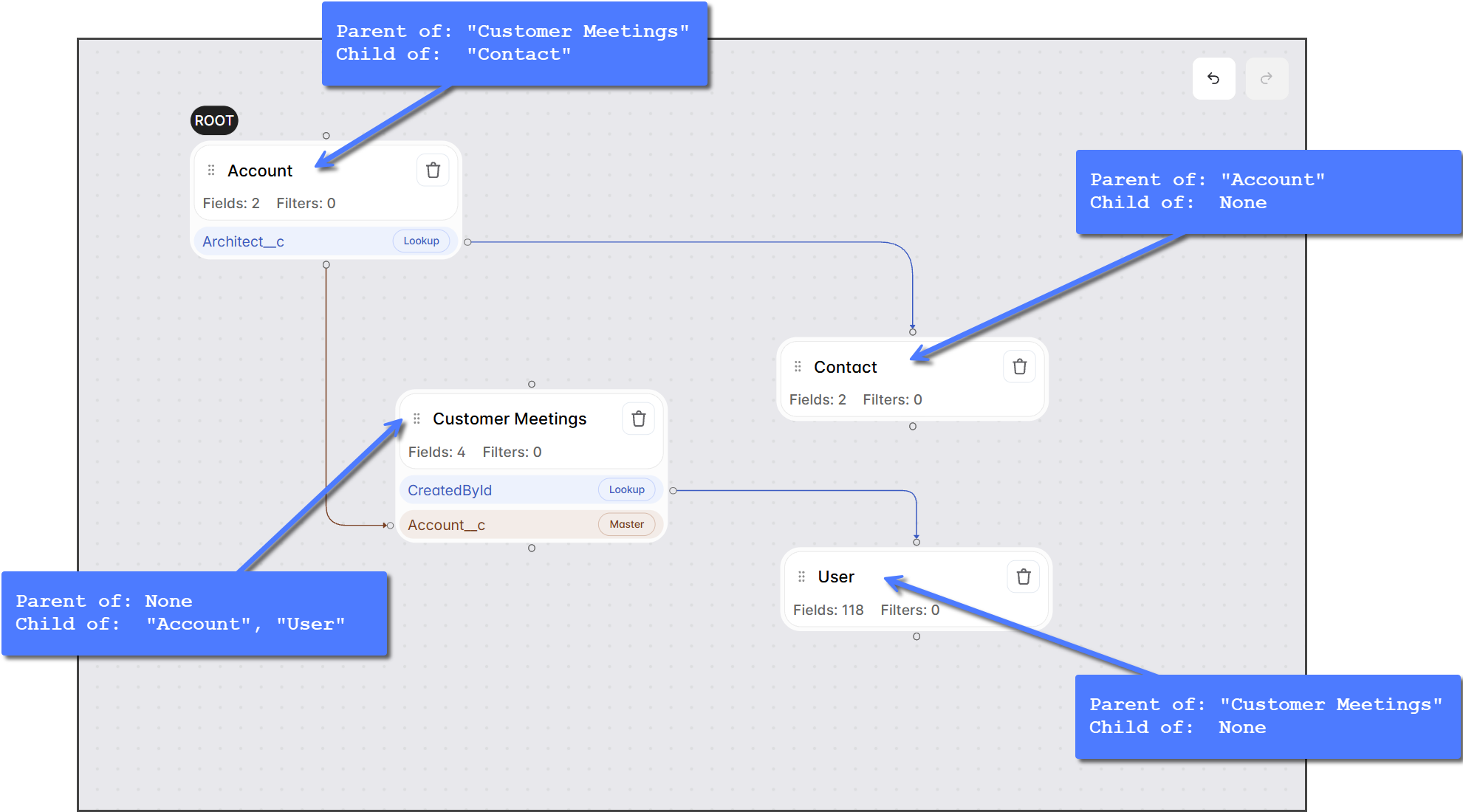
* **Parent -> Child** connections run from the bottom of the parent object to the left side of the child object.
* **Child -> Parent** connections run from the right side of the child object to the top of the parent object.
The screenshot below displays a template with multiple objects. For each object, the parent-child relationships with other objects are outlined.
### Master-Detail Relationship
The **Master-Detail** icon indicates a Master-Detail relationship in which the child object is tightly coupled to and completely dependent on the parent object. In this relationship, the parent record controls certain behaviors of the child record. If a Master record is deleted, all related Detail records are automatically deleted. During data migration, you must migrate parent records before or at the same time as child records to maintain data integrity.
For example, if the Customer Meetings object has a Master-Detail relationship with the Account object, you should migrate both Account and Customer Meetings records together. This ensures no Customer Meetings records are deleted if Account records are removed from the source org.
[Salesforce - Object Relationships Overview](https://help.salesforce.com/s/articleView?id=platform.overview_of_custom_object_relationships.htm)
### Lookup Relationship
The **Lookup** icon indicates a Lookup relationship, where the child object references but is not dependent on the parent object. Unlike Master-Detail relationships, Lookup relationships are more loosely coupled. A child record can reference a parent record or exist independently without a parent reference. When a parent record is deleted, the related child records are not automatically deleted.
For example, if the Case object has a Lookup relationship with the Account object, Case records can exist with or without an associated Account record. If the related Account record is deleted, the Case records persist and are not removed.
[Salesforce - Object Relationships Overview](https://help.salesforce.com/s/articleView?id=platform.overview_of_custom_object_relationships.htm)
### Relationship Field
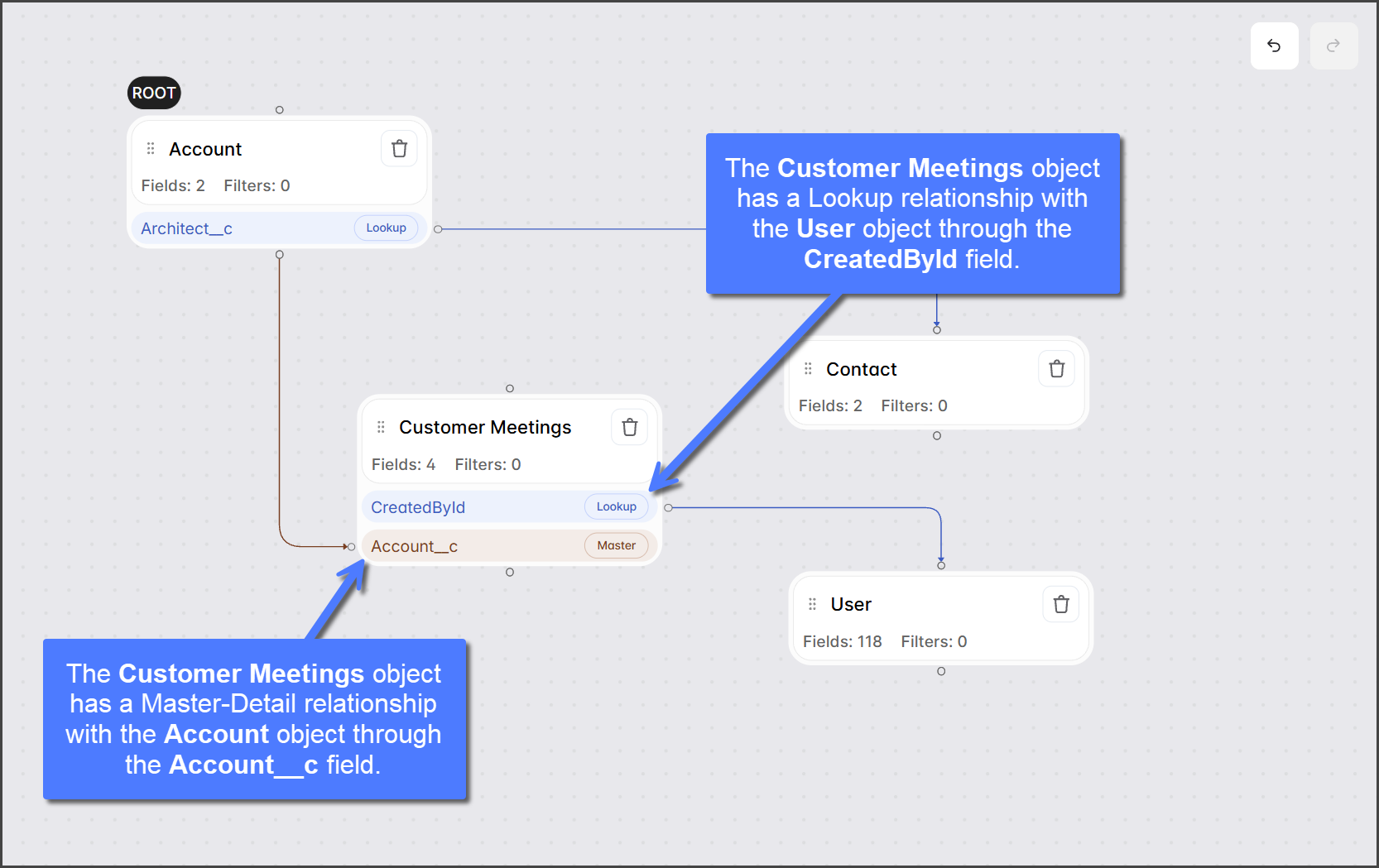
The **Relationship Field** is the field a child record uses to reference its parent record. It appears below each child object, with a line connecting it to its corresponding parent. In the screenshot below, the **Customer Meetings** object has two Relationship Fields.
* **CreatedById**: Connects the **Customer Meetings** object to the **User** object in a Lookup relationship.
* **Account\_\_c**: Connects the **Customer Meetings** object to the **Account** object in a Master-Detail relationship.
{% hint style="warning" %}
#### Preserving Relationships
To preserve the link between parent and child records during migration, migrated child records must include the **Relationship Field** that connects them to their parent. This applies to both Master-Detail and Lookup relationships. To learn more about this, see the following article.
* [Preserving Object Relationships](/data-migrator/templates/template-designer/preserving-object-relationships.md)
{% endhint %}
## Data Masking
Data Masking allows you to protect sensitive fields during migration by replacing their values with randomized data before they are written to the target organization. This ensures that sandbox and testing environments maintain realistic data structures for validation without exposing real customer information, helping your team stay compliant with data privacy requirements. To learn more about Data Masking and how to apply it to a specific field, see the following article.
* [Applying Data Masking to Fields](/data-migrator/templates/template-designer/applying-data-masking-to-fields.md)
## Object Migration Settings
Each object has individual settings that control how it is migrated. Use these settings to fine-tune migration behavior at the object level, including record limits and record mapping.
For the root object of a template, you can set a limit on the number of root records transferred during a migration. Because the limit applies only to root records and child objects migrate their own records, the total number of migrated records can be much higher than the limit set. The following article explains how this setting works and how to enable it.
* [Setting Migration Record Limits](/data-migrator/templates/template-designer/setting-migration-record-limits.md)
Data Migrator uses record mapping to keep records accurate across multiple migration runs. When you enable record mapping for an object, Data Migrator maps individual records between the source and target organizations, ensuring that subsequent migrations add only new records and update existing ones. The following articles explain how record mapping works, describe the available record mapping options, and provide instructions for enabling it.
* [How Record Mapping Works](/data-migrator/templates/migration/how-record-mapping-works.md)
* [Setting Object Record Mapping](/data-migrator/templates/template-designer/setting-object-record-mapping.md)
---
# Agent Instructions
This documentation is published with GitBook. GitBook is the documentation platform designed so that both humans and AI agents can read, navigate, and reason over technical content effectively. Learn more at gitbook.com.
## Querying This Documentation
If you need additional information that is not directly available in this page, you can query the documentation by asking a question.
Perform an HTTP GET request on the following URL with the `ask` and `goal` query parameters:
```
GET https://docs.flosum.com/data-migrator/templates/template-designer/overview-of-templates.md?ask=&goal=
```
`ask` is the immediate question: it should be specific, self-contained, and written in natural language.
`goal` is what the user is ultimately trying to achieve, the reason they need the answer. Sharing it helps GitBook give you a better, more relevant answer. A goal is most helpful when it describes the outcome the user wants rather than restating the question. For example, with `ask=how do I create an API token`, a goal like `automate deployments from our CI pipeline` lets GitBook tailor the answer to that use case.
The response will contain a direct answer to the question and relevant excerpts and sources from the documentation.
Use this mechanism when the answer is not explicitly present in the current page, you need clarification or additional context, or you want to retrieve related documentation sections.
 The **Master-Detail** icon indicates a Master-Detail relationship in which the child object is tightly coupled to and completely dependent on the parent object. In this relationship, the parent record controls certain behaviors of the child record. If a Master record is deleted, all related Detail records are automatically deleted. During data migration, you must migrate parent records before or at the same time as child records to maintain data integrity.
For example, if the Customer Meetings object has a Master-Detail relationship with the Account object, you should migrate both Account and Customer Meetings records together. This ensures no Customer Meetings records are deleted if Account records are removed from the source org.
[Salesforce - Object Relationships Overview](https://help.salesforce.com/s/articleView?id=platform.overview_of_custom_object_relationships.htm)
### Lookup Relationship
The **Master-Detail** icon indicates a Master-Detail relationship in which the child object is tightly coupled to and completely dependent on the parent object. In this relationship, the parent record controls certain behaviors of the child record. If a Master record is deleted, all related Detail records are automatically deleted. During data migration, you must migrate parent records before or at the same time as child records to maintain data integrity.
For example, if the Customer Meetings object has a Master-Detail relationship with the Account object, you should migrate both Account and Customer Meetings records together. This ensures no Customer Meetings records are deleted if Account records are removed from the source org.
[Salesforce - Object Relationships Overview](https://help.salesforce.com/s/articleView?id=platform.overview_of_custom_object_relationships.htm)
### Lookup Relationship  The **Lookup** icon indicates a Lookup relationship, where the child object references but is not dependent on the parent object. Unlike Master-Detail relationships, Lookup relationships are more loosely coupled. A child record can reference a parent record or exist independently without a parent reference. When a parent record is deleted, the related child records are not automatically deleted.
For example, if the Case object has a Lookup relationship with the Account object, Case records can exist with or without an associated Account record. If the related Account record is deleted, the Case records persist and are not removed.
[Salesforce - Object Relationships Overview](https://help.salesforce.com/s/articleView?id=platform.overview_of_custom_object_relationships.htm)
### Relationship Field
The **Relationship Field** is the field a child record uses to reference its parent record. It appears below each child object, with a line connecting it to its corresponding parent. In the screenshot below, the **Customer Meetings** object has two Relationship Fields.
* **CreatedById**: Connects the **Customer Meetings** object to the **User** object in a Lookup relationship.
* **Account\_\_c**: Connects the **Customer Meetings** object to the **Account** object in a Master-Detail relationship.
The **Lookup** icon indicates a Lookup relationship, where the child object references but is not dependent on the parent object. Unlike Master-Detail relationships, Lookup relationships are more loosely coupled. A child record can reference a parent record or exist independently without a parent reference. When a parent record is deleted, the related child records are not automatically deleted.
For example, if the Case object has a Lookup relationship with the Account object, Case records can exist with or without an associated Account record. If the related Account record is deleted, the Case records persist and are not removed.
[Salesforce - Object Relationships Overview](https://help.salesforce.com/s/articleView?id=platform.overview_of_custom_object_relationships.htm)
### Relationship Field
The **Relationship Field** is the field a child record uses to reference its parent record. It appears below each child object, with a line connecting it to its corresponding parent. In the screenshot below, the **Customer Meetings** object has two Relationship Fields.
* **CreatedById**: Connects the **Customer Meetings** object to the **User** object in a Lookup relationship.
* **Account\_\_c**: Connects the **Customer Meetings** object to the **Account** object in a Master-Detail relationship.