> For the complete documentation index, see [llms.txt](https://docs.flosum.com/llms.txt). Markdown versions of documentation pages are available by appending `.md` to page URLs; this page is available as [Markdown](https://docs.flosum.com/devops/devops-ja/kdo/buranchi/buranchihenokonpnentono.md).

# ブランチへのコンポーネントの追加

## ![](https://225042527-files.gitbook.io/~/files/v0/b/gitbook-x-prod.appspot.com/o/spaces%2FRpUu5iMlzMFAudyBvMOl%2Fuploads%2FG5ZbxX918xOHwbAwAJ4n%2FSummary2-Small-Icon.svg?alt=media\&token=da26a67f-ff7f-47b3-8669-06be960dc2d7) 概要

ブランチが初めて作成されると、その Components タブには、Main Branch から、または作成時に使用されたソースブランチから継承されたメタデータが含まれます。Add Components ボタンを使用して、いつでもメタデータを追加できます。

{% hint style="info" %}

#### ベストプラクティス

* 不一致を避けるため、必ず正しい Salesforce 組織からコンポーネントを追加してください。
* プルリクエストやマージを行う前に、Activities で競合を確認してください。
* 特定のコンポーネントが追加された理由を追跡できるように、コミットメッセージはわかりやすくしましょう。
  {% endhint %}

## コンポーネントの追加

{% stepper %}
{% step %}

### ブランチを選択

1. クリック **ブランチ** を左側のサイドバーメニューから。
2. 一覧からブランチを選択します。

   <div align="left"><figure><img src="https://225042527-files.gitbook.io/~/files/v0/b/gitbook-x-prod.appspot.com/o/spaces%2FRpUu5iMlzMFAudyBvMOl%2Fuploads%2FDQ0b2amkcDKa0OD8TunG%2FAddingComponentsToABranch-S01-01.png?alt=media&amp;token=d2739124-cf76-4a8f-b07e-4610ec5d2b7a" alt="" width="563"><figcaption></figcaption></figure></div>

{% endstep %}

{% step %}

### コンポーネントを追加

1. クリック **+ コンポーネントを追加**.

   <div align="left"><figure><img src="https://225042527-files.gitbook.io/~/files/v0/b/gitbook-x-prod.appspot.com/o/spaces%2FRpUu5iMlzMFAudyBvMOl%2Fuploads%2FNjXIUIxRYH3XPHmCtJTW%2FAddingComponentsToABranch-S02-01.png?alt=media&amp;token=a8ece3d2-8bc6-41d2-9129-2fe0c1908193" alt="" width="563"><figcaption></figcaption></figure></div>
2. クリック **選択** メタデータを取得したい Salesforce 組織に対して。
3. クリック **次へ**.

   <div align="left"><figure><img src="https://225042527-files.gitbook.io/~/files/v0/b/gitbook-x-prod.appspot.com/o/spaces%2FRpUu5iMlzMFAudyBvMOl%2Fuploads%2FUlOkQ5KjsX7P2cCAzQjz%2FAddingComponentsToABranch-S02-02.png?alt=media&amp;token=aa1f76cd-5144-4393-a798-45d1224c84b2" alt="" width="563"><figcaption></figcaption></figure></div>
4. 次の項目を使用します。 **検索**, **フィルター**、および **並べ替え** オプションで、追加するコンポーネントを見つけます。

   <div align="left"><figure><img src="https://225042527-files.gitbook.io/~/files/v0/b/gitbook-x-prod.appspot.com/o/spaces%2FRpUu5iMlzMFAudyBvMOl%2Fuploads%2FWIGK0gCwLybSr2zQwtzf%2FAddingComponentsToABranch-S02-03.png?alt=media&amp;token=68e3bdbe-eeff-4927-beab-bfae04fd5c39" alt="" width="563"><figcaption></figcaption></figure></div>
5. 次の **+ 選択** ボタンを、追加する各コンポーネントに対してクリックします。
6. クリック **次へ**.

   <div align="left"><figure><img src="https://225042527-files.gitbook.io/~/files/v0/b/gitbook-x-prod.appspot.com/o/spaces%2FRpUu5iMlzMFAudyBvMOl%2Fuploads%2F7vFkUEbdwM0iwnXtGGmn%2FAddingComponentsToABranch-S02-04.png?alt=media&amp;token=1099cc20-4abd-48ad-92c3-077e541d31cf" alt="" width="563"><figcaption></figcaption></figure></div>

{% endstep %}

{% step %}

### 変更をコミット

1. テキストボックスにコミットメッセージを入力します。
2. クリック **コミット**.

   <div align="left"><figure><img src="https://225042527-files.gitbook.io/~/files/v0/b/gitbook-x-prod.appspot.com/o/spaces%2FRpUu5iMlzMFAudyBvMOl%2Fuploads%2F5ss2qGZWHI5659eaf71Q%2FAddingComponentsToABranch-S03-01.png?alt=media&amp;token=d811a145-48ae-4ca6-a8fc-5501dbca92e9" alt="" width="563"><figcaption></figcaption></figure></div>
3. コミット後、 **アクティビティ** タブに、 **ブランチへのコミット** で開始したジョブが表示されます。

   <div align="left"><figure><img src="https://225042527-files.gitbook.io/~/files/v0/b/gitbook-x-prod.appspot.com/o/spaces%2FRpUu5iMlzMFAudyBvMOl%2Fuploads%2FQWkeAPN3H88I2FZavoJ2%2FAddingComponentsToABranch-S03-02.png?alt=media&amp;token=4239cd57-0c8c-4f05-876d-2f969f8403a8" alt="" width="563"><figcaption></figcaption></figure></div>
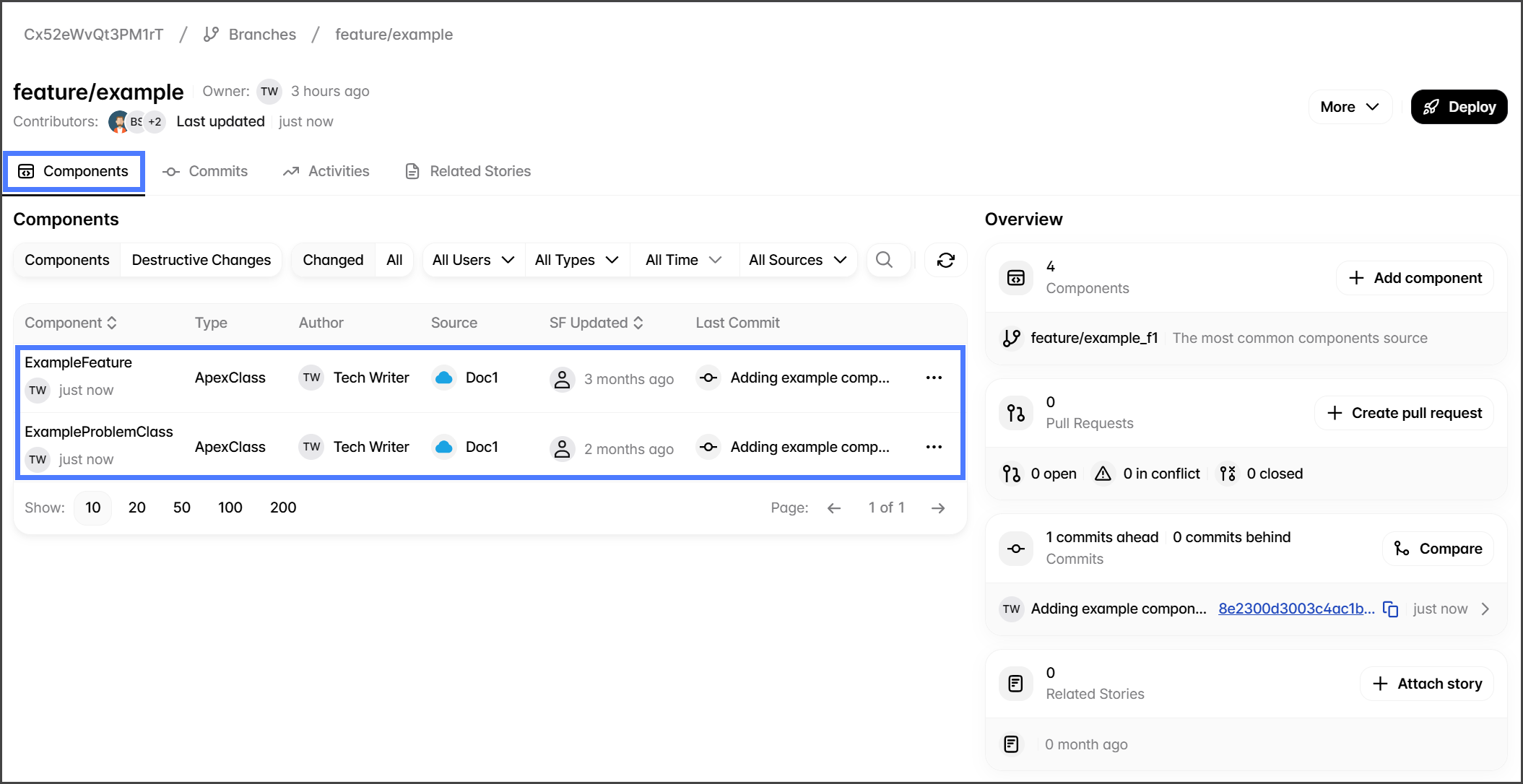
4. ジョブが完了したら、 **Components** タブに切り替えて、追加したコンポーネントを確認します。

   <div align="left"><figure><img src="https://225042527-files.gitbook.io/~/files/v0/b/gitbook-x-prod.appspot.com/o/spaces%2FRpUu5iMlzMFAudyBvMOl%2Fuploads%2F6TwrOIINas1U2v0bnzvK%2FAddingComponentsToABranch-S03-03.png?alt=media&amp;token=61eeb1f3-7cdf-4e9e-86f4-a92a193bf240" alt="" width="563"><figcaption></figcaption></figure></div>

{% endstep %}
{% endstepper %}


---

# Agent Instructions
This documentation is published with GitBook. GitBook is the documentation platform designed so that both humans and AI agents can read, navigate, and reason over technical content effectively. Learn more at gitbook.com.

## Querying This Documentation
If you need additional information that is not directly available in this page, you can query the documentation by asking a question.

Perform an HTTP GET request on the following URL with the `ask` and `goal` query parameters:

```
GET https://docs.flosum.com/devops/devops-ja/kdo/buranchi/buranchihenokonpnentono.md?ask=<question>&goal=<user_goal>
```

`ask` is the immediate question: it should be specific, self-contained, and written in natural language.
`goal` is what the user is ultimately trying to achieve, the reason they need the answer. Sharing it helps GitBook give you a better, more relevant answer. A goal is most helpful when it describes the outcome the user wants rather than restating the question. For example, with `ask=how do I create an API token`, a goal like `automate deployments from our CI pipeline` lets GitBook tailor the answer to that use case.

The response will contain a direct answer to the question and relevant excerpts and sources from the documentation.

Use this mechanism when the answer is not explicitly present in the current page, you need clarification or additional context, or you want to retrieve related documentation sections.