> For the complete documentation index, see [llms.txt](https://docs.flosum.com/llms.txt). Markdown versions of documentation pages are available by appending `.md` to page URLs; this page is available as [Markdown](https://docs.flosum.com/devops/devops-ja/paipurain/paipurainsuteppuno/paipurainsuteppuno.md). Agents can also search and read this documentation through its [MCP server](https://docs.flosum.com/~gitbook/mcp).
# パイプラインステップの追加
{% hint style="warning" %}
#### 旧UI向けに作成
この記事は旧UI向けに作成されました。手順は今でも使用できますが、スクリーンショットは古くなっています。場合によっては、手順で参照されている項目が移動または変更されていることがあります。項目が見つからない場合は、 [どこに行ったのか](https://docs.flosum.com/devops/devops-ja/shii-uiux-heno/dokonittanoka.md) 記事。
{% endhint %}
##  概要
パイプラインは複数のステップで構成され、各ステップには操作とその設定が示されます。各ステップでは、現在の操作の結果に基づいて次のステップも指定されます。このガイドでは、Validate 操作を例にしてステップを作成するための詳細な手順を説明します。手順は各操作で共通しているためです。各操作の設定に関する詳細は含まれていません。特定の操作の詳細については、ステップに組み込む操作に対応する記事を参照してください。
* [パイプライン操作: Validate](https://docs.flosum.com/devops/devops-ja/paipurain/paipurain-1/paipurain-validate.md)
* [パイプライン操作: コードスキャン](https://docs.flosum.com/devops/devops-ja/paipurain/paipurain-1/paipurain-kdosukyan.md)
## ステップを追加
{% stepper %}
{% step %}
### パイプラインを作成または編集
1. クリック **パイプライン** 左側のサイドバーメニューから。
2. で **パイプライン** ページで、次のいずれかの方法でパイプラインを作成または編集します:
* クリックする **パイプラインを作成**.
* または、一覧から既存のパイプラインをクリックします。
{% endstep %}
{% step %}
### ステップを追加
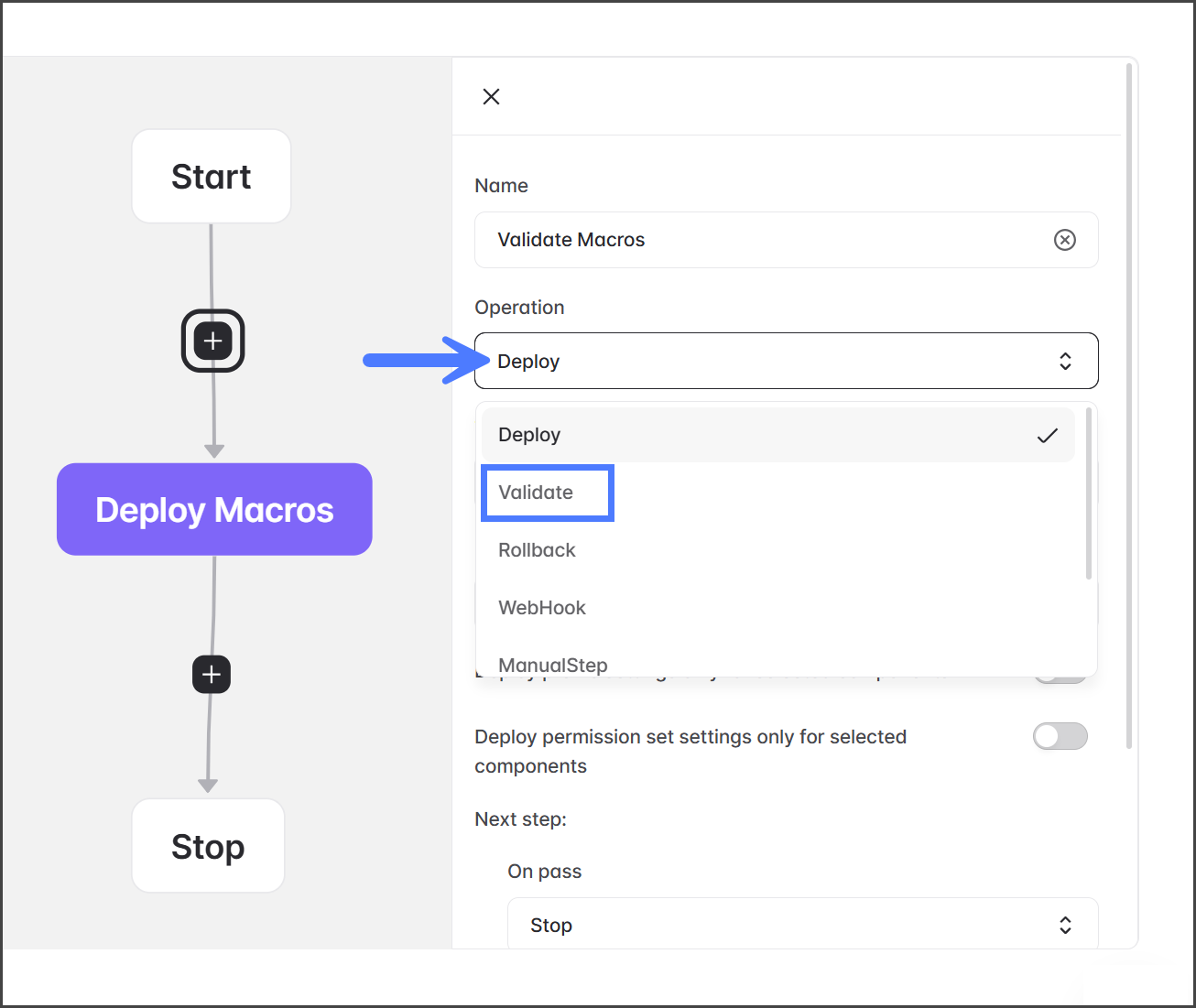
1. をクリックします。 **+** 2つのステップの間のアイコン。
2. を入力してください。 **名前** そのステップに対して。
{% endstep %}
{% step %}
### 操作を選択
1. をクリックします。 **操作** ドロップダウンメニュー。
2. 選択します **検証**.
{% endstep %}
{% step %}
### 操作を設定
各操作には、特定のフィールドとオプションが含まれます。追加する操作の詳細な設定手順については、以下にリンクされている該当記事を参照してください。
* [パイプライン操作: Validate](https://docs.flosum.com/devops/devops-ja/paipurain/paipurain-1/paipurain-validate.md)
* [パイプライン操作: コードスキャン](https://docs.flosum.com/devops/devops-ja/paipurain/paipurain-1/paipurain-kdosukyan.md)
{% endstep %}
{% step %}
### 次のステップの動作を設定
その **次のステップ** セクションでは、現在のステップが **成功する** または **失敗する**.
{% hint style="warning" %}
#### ステップ削除の警告
ステップへのパスがない場合、そのステップはパイプラインから自動的に削除されます。これは例えば、あなたが挿入した場合に発生することがあります、 **検証** ステップの前に **デプロイ** ステップと両方を設定し **合格時** および **不合格時** に **停止**。このシナリオでは、もはやその **デプロイ** ステップに到達するパスがなくなり、パイプラインは孤立したステップを自動的に削除します。問題を視覚化するための図は下をご覧ください。
{% endhint %}
1. をクリックします。 **成功時** ドロップダウンメニュー。
2. 現在のステップが **成功する**.
3. をクリックします。 **失敗時** ドロップダウンメニュー。
4. 現在のステップが **失敗する**.
{% hint style="warning" %}
両方を設定しないでください **成功時** および **失敗時** を **停止** パイプラインの最終ステップでない限り。
{% endhint %}
{% endstep %}
{% step %}
### ステップをパイプラインに追加
1. クリック **追加**.
2. ステップがパイプラインに表示されると、自動的に保存されます。
{% hint style="info" %}
変更が行われるたびに、パイプラインは自動的に保存されます。
{% endhint %}
{% endstep %}
{% endstepper %}
---
# Agent Instructions
This documentation is published with GitBook. GitBook is the documentation platform designed so that both humans and AI agents can read, navigate, and reason over technical content effectively. Learn more at gitbook.com.
## Querying This Documentation
If you need additional information that is not directly available in this page, you can query the documentation by asking a question.
Perform an HTTP GET request on the following URL with the `ask` and `goal` query parameters:
```
GET https://docs.flosum.com/devops/devops-ja/paipurain/paipurainsuteppuno/paipurainsuteppuno.md?ask=&goal=
```
`ask` is the immediate question: it should be specific, self-contained, and written in natural language.
`goal` is what the user is ultimately trying to achieve, the reason they need the answer. Sharing it helps GitBook give you a better, more relevant answer. A goal is most helpful when it describes the outcome the user wants rather than restating the question. For example, with `ask=how do I create an API token`, a goal like `automate deployments from our CI pipeline` lets GitBook tailor the answer to that use case.
The response will contain a direct answer to the question and relevant excerpts and sources from the documentation.
Use this mechanism when the answer is not explicitly present in the current page, you need clarification or additional context, or you want to retrieve related documentation sections.