> For the complete documentation index, see [llms.txt](https://docs.flosum.com/llms.txt). Markdown versions of documentation pages are available by appending `.md` to page URLs; this page is available as [Markdown](https://docs.flosum.com/devops/devops-ja/pururikuesuto/pururikuesutonopurosesu/pururikuesutono-3-mji.md).
# プルリクエストの手順 3: マージ
{% hint style="warning" %}
#### 旧UI向けに作成
この記事は旧UI向けに作成されました。手順は今でも使用できますが、スクリーンショットは古くなっています。場合によっては、手順で参照されている項目が移動または変更されていることがあります。項目が見つからない場合は、 [どこに行ったのか](/devops/devops-ja/shii-uiux-heno/dokonittanoka.md) 記事。
{% endhint %}
##  概要
この記事では、Pull Request のソースブランチをターゲットブランチにマージして、Pull Request を完了する方法を説明します。
### プルリクエストの手順
プルリクエストの各ステップを順を追って解説する一連の記事をご覧ください。順番に読むことも、特定の段階に関する詳しいガイダンスを得るために個別の記事を選ぶこともできます。
* [プルリクエストの手順 1: 作成](/devops/devops-ja/pururikuesuto/pururikuesutonopurosesu/pururikuesutono-1.md)
* [プルリクエストの手順 2: レビュー](/devops/devops-ja/pururikuesuto/pururikuesutonopurosesu/pururikuesutono-2-reby.md)
* [プルリクエストの手順 3: マージ](/devops/devops-ja/pururikuesuto/pururikuesutonopurosesu/pururikuesutono-3-mji.md)
## Pull Request をマージ
{% stepper %}
{% step %}
### Pull Request を選択
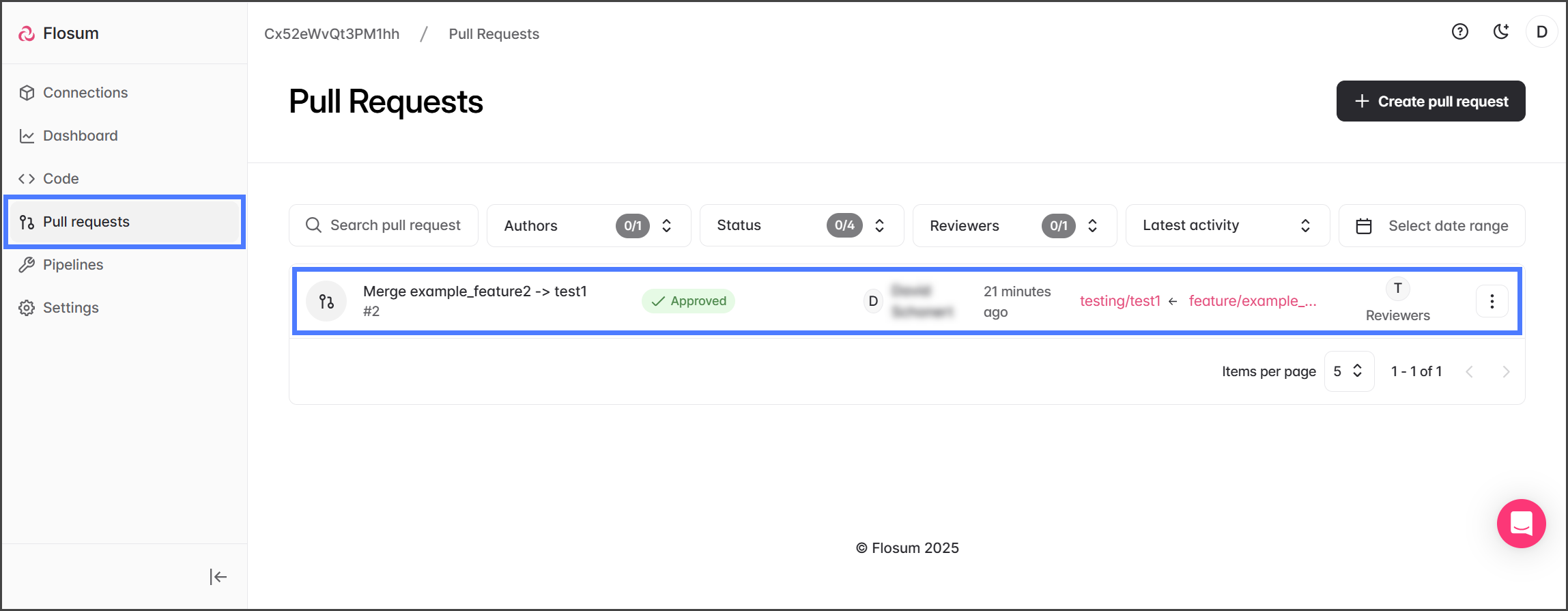
1. 次をクリックします **プルリクエスト** を左側のサイドバーメニューから。
2. マージする Pull Request をクリックします。
{% endstep %}
{% step %}
### マージ
{% hint style="info" %}
Pull Request をマージできるのは、ステータスが **承認済み**である場合、または Pull Request が自己レビュー済みで、ステータスが **作成済み**.
{% endhint %}
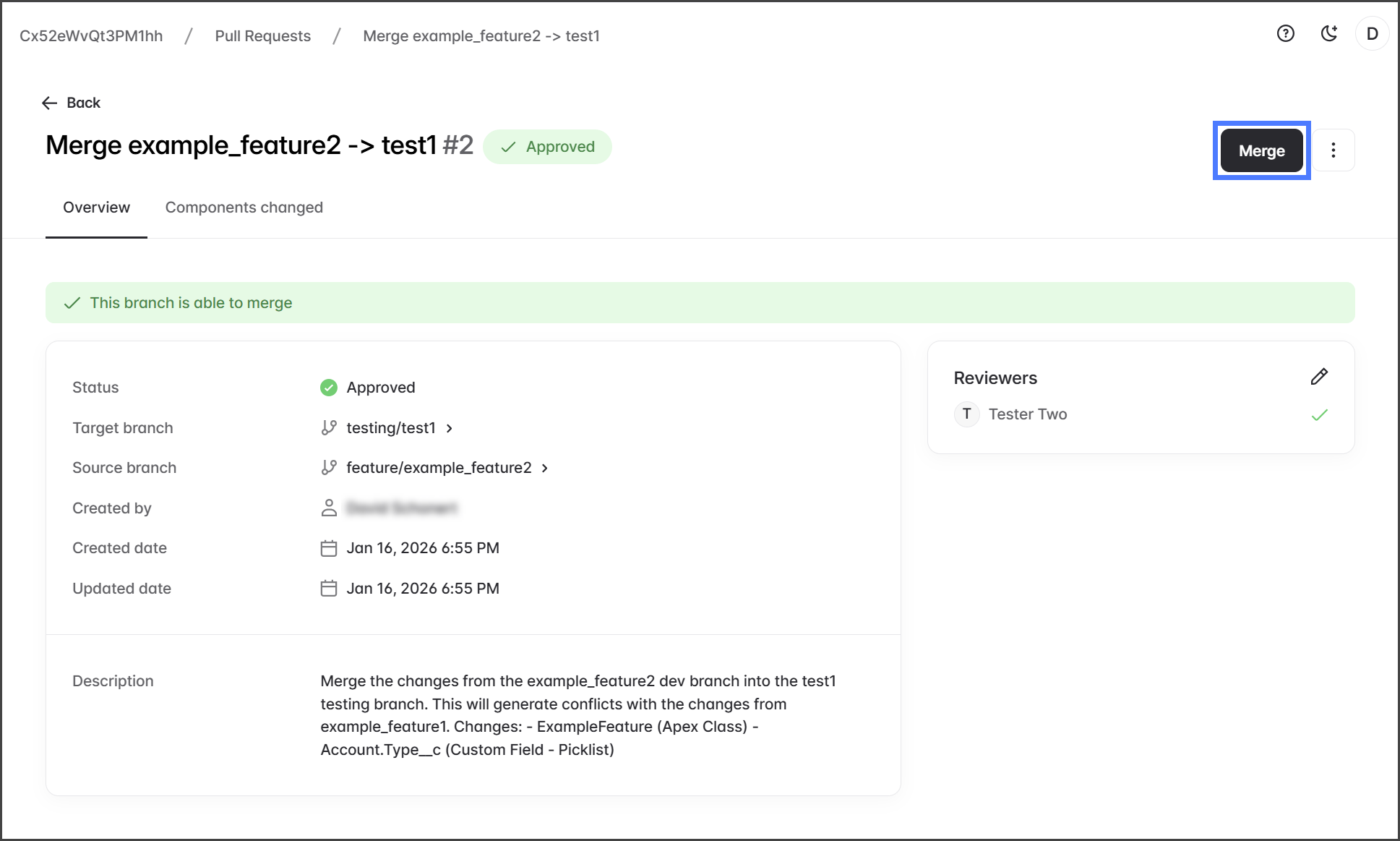
1. 次をクリックします **マージ**.
{% hint style="warning" %}
次の場合 **マージ** ボタンが無効(グレー表示)になっていて、ステータスが **承認済み**と表示されている場合は、ページを更新して有効になるか確認してください。
{% endhint %}
2. マージ処理によって、ソースブランチの変更がターゲットブランチにマージされます。
3. マージが完了すると、Pull Request は **プルリクエスト** 一覧から削除されます。
{% endstep %}
{% endstepper %}
---
# Agent Instructions
This documentation is published with GitBook. GitBook is the documentation platform designed so that both humans and AI agents can read, navigate, and reason over technical content effectively. Learn more at gitbook.com.
## Querying This Documentation
If you need additional information that is not directly available in this page, you can query the documentation by asking a question.
Perform an HTTP GET request on the following URL with the `ask` and `goal` query parameters:
```
GET https://docs.flosum.com/devops/devops-ja/pururikuesuto/pururikuesutonopurosesu/pururikuesutono-3-mji.md?ask=&goal=
```
`ask` is the immediate question: it should be specific, self-contained, and written in natural language.
`goal` is what the user is ultimately trying to achieve, the reason they need the answer. Sharing it helps GitBook give you a better, more relevant answer. A goal is most helpful when it describes the outcome the user wants rather than restating the question. For example, with `ask=how do I create an API token`, a goal like `automate deployments from our CI pipeline` lets GitBook tailor the answer to that use case.
The response will contain a direct answer to the question and relevant excerpts and sources from the documentation.
Use this mechanism when the answer is not explicitly present in the current page, you need clarification or additional context, or you want to retrieve related documentation sections.