
> For the complete documentation index, see [llms.txt](https://docs.flosum.com/llms.txt). Markdown versions of documentation pages are available by appending `.md` to page URLs; this page is available as [Markdown](https://docs.flosum.com/devops/devops-ja/zu-zhi/no.md).

# 組織の概要

{% hint style="warning" %}

#### 旧UI向けに作成

この記事は旧UI向けに作成されました。手順は今でも使用できますが、スクリーンショットは古くなっています。場合によっては、手順で参照されている項目が移動または変更されていることがあります。項目が見つからない場合は、 [どこに行ったのか](/devops/devops-ja/shii-uiux-heno/dokonittanoka.md) 記事。
{% endhint %}

## ![](https://225042527-files.gitbook.io/~/files/v0/b/gitbook-x-prod.appspot.com/o/spaces%2FRpUu5iMlzMFAudyBvMOl%2Fuploads%2FG5ZbxX918xOHwbAwAJ4n%2FSummary2-Small-Icon.svg?alt=media\&token=da26a67f-ff7f-47b3-8669-06be960dc2d7) 概要 <a href="#overview" id="overview"></a>

Organizationsページには、メタデータの取得、変更の確認、デプロイメントを含む、DevOps操作で利用可能なすべてのSalesforce組織が一覧表示されます。

{% hint style="info" %}

#### 重要

ここにSalesforce組織が表示されない場合は、Organizationsが次の場所で作成されていることを確認してください。 **Flosum Global Settings** アプリ、および各Organizationに **DevOps** アプリが割り当てられていること。これらの操作の完了方法については、以下の記事を参照してください。

* [組織の作成](/global-settings/global-settings-docs-ja/huan-jing/zu-zhi/no.md)
* [組織へのアプリの割り当て](/global-settings/global-settings-docs-ja/huan-jing/zu-zhi/henoapurinorite.md)
  {% endhint %}

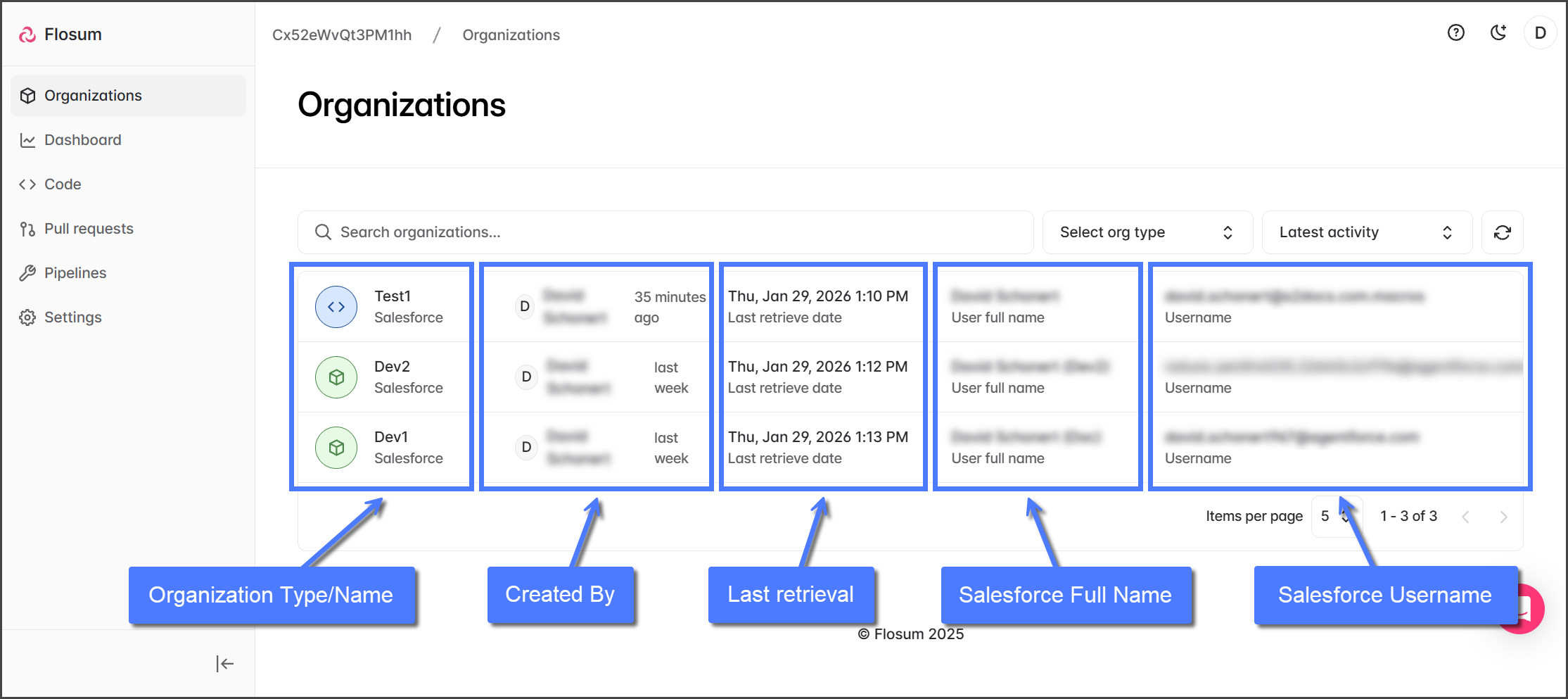
Organizationsページにアクセスして利用可能なSalesforce組織を表示するには、 **組織** 左サイドバーメニューでクリックします。組織一覧は検索でき、組織タイプでフィルタリングでき、名前または最新のアクティビティで並べ替えられます。各組織には次の詳細が表示されます:

<table data-header-hidden><thead><tr><th width="210"></th><th></th></tr></thead><tbody><tr><td><strong>組織タイプ/名前</strong></td><td>Salesforce組織タイプのアイコンが含まれます: <img src="https://225042527-files.gitbook.io/~/files/v0/b/gitbook-x-prod.appspot.com/o/spaces%2FRpUu5iMlzMFAudyBvMOl%2Fuploads%2F1AbCztruXPdsPWYQ5SW0%2FConnection%20Type%20Production.png?alt=media&amp;token=dc87f462-29b8-4fb1-8016-0c6b7649aec0" alt="" data-size="line"> <strong>本番</strong> または <img src="https://225042527-files.gitbook.io/~/files/v0/b/gitbook-x-prod.appspot.com/o/spaces%2FRpUu5iMlzMFAudyBvMOl%2Fuploads%2F07WH8T2J8IncQ66fjSzg%2FConnection%20Type%20Sandbox.png?alt=media&amp;token=a2c0b9ba-04df-4ecc-ae3f-5c1868037e72" alt="" data-size="line"> <strong>サンドボックス</strong>、およびGlobal Settingsで割り当てられた組織名。</td></tr><tr><td><strong>作成者</strong></td><td>Global settingsで組織を作成したユーザーのユーザー名と、作成されてからの経過時間。</td></tr><tr><td><strong>最終取得</strong></td><td>最後のメタデータ取得の日付と時刻。</td></tr><tr><td><strong>Salesforceフルネーム</strong></td><td>Salesforce組織とFlosumテナントの接続を確立するために使用されたSalesforceユーザーアカウントのフルネーム。</td></tr><tr><td><strong>Salesforceユーザー名</strong></td><td>Salesforce組織とFlosumテナントの接続を確立するために使用されたSalesforceユーザーアカウントのユーザー名。</td></tr></tbody></table>

<figure><img src="https://225042527-files.gitbook.io/~/files/v0/b/gitbook-x-prod.appspot.com/o/spaces%2FRpUu5iMlzMFAudyBvMOl%2Fuploads%2FFczNj0n9w9nxEOnOSOi8%2FOverviewOfOrganizations-Page-01.png?alt=media&amp;token=b1019233-3dda-4f17-be1c-28dc05dca243" alt=""><figcaption></figcaption></figure>

### Organizationsの使用 <a href="#using-organizations" id="using-organizations"></a>

一覧に表示されている任意の組織をクリックすると、その組織の概要ページが開きます。そこから、次のことができます:

* メタデータを取得: [組織メタデータの取得](/devops/devops-ja/zu-zhi/no-1/metadtano.md).
* メタデータコンポーネントを参照、検索、フィルタリングします。
* メタデータ取得と組織アクティビティの履歴を表示します。
* 組織設定を調整します。

{% hint style="info" %}

#### ベストプラクティス

* 新しいSalesforce組織は必ずGlobal Settingsで追加し、DevOpsで使用できるようにDevOpsアプリを割り当ててください。
* 混乱を避けるため、組織名は一貫性のある分かりやすいものにしてください（例: CRM-Prod、Finance-Sandbox）。
  {% endhint %}


---

# Agent Instructions
This documentation is published with GitBook. GitBook is the documentation platform designed so that both humans and AI agents can read, navigate, and reason over technical content effectively. Learn more at gitbook.com.

## Querying This Documentation
If you need additional information that is not directly available in this page, you can query the documentation by asking a question.

Perform an HTTP GET request on the following URL with the `ask` and `goal` query parameters:

```
GET https://docs.flosum.com/devops/devops-ja/zu-zhi/no.md?ask=<question>&goal=<user_goal>
```

`ask` is the immediate question: it should be specific, self-contained, and written in natural language.
`goal` is what the user is ultimately trying to achieve, the reason they need the answer. Sharing it helps GitBook give you a better, more relevant answer. A goal is most helpful when it describes the outcome the user wants rather than restating the question. For example, with `ask=how do I create an API token`, a goal like `automate deployments from our CI pipeline` lets GitBook tailor the answer to that use case.

The response will contain a direct answer to the question and relevant excerpts and sources from the documentation.

Use this mechanism when the answer is not explicitly present in the current page, you need clarification or additional context, or you want to retrieve related documentation sections.