> For the complete documentation index, see [llms.txt](https://docs.flosum.com/llms.txt). Markdown versions of documentation pages are available by appending `.md` to page URLs; this page is available as [Markdown](https://docs.flosum.com/devops/mcp-server/using-devops-mcp-tools.md).
# Using DevOps MCP Tools
{% hint style="warning" %}
#### Beta
The DevOps MCP server is in beta. Some tools may not work as expected yet, and this documentation may not reflect the latest changes to the server.
{% endhint %}
##  Overview
This article explains how to use the DevOps MCP tools after you connect your AI assistant to the DevOps MCP server. It covers where to find your Topology ID, how to ask the assistant to work with your DevOps data, and the tools the DevOps MCP server provides.
The article lists each tool with a short description, but you do not need to know the tool names to use them. Ask the assistant what you want in plain language, and it chooses which tools to use. The assistant works in DevOps as the Flosum user you signed in with when you connected it.
{% hint style="info" %}
#### Before You Start
Connect your AI assistant to the DevOps MCP server first. See the following articles.
* [Connecting ChatGPT to the DevOps MCP Server](https://docs.flosum.com/devops/mcp-server/connecting-chatgpt-to-the-devops-mcp-server.md)
* [Connecting Claude to the DevOps MCP Server](https://docs.flosum.com/devops/mcp-server/connecting-claude-to-the-devops-mcp-server.md)
{% endhint %}
## Where to Find Your Topology ID
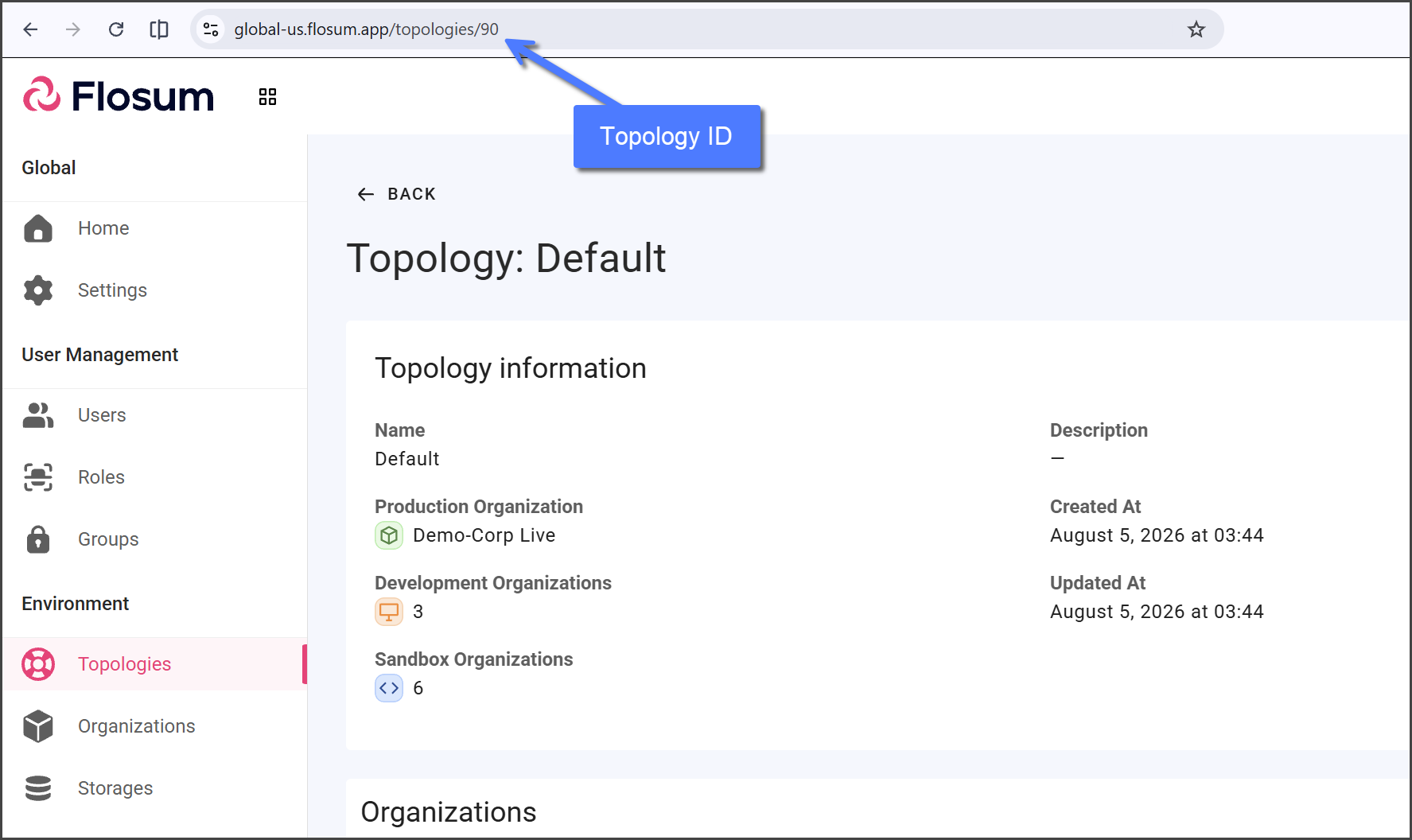
Almost every DevOps MCP tool works inside one Topology, so the assistant needs your Topology's ID. The ID appears in the address bar when you open the Topology in Global Settings.
{% stepper %}
{% step %}
### Log In to Global Settings
Log in to Global Settings. For login instructions, see the following article.
* [Log In To Global Settings](https://docs.flosum.com/global-settings/getting-started/log-in-to-global-settings.md)
{% endstep %}
{% step %}
### Open the Topology
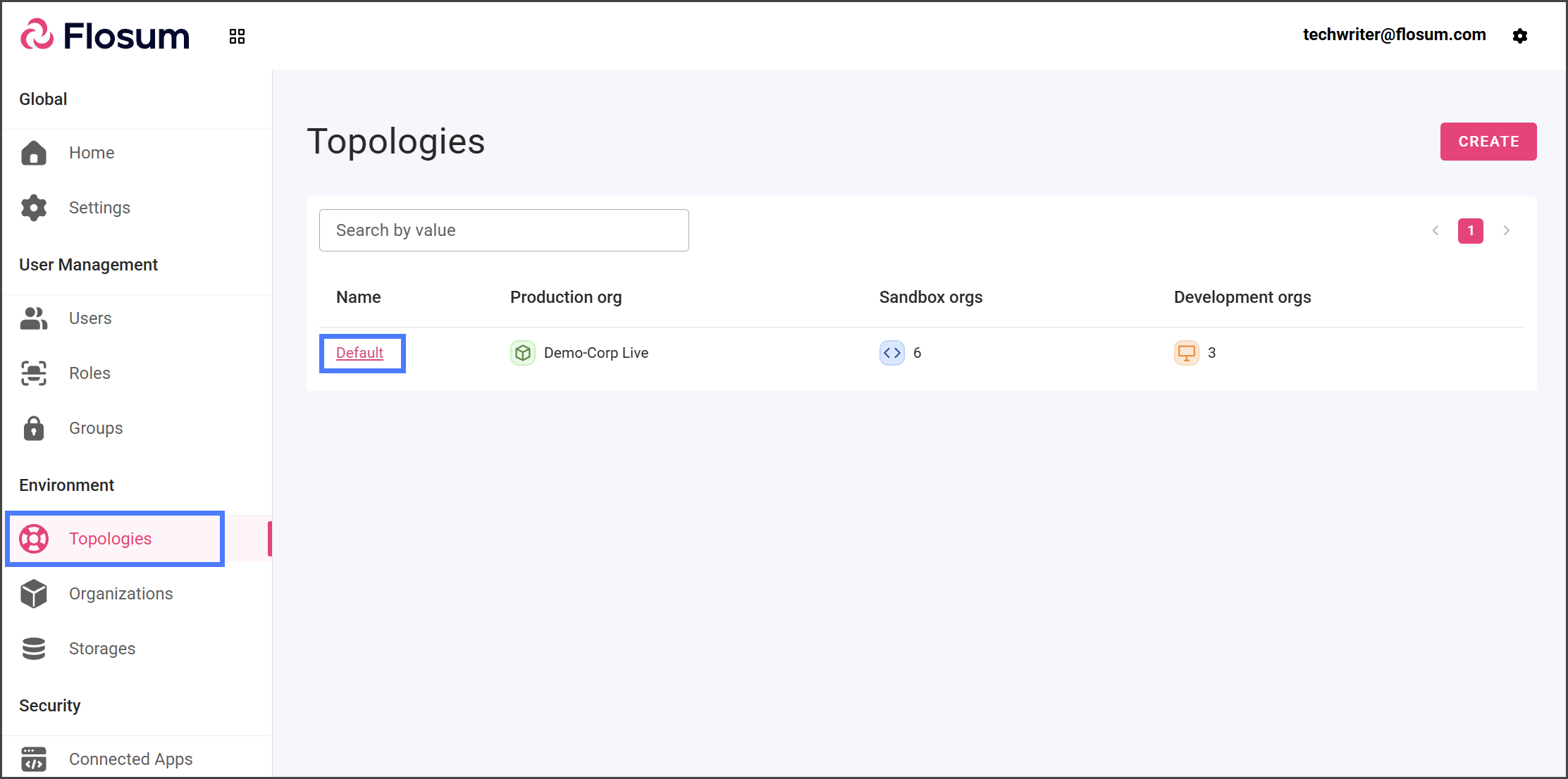
1. Click **Topologies** from the left sidebar menu.
2. Click the Topology you work in.
{% endstep %}
{% step %}
### Copy the Topology ID
1. Copy the number at the end of the URL in your browser's address bar. This is the Topology ID.
{% hint style="info" %}
For example, in `https://global-us.flosum.app/topologies/123`, the Topology ID is `123`.
{% endhint %}
{% endstep %}
{% endstepper %}
## Using the Tools
Start a new chat with your AI assistant and include your Topology ID in your request. The assistant uses it for the rest of the chat. For example:
* List the branches in Topology `` using the Flosum DevOps MCP.
* Show me the open pull requests in Topology ``.
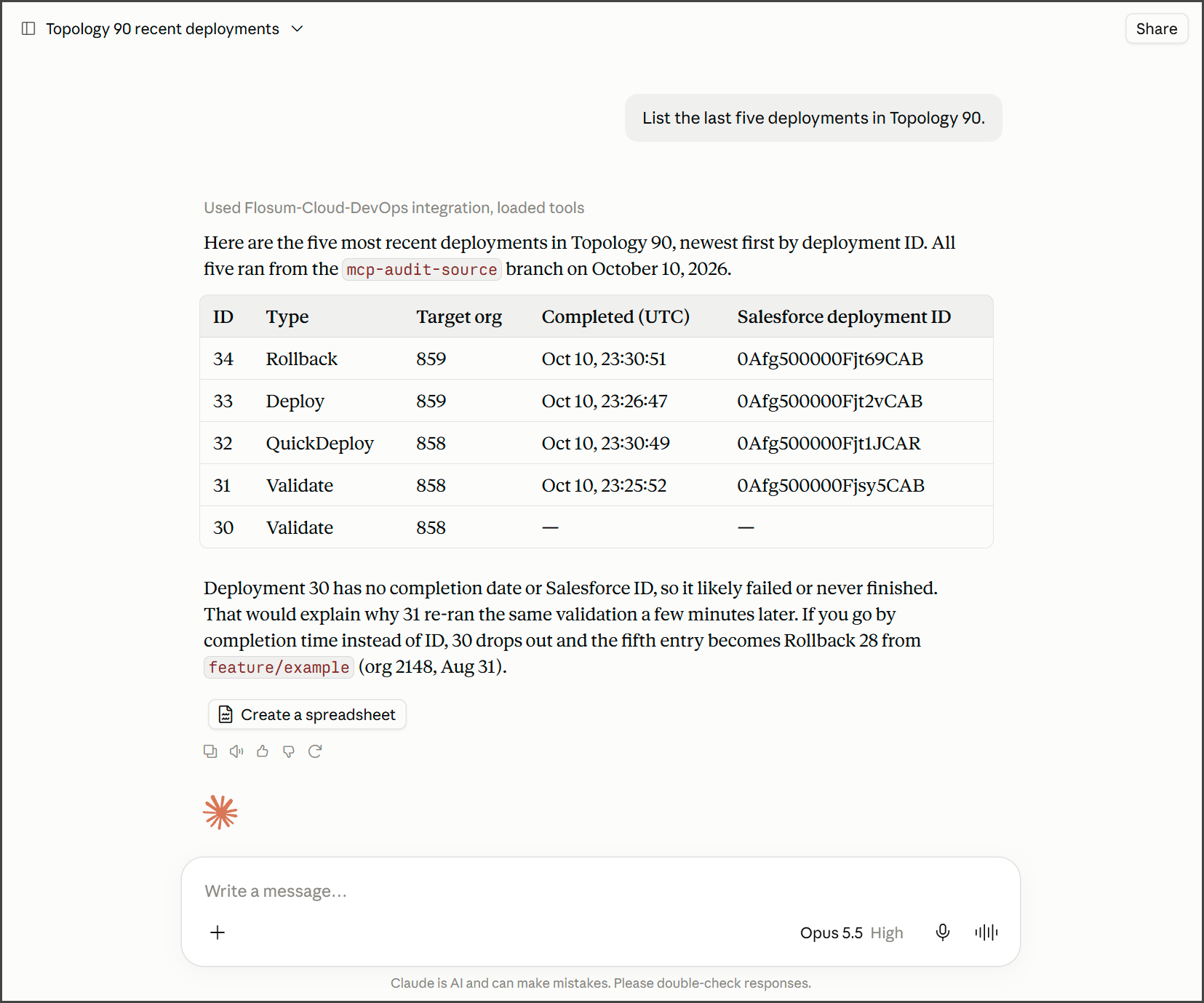
* List the last five deployments in Topology ``.
* Show the steps in the pipeline named `` in Topology ``.
The following example shows Claude listing the last five deployments in a Topology.
Refer to branches, pull requests, and pipelines by name. The assistant looks up their IDs with the tools.
{% hint style="warning" %}
#### Approving Tools
Your AI assistant may ask you to approve a tool before it runs. Check what the tool is about to do before you approve it, especially a tool that changes data. A deployment, rollback, or merge changes your Salesforce organizations or branches as soon as it runs.
{% endhint %}
## Tools That Read Data
These tools read DevOps data and change nothing.
Branches and Commits
| Tool | What it does |
| --------------------------------- | ------------------------------------------------------------------------------------------------- |
| `list_branches` | Lists branches, filtered by name, environment, Active or Stale, creator, date, or default branch. |
| `get_branch` | Gets one branch's details. |
| `list_commits` | Lists a branch's commit history, newest first. |
| `get_commit` | Gets one commit's message, hash, time, and author. |
| `list_commit_components` | Lists the components one commit changed. |
| `list_component_versions` | Lists the latest version of each component in a branch. |
| `get_component_version` | Gets one component version, with its files and the commit that introduced it. |
| `list_fit_component_dependencies` | Lists the dependencies of one component version in a branch. |
Organization Components
| Tool | What it does |
| ------------------------------ | --------------------------------------------------------------------- |
| `list_organization_components` | Lists the components DevOps has stored for a Salesforce organization. |
| `get_organization_component` | Gets one organization component, with its metadata files. |
| `list_component_dependencies` | Lists the dependencies of one organization component. |
Pull Requests
| Tool | What it does |
| --------------------------------------- | ---------------------------------------------------------------------------------------------------------------------- |
| `list_pull_requests` | Lists pull requests, filtered by status, branches, creator, reviewer, or date. |
| `get_pull_request` | Gets one pull request, with its branches, reviewers, and status. |
| `list_pull_request_activities` | Lists a pull request's timeline: created, commits, reviews requested, changes requested, approved, merged, and closed. |
| `list_pull_request_conversations` | Lists a pull request's review threads. |
| `list_pull_request_reviewers` | Lists reviewers and their review status. |
| `list_available_pull_request_reviewers` | Lists the users who can be assigned as reviewers. |
| `list_pull_request_merge_rules` | Lists the Pull Request Approval Rules. |
| `get_conflicts` | Checks for merge conflicts between a source and a target branch. |
| `list_conflict_components` | Lists the components in conflict. |
Deployments
| Tool | What it does |
| ---------------------------- | ----------------------------------------------------------------------------------------------- |
| `list_deployments` | Lists Validate, Deploy, Quick Deploy, and Rollback history, with the target organization. |
| `list_deployment_components` | Lists the components one deployment processed, with status, change type, and any error message. |
| `list_deployment_changes` | Lists the component changes in one deployment's results. |
| `get_deployment_stats` | Gets the number of components that succeeded and failed in one deployment. |
| `get_deployment_tests` | Gets the Apex test totals for one deployment. |
Pipelines
| Tool | What it does |
| ------------------------------- | ----------------------------------------------------------------------------------------------------- |
| `list_pipelines` | Lists the pipelines in the Topology. |
| `get_pipeline` | Gets one pipeline's details. |
| `list_steps` | Lists a pipeline's steps and how they link on success and failure. |
| `list_pipeline_launch_settings` | Lists when pipelines start automatically: on commit or on pull request merge, and for which branches. |
| `list_pipeline_runs` | Lists pipeline runs, with pipeline, branch, trigger, status, and duration. |
| `get_pipeline_run` | Gets one run's status. |
| `list_run_steps` | Lists the status of each step in one run. |
Activity History
| Tool | What it does |
| ----------------- | --------------------------------------------------------------------------------------------- |
| `list_activities` | Lists activity history, filtered by job type, status, creator, date, branch, or organization. |
| `get_activity` | Gets one activity's details. |
Code Scan
| Tool | What it does |
| ------------------------------- | --------------------------------------------------------------------------------------- |
| `get_code_scan_stats` | Gets a code scan's findings by severity. |
| `list_code_scan_components` | Lists the component files in a code scan. |
| `get_code_scan_component` | Gets the findings for one file, by severity: Blocker, Critical, Major, Minor, and Info. |
| `get_code_scan_component_stats` | Gets the severity counts for one file. |
Overwrite Protection
| Tool | What it does |
| -------------------------------------- | ------------------------------------------------------------- |
| `get_overwrite_protection_stats` | Gets the comparison totals for an Overwrite Protection check. |
| `list_overwrite_protection_components` | Lists the components, by status: Same, Different, or New. |
| `get_overwrite_protection_component` | Gets one component. |
| `get_overwrite_protection_content` | Gets one component's file contents. |
Pre-Deploy Fix
| Tool | What it does |
| ------------------------------------------------- | ------------------------------------------------------------- |
| `list_pre_deploy_fix_search_missing_dependencies` | Lists the missing dependencies a Pre-Deploy Fix search found. |
| `list_pre_deploy_fix_search_api_version_issues` | Lists the API version issues a Pre-Deploy Fix search found. |
| `list_pre_deploy_fix_retrieve_components` | Lists the components a Pre-Deploy Fix retrieved. |
| `list_pre_deploy_fix_remove_components` | Lists the components a Pre-Deploy Fix removed. |
| `list_pre_deploy_fix_update_components` | Lists the components a Pre-Deploy Fix updated. |
## Tools That Change Data
These tools create or change data in DevOps, and some change your Salesforce organizations or Git repository.
All Tools That Change Data
| Tool | What it does |
| ---------------------------------- | ------------------------------------------------------------------ |
| `create_branch` | Creates a branch from an existing branch. |
| `create_commit` | Commits components to a branch. |
| `create_pull_request` | Creates a pull request, with or without reviewers. |
| `update_pull_request` | Changes a pull request's title or target branch. |
| `set_pull_request_reviewers` | Replaces a pull request's reviewers. |
| `set_pull_request_review` | Sets a review to Approved, Changes Requested, or Review Requested. |
| `create_pull_request_conversation` | Starts a review thread on a line of a file. |
| `create_pull_request_comment` | Adds a comment to a review thread. |
| `create_pipeline` | Creates an empty pipeline. |
| `save_pipeline_steps` | Replaces all of a pipeline's steps. |
| `run_pipeline` | Runs a pipeline on a branch. |
| `run_activity` | Starts a DevOps job. See the list below. |
{% hint style="info" %}
#### Git Repositories
In a Topology connected to a Git repository, creating a branch or a commit also pushes it to the repository.
{% endhint %}
### Jobs the Assistant Can Start
The `run_activity` tool starts these jobs:
* Retrieve
* Validate
* Deploy, with optional Apex after deployment, Apex test level, and destructive changes
* Quick Deploy
* Rollback
* Commit To Branch
* Merge of a branch or a pull request
* Search and Replace Text
* Overwrite Protection
* Pre-Deploy Fix Search, Remove, Retrieve, and Update
### Pipeline Steps the Assistant Can Configure
The `save_pipeline_steps` tool can add these step types: Deploy, Validate, Rollback, Manual Step, Code Scan, Execute Apex, Commit To Branch, Overwrite Protection, and Pre-Deploy Fix Search. Add WebHook, Migrate Data, and Test Execution steps in DevOps.
---
# Agent Instructions
This documentation is published with GitBook. GitBook is the documentation platform designed so that both humans and AI agents can read, navigate, and reason over technical content effectively. Learn more at gitbook.com.
## Querying This Documentation
If you need additional information that is not directly available in this page, you can query the documentation by asking a question.
Perform an HTTP GET request on the following URL with the `ask` and `goal` query parameters:
```
GET https://docs.flosum.com/devops/mcp-server/using-devops-mcp-tools.md?ask=&goal=
```
`ask` is the immediate question: it should be specific, self-contained, and written in natural language.
`goal` is what the user is ultimately trying to achieve, the reason they need the answer. Sharing it helps GitBook give you a better, more relevant answer. A goal is most helpful when it describes the outcome the user wants rather than restating the question. For example, with `ask=how do I create an API token`, a goal like `automate deployments from our CI pipeline` lets GitBook tailor the answer to that use case.
The response will contain a direct answer to the question and relevant excerpts and sources from the documentation.
Use this mechanism when the answer is not explicitly present in the current page, you need clarification or additional context, or you want to retrieve related documentation sections.