# Overview of Organizations

## ![](https://1800549522-files.gitbook.io/~/files/v0/b/gitbook-x-prod.appspot.com/o/spaces%2FRpUu5iMlzMFAudyBvMOl%2Fuploads%2FG5ZbxX918xOHwbAwAJ4n%2FSummary2-Small-Icon.svg?alt=media\&token=da26a67f-ff7f-47b3-8669-06be960dc2d7) Overview <a href="#overview" id="overview"></a>

The Organizations page lists all Salesforce orgs available for DevOps operations, including metadata retrieval, change viewing, and deployment.

{% hint style="info" %}

#### Important

If you do not see your Salesforce orgs listed here, ensure the Organizations are created in the **Flosum Global Settings** app and that the **DevOps** app is assigned to each Organization. For instructions on completing these actions, see the following articles.

* [Creating an Organization](https://app.gitbook.com/s/sEk2hU5IMh3HEY5dJZjR/environment/organizations/creating-an-organization "mention")
* [Assigning an App to an Organization](https://app.gitbook.com/s/sEk2hU5IMh3HEY5dJZjR/environment/organizations/assigning-an-app-to-an-organization "mention")
  {% endhint %}

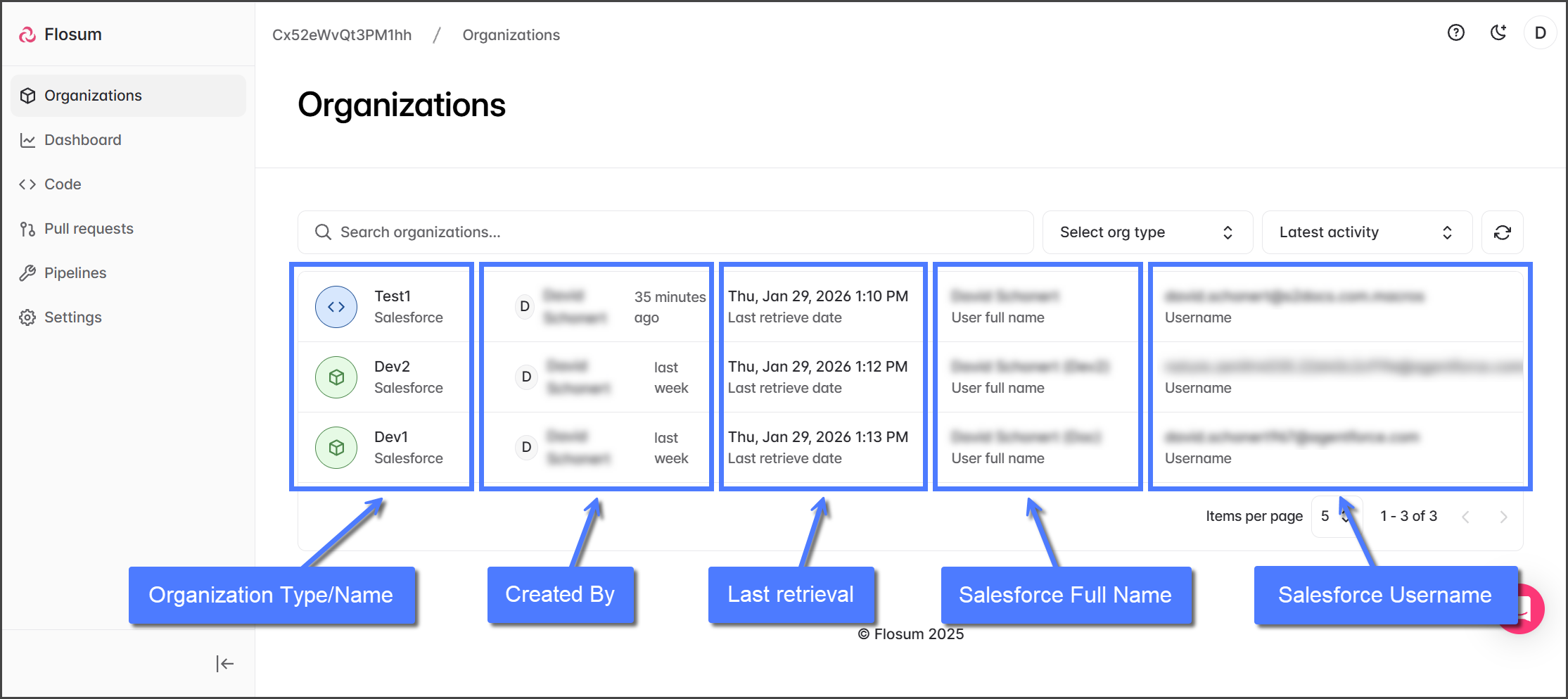
To access the Organizations page and view available Salesforce orgs, click **Organizations** in the left sidebar menu. The list of orgs can be searched, filtered by org type, and sorted by name or most recent activity. Each org displays the following details:

<table data-header-hidden><thead><tr><th width="210"></th><th></th></tr></thead><tbody><tr><td><strong>Organization Type/Name</strong></td><td>Includes the Salesforce org type icon: <img src="https://1800549522-files.gitbook.io/~/files/v0/b/gitbook-x-prod.appspot.com/o/spaces%2FRpUu5iMlzMFAudyBvMOl%2Fuploads%2F1AbCztruXPdsPWYQ5SW0%2FConnection%20Type%20Production.png?alt=media&#x26;token=dc87f462-29b8-4fb1-8016-0c6b7649aec0" alt="" data-size="line"> <strong>Production</strong> or <img src="https://1800549522-files.gitbook.io/~/files/v0/b/gitbook-x-prod.appspot.com/o/spaces%2FRpUu5iMlzMFAudyBvMOl%2Fuploads%2F07WH8T2J8IncQ66fjSzg%2FConnection%20Type%20Sandbox.png?alt=media&#x26;token=a2c0b9ba-04df-4ecc-ae3f-5c1868037e72" alt="" data-size="line"> <strong>Sandbox</strong>, and the Organization name assigned in Global Settings.</td></tr><tr><td><strong>Created By</strong></td><td>The username of the user that created the Organization in Global settings and how long ago it was created.</td></tr><tr><td><strong>Last Retrieval</strong></td><td>The date and time of the last metadata retrieval.</td></tr><tr><td><strong>Salesforce Full Name</strong></td><td>The full name of the Salesforce user account used to establish the connection between your Salesforce org and your Flosum tenant.</td></tr><tr><td><strong>Salesforce Username</strong></td><td>The username of the Salesforce user account used to establish the connection between your Salesforce org and your Flosum tenant.</td></tr></tbody></table>

<figure><img src="https://1800549522-files.gitbook.io/~/files/v0/b/gitbook-x-prod.appspot.com/o/spaces%2FRpUu5iMlzMFAudyBvMOl%2Fuploads%2FFczNj0n9w9nxEOnOSOi8%2FOverviewOfOrganizations-Page-01.png?alt=media&#x26;token=b1019233-3dda-4f17-be1c-28dc05dca243" alt=""><figcaption></figcaption></figure>

### Using Organizations <a href="#using-organizations" id="using-organizations"></a>

Clicking on any listed org opens its Organization Overview page. From there, you can:

* Retrieve Metadata: [retrieving-organization-metadata](https://docs.flosum.com/devops/organizations/individual-organizations/retrieving-organization-metadata "mention")
* Browse, search, and filter metadata components.
* View metadata retrieval and organization activity history.
* Adjust organization settings.

{% hint style="info" %}

#### Best Practices

* Always add new Salesforce organizations in Global Settings and assign the DevOps app to enable their use in DevOps.
* Use consistent and descriptive organization names to avoid confusion (e.g., CRM-Prod, Finance-Sandbox).
  {% endhint %}