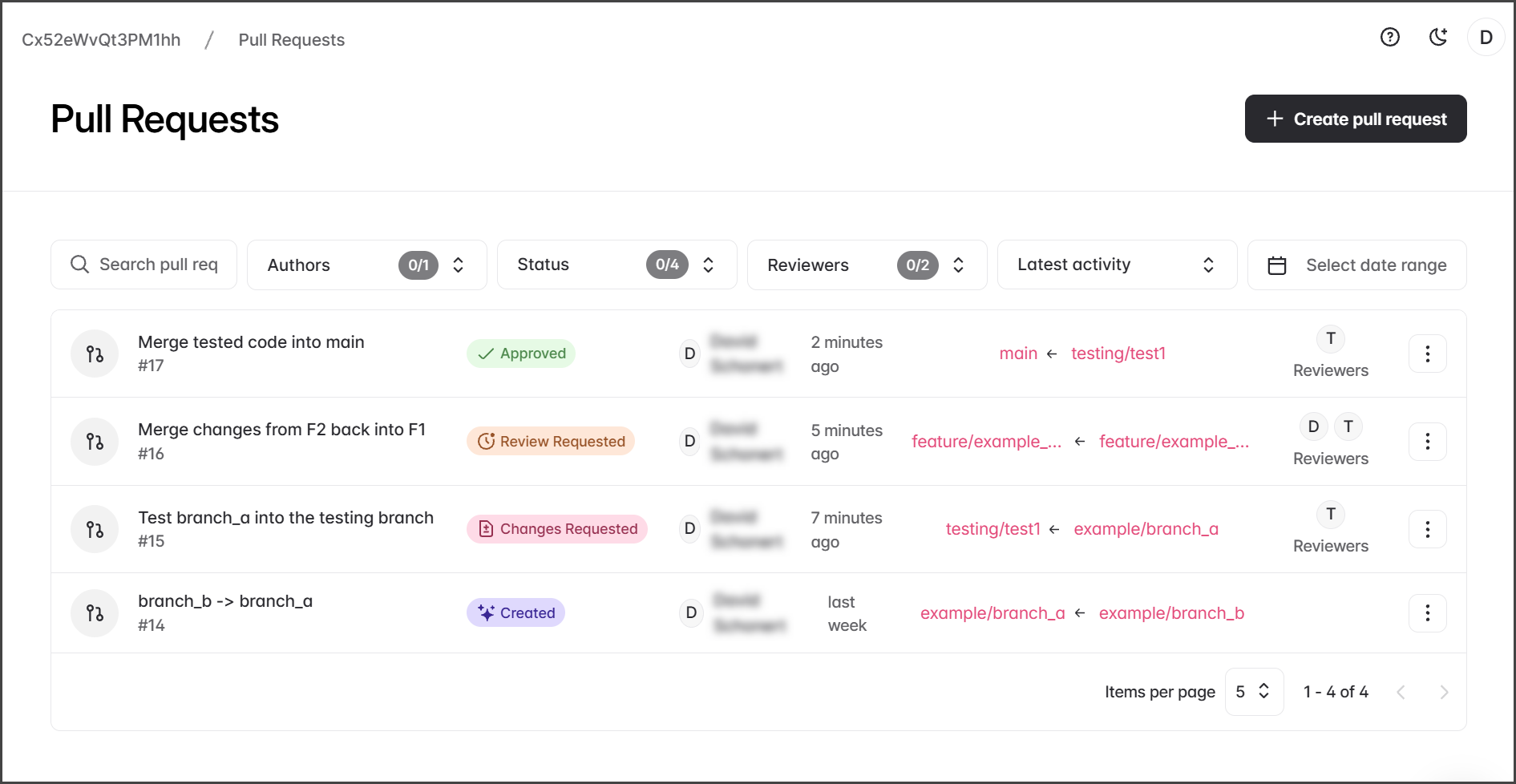
Overview of Pull Requests
Overview
Pull Requests are a key part of the Cloud DevOps workflow, enabling updates from a source branch to a target branch. They are designed to support collaboration through code reviews that must be approved before merging.
Benefits of Pull Requests:
Code Review: Enables thorough examination of changes before merging.
Conflict Detection: Identifies and addresses conflicts early in the process.
Clean Release History: Maintains an organized and clear project history.
Pull Request Overview Page
The Pull Request overview page provides a comprehensive snapshot of all active requests. Serving as the central hub, it facilitates progress tracking and merge readiness. Each Pull Request displays these details.
Active Pull Requests
The Pull Request Overview page only lists active Pull Requests. Once a Pull Request is Merged or Closed, it is removed from the active Pull Requests list.
Title and ID
The Pull Request title and ID number. Each Pull Request is assigned a unique sequential ID number.
Status
The status of the Pull Request can be one of the following: Created, Review Requested, Changes Requested, and Approved.
Author
The Flosum User that created the Pull Request.
Lastest Activity
The amount of time since the lastest activity for the Pull Request.
Tartet and Source
The target and source branches are listed with an arrow pointing from the source to the target. Clicking a branch takes you to the branches main page.
Reviewers
The Flosum Users that are assigened as reviewers of the Pull Request.
Clicking a Pull Request takes you to the request's overview page, where you can perform actions on it.
The Three Vertical Dots menu at the end of a Pull Request gives you the following options:
Edit: Takes you to the edit Pull Request page to change: Target branch, Source branch, Name, and Description.
Close: Terminates the Pull Request without merging. Once closed, the Pull Request is no longer shown in the Pull Requests list, and no more actions can be performed.

Searching, Sorting, and Filtering
The Pull Requests page can be searched, filtered, and sorted using the following tools.
Search – search by Pull Request name or ID.
Authors – filter by PR creator.
Status – filter by state (Created, Review Requested, Changes Requested, Approved).
Reviewers – filter by assigned reviewers.
Latest Activity – sort pull requests by:
Sort by name A–Z – alphabetical order.
Sort by name Z–A – reverse alphabetical order.
Latest activity – most recent updates first.
Oldest activity – earliest updates first.
Date Range – filter by creation or update timeframe. Use the date widget to enter a range.
Pull Request Statuses
Created
Pull Request opened but not reviewed.
Review Requested
Reviewers assigned but awaiting their feedback.
Changes Requested
Reviewers requested reviesions before approval.
Approved
Pull Request is approved by reivewers and ready to merge.
Pull Request Process
Pull Requests involve three key steps: creation, review, and merging. If conflicts arise during creation, they must be resolved prior to merging. Detailed guidance for each step is provided in the following articles.
Last updated
Was this helpful?