> For the complete documentation index, see [llms.txt](https://docs.flosum.com/llms.txt). Markdown versions of documentation pages are available by appending `.md` to page URLs; this page is available as [Markdown](https://docs.flosum.com/devops/settings/jira-integration/overview-of-jira-integration.md).
# Overview of Jira Integration
{% hint style="warning" %}
#### Written for the Old UI
This article was written for the old UI. The instructions are still usable, but the screenshots are outdated. In some cases, items referenced in the instructions have moved or changed. If you cannot find an item, see the [Where Did It Go](/devops/new-ui-ux-transition/where-did-it-go.md) article.
{% endhint %}
##  Overview
DevOps integrates with your team's Jira account to automatically update story statuses when you deploy a branch to an organization. This keeps Jira workflow statuses aligned with your release process. With the integration, you can control which organization deployments map to which Jira statuses and which stories relate to which branches.
### How does the DevOps Jira Integration work?
To get started with the Jira Integration, connect your Jira account to DevOps. Once connected, add your Jira projects to the integration. Then configure **Status Mappings** to define which Jira status a story updates to when you deploy a branch to a specific organization. For example, map your Development organization to **In Progress**, your Testing organization to **In Review**, and your Production organization to **Done**. For instructions on completing these steps, see the following articles.
* [Adding a Jira Integration](/devops/settings/jira-integration/adding-a-jira-integration.md)
* [Adding Projects to a Jira Integration](/devops/settings/jira-integration/adding-projects-to-a-jira-integration.md)
* [Configuring a Jira Project](/devops/settings/jira-integration/configuring-a-jira-project.md)
To control which stories update during deployment, add them to a branch's **Related Stories** list. When you deploy that branch, DevOps automatically updates all related Jira stories based on the **Status Mapping** for that organization, ensuring story statuses accurately reflect delivery progress without manual updates. For instructions on adding stories to a branch, see the following article.
* [Adding Jira Stories to a Branch](/devops/settings/jira-integration/adding-jira-stories-to-a-branch.md)
{% hint style="info" %}
#### Best Practices
* Use distinct names for integrations when connecting multiple Jira instances.
* Create separate status mappings for each environment (Dev, QA, Prod) to match your Jira workflow.
* Align Jira workflow statuses with your release process. For example: In Progress → In Review → Done.
* Save your configuration after every mapping change to ensure deployments trigger the correct updates.
{% endhint %}
#### Example Jira Integration
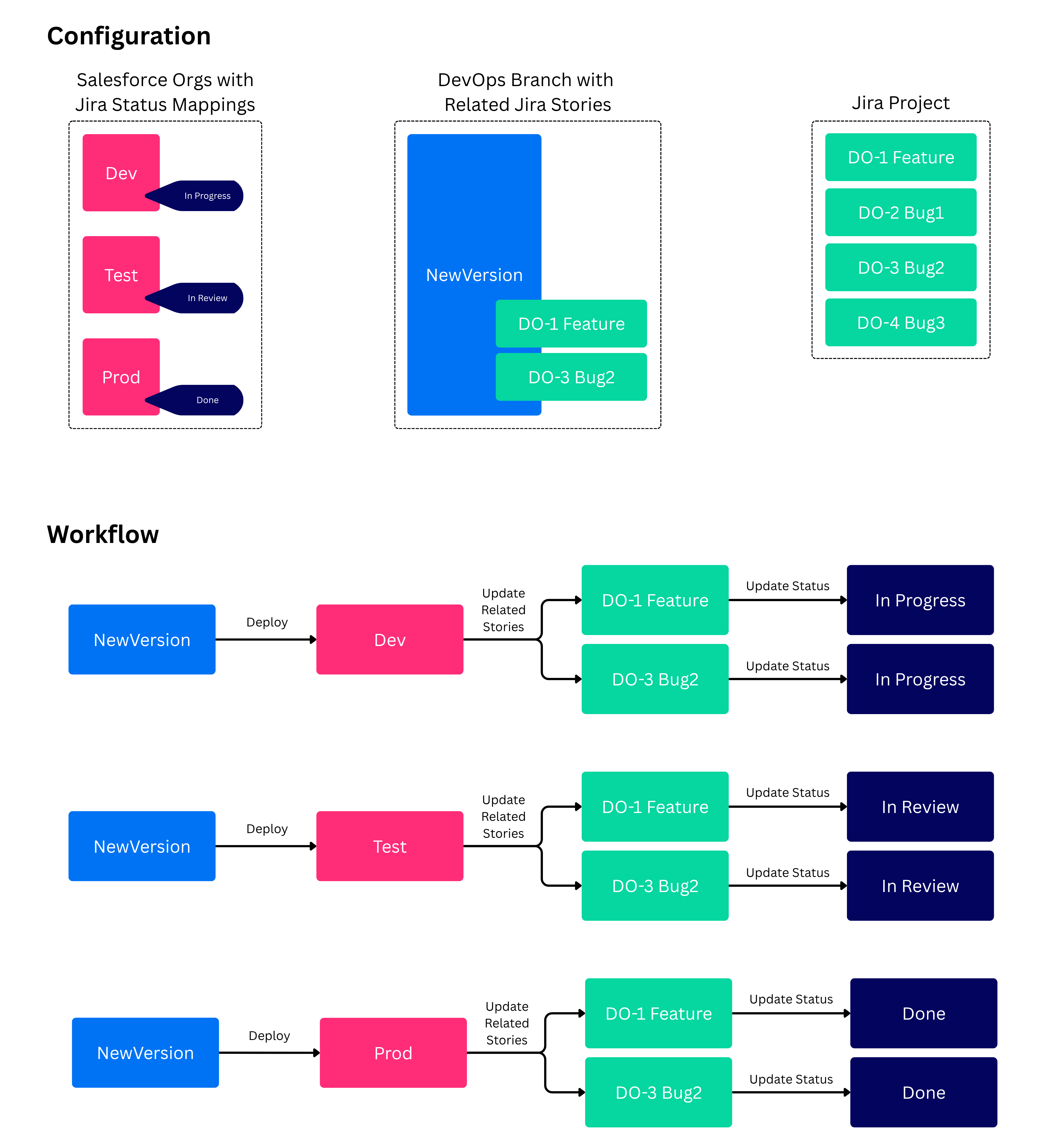
The diagram below illustrates how the Jira integration works using an example configuration and workflow. See the explanation of the **Configuration** and **Workflow** sections below.
* **Configuration**
* Status Mapping
* **Dev** org mapped to **In Progress**
* **Test** org mapped to **In Review**
* **Prod** org mapped to **Done**
* Branch Related Stories
* **DO-1 Feature** and **DO-3 Bug2** stories are related to the **NewVersion** branch
* Jira Project
* Lists all stories in this example Jira project.
* **Workflow**
* Shows what happens when the **NewVersion** branch is deployed to the **Dev** org.
* Shows what happens when the **NewVersion** branch is deployed to the **Test** org.
* Shows what happens when the **NewVersion** branch is deployed to the **Prod** org.
---
# Agent Instructions
This documentation is published with GitBook. GitBook is the documentation platform designed so that both humans and AI agents can read, navigate, and reason over technical content effectively. Learn more at gitbook.com.
## Querying This Documentation
If you need additional information that is not directly available in this page, you can query the documentation by asking a question.
Perform an HTTP GET request on the following URL with the `ask` and `goal` query parameters:
```
GET https://docs.flosum.com/devops/settings/jira-integration/overview-of-jira-integration.md?ask=&goal=
```
`ask` is the immediate question: it should be specific, self-contained, and written in natural language.
`goal` is what the user is ultimately trying to achieve, the reason they need the answer. Sharing it helps GitBook give you a better, more relevant answer. A goal is most helpful when it describes the outcome the user wants rather than restating the question. For example, with `ask=how do I create an API token`, a goal like `automate deployments from our CI pipeline` lets GitBook tailor the answer to that use case.
The response will contain a direct answer to the question and relevant excerpts and sources from the documentation.
Use this mechanism when the answer is not explicitly present in the current page, you need clarification or additional context, or you want to retrieve related documentation sections.