> For the complete documentation index, see [llms.txt](https://docs.flosum.com/llms.txt). Markdown versions of documentation pages are available by appending `.md` to page URLs; this page is available as [Markdown](https://docs.flosum.com/global-settings/global-settings-docs-ja/huan-jing/zu-zhi/no-2.md).
# 組織の削除
{% hint style="success" %}
#### 必要なユーザー認証情報
\[**Flosumユーザー**] - **システム管理者** 役割
{% endhint %}
## 概要
Organizationはテナントから削除できます。この操作により、このOrganizationに関連付けられたすべてのFlosum Cloud Appsに保存されているデータが削除されますが、Salesforce org内のデータは削除されません。この記事では、Organizationを削除する方法について説明します。
{% hint style="danger" %}
#### データ損失の警告
Organizationを削除すると、このOrganizationに関連するすべてのバックアップ、アーカイブ、メタデータ、設定、およびその他のデータが、すべてのFlosum Cloud Appsから削除されます。この操作は元に戻せません。
{% endhint %}
## Salesforce Organizationを削除する
{% stepper %}
{% step %}
### グローバル設定にアクセスする
1. 任意の **Flosum Cloud App**で、 **アプリスイッチャー** アイコンを左側のサイドバーメニュー上部でクリックします。
2. クリック **グローバル設定**.
3. その **グローバル設定** アプリは新しいタブで開きます。
{% hint style="info" %}
グローバル設定には、Flosum Cloud Apps のログインURLから直接ログインしてアクセスすることもできます。ログイン手順については、以下の記事を参照してください。
* [グローバル設定にログインする](/global-settings/global-settings-docs-ja/hajimeni/gurbaruniroguinsuru.md)
{% endhint %}
{% endstep %}
{% step %}
### Organizationを削除する
{% hint style="danger" %}
#### データ損失の警告
Organizationを削除すると、このOrganizationに関連するすべてのバックアップ、アーカイブ、メタデータ、設定、およびその他のデータが、すべてのFlosum Cloud Appsから削除されます。この操作は元に戻せません。
{% endhint %}
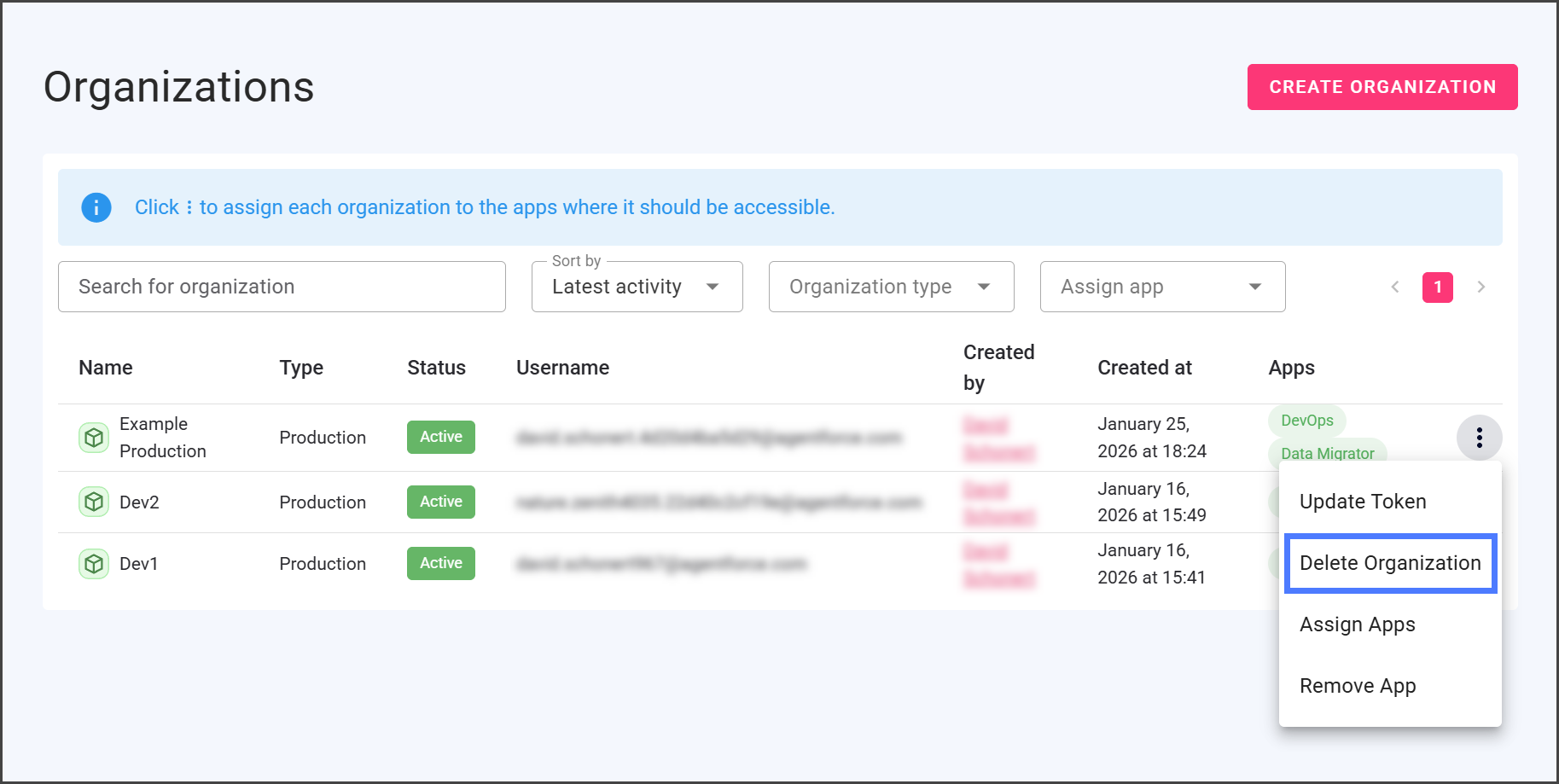
1. クリックします **Organizations** をサイドバー メニューから。
2. 次をクリックします **縦の3点アイコン** 削除したいOrganizationの右端にあるメニュー。
3. クリックします **Organizationを削除する**.
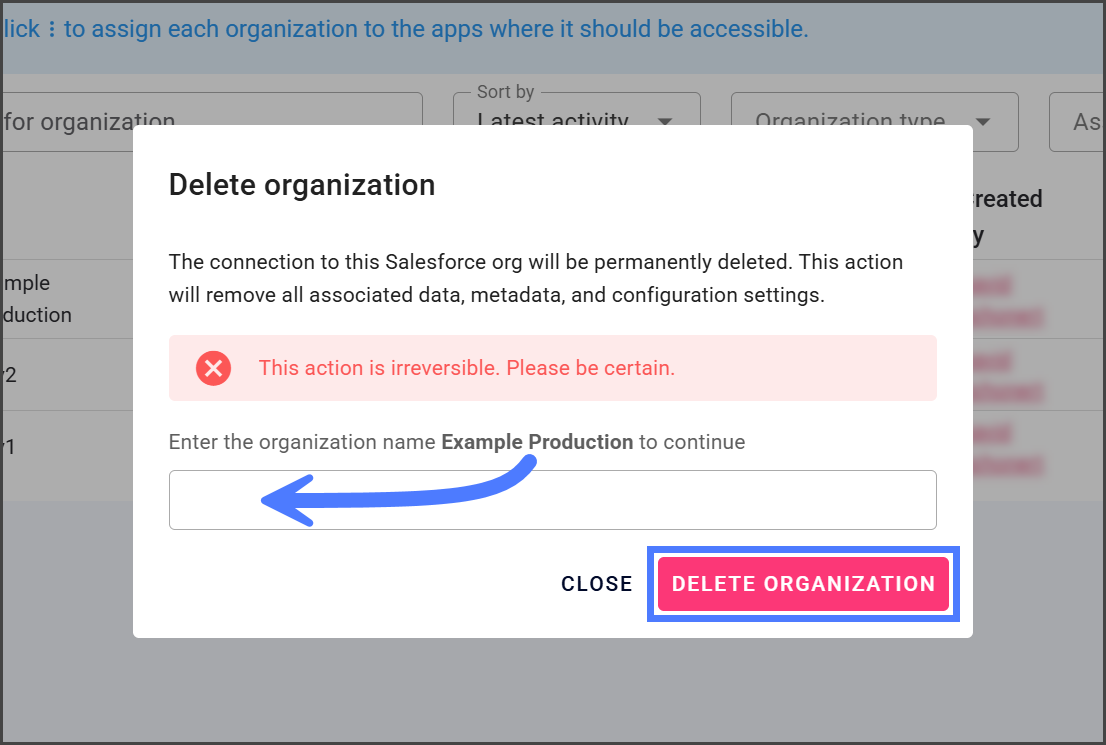
4. 確認ダイアログのテキストボックスに **Organizationを削除する** 削除するOrganizationの名前を入力します。
5. クリックします **Organizationを削除する**.
6. OrganizationはすべてのFlosum Cloud Appsから削除され、関連データもすべて削除されました。
{% endstep %}
{% endstepper %}
---
# Agent Instructions
This documentation is published with GitBook. GitBook is the documentation platform designed so that both humans and AI agents can read, navigate, and reason over technical content effectively. Learn more at gitbook.com.
## Querying This Documentation
If you need additional information that is not directly available in this page, you can query the documentation by asking a question.
Perform an HTTP GET request on the following URL with the `ask` and `goal` query parameters:
```
GET https://docs.flosum.com/global-settings/global-settings-docs-ja/huan-jing/zu-zhi/no-2.md?ask=&goal=
```
`ask` is the immediate question: it should be specific, self-contained, and written in natural language.
`goal` is what the user is ultimately trying to achieve, the reason they need the answer. Sharing it helps GitBook give you a better, more relevant answer. A goal is most helpful when it describes the outcome the user wants rather than restating the question. For example, with `ask=how do I create an API token`, a goal like `automate deployments from our CI pipeline` lets GitBook tailor the answer to that use case.
The response will contain a direct answer to the question and relevant excerpts and sources from the documentation.
Use this mechanism when the answer is not explicitly present in the current page, you need clarification or additional context, or you want to retrieve related documentation sections.