> For the complete documentation index, see [llms.txt](https://docs.flosum.com/llms.txt). Markdown versions of documentation pages are available by appending `.md` to page URLs; this page is available as [Markdown](https://docs.flosum.com/global-settings/global-settings-docs-ja/yz/rrugurpuyzno.md).
# ロール、グループ、ユーザーの概要
## 概要
この記事は、プラットフォーム内のユーザーアクセスと権限を管理するために不可欠なコンポーネントであるFlosumのロール、グループ、およびユーザーの機能についての洞察を提供します。ロール、グループ、およびユーザーの作成手順については、以下の記事を参照してください。
* [ロールの作成](/global-settings/global-settings-docs-ja/yz/rru/rruno.md)
* [グループの作成](/global-settings/global-settings-docs-ja/yz/gurpu/gurpuno.md)
* [ユーザーの作成](/global-settings/global-settings-docs-ja/yz/yz/yzno.md)
{% hint style="info" %}
ユーザーはグループに割り当てられ、グループはロールに割り当てられるため、最初にロールを作成し、次にグループを追加し、最後にユーザーを追加する必要があります。
{% endhint %}
Flosum Cloud Appsで利用可能な各権限の詳細については、以下の記事を参照してください。
* [Flosum Cloud App の権限](/global-settings/global-settings-docs-ja/yz/flosum-cloud-app-no.md)
グループのロールを変更する方法については、以下の記事を参照してください。
* [グループのロールの変更](/global-settings/global-settings-docs-ja/yz/gurpu/gurpunorruno.md)
## ロール、グループ、およびユーザーの動作方法
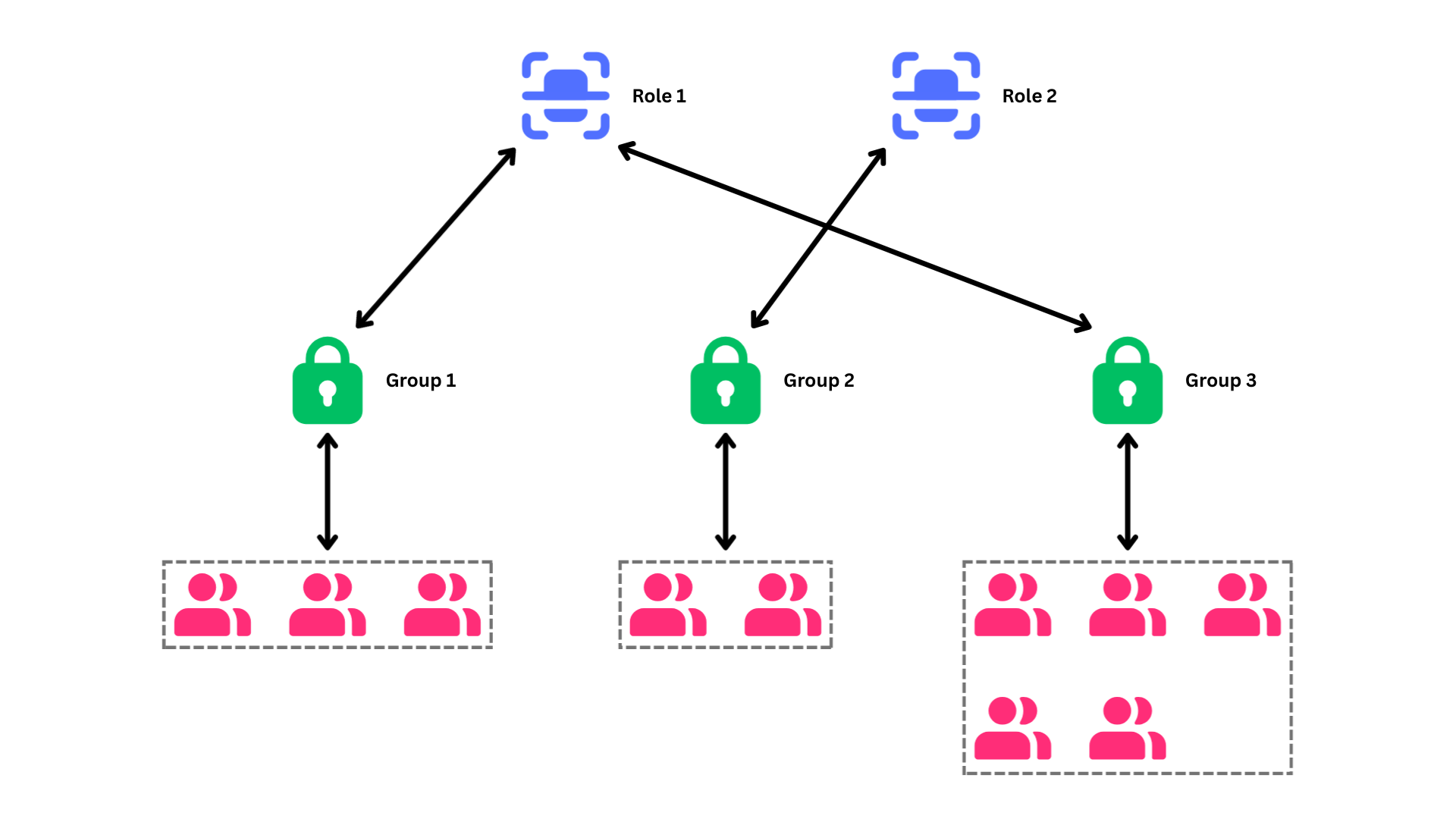
Flosum Cloud Appsでは、ユーザー管理は次の方法で構成されています: **ロール**, **グループ**, および **ユーザー**、効果的な権限管理を促進します。この階層構造により、権限が明確に定義され、組織内の異なるチームの特定のニーズに合わせて調整できるようになります。以下は各コンポーネントの内訳です:
* **ロール**:ロールは使用されるライセンスと追加された各Salesforce組織の権限を定義します。
* **グループ**:グループは特定のロールを持つユーザーを結び付けます。この構造により、複数のユーザーの権限を同時に素早く変更できます。グループは1つのロールしか割り当てられませんが、複数のグループが同じロールを共有することは可能です。
* **ユーザー**:ユーザーアカウントは個人がFlosumアプリにログインすることを可能にします。各ユーザーは1つのグループにのみ属することができ、同じグループに多くのユーザーが所属することができます。
{% hint style="info" %}
#### SystemAdministrator(システム管理者)
その **SystemAdministrator(システム管理者)** ロールと **SystemAdministrator(システム管理者)** グループはシステム定義されており、変更することはできません。 **SystemAdministrator(システム管理者)** ロールはスーパー管理者権限を持つシステム定義のロールです。このロールはユーザーに **Global Settings(グローバル設定)** アプリおよび **Backup & Archive(バックアップとアーカイブ)**.
* などの他のライセンスされたFlosumアプリへの完全なアクセスを付与します。 **SystemAdministrator(システム管理者)** 新しいアカウントでは、アカウント作成者が自動的に **SystemAdministrator(システム管理者)** ロールを持つ
* グループに追加されます。 **SystemAdministrator(システム管理者)** 新しいアカウントでは、アカウント作成者が自動的に **SystemAdministrator(システム管理者)** ロールを持つ
{% endhint %}
### 既存のアカウントでは、ユーザープールからグローバル設定への移行時のルートユーザーが自動的に
に割り当てられます。
例
{% hint style="warning" %}
下のスクリーンショットはロール、グループ、およびユーザー間の関係を示しています。この例では、グループ1とグループ3の両方のユーザーが同じロールを共有しています。
* [グループのロールの変更](/global-settings/global-settings-docs-ja/yz/gurpu/gurpunorruno.md)
{% endhint %}
---
# Agent Instructions
This documentation is published with GitBook. GitBook is the documentation platform designed so that both humans and AI agents can read, navigate, and reason over technical content effectively. Learn more at gitbook.com.
## Querying This Documentation
If you need additional information that is not directly available in this page, you can query the documentation by asking a question.
Perform an HTTP GET request on the following URL with the `ask` and `goal` query parameters:
```
GET https://docs.flosum.com/global-settings/global-settings-docs-ja/yz/rrugurpuyzno.md?ask=&goal=
```
`ask` is the immediate question: it should be specific, self-contained, and written in natural language.
`goal` is what the user is ultimately trying to achieve, the reason they need the answer. Sharing it helps GitBook give you a better, more relevant answer. A goal is most helpful when it describes the outcome the user wants rather than restating the question. For example, with `ask=how do I create an API token`, a goal like `automate deployments from our CI pipeline` lets GitBook tailor the answer to that use case.
The response will contain a direct answer to the question and relevant excerpts and sources from the documentation.
Use this mechanism when the answer is not explicitly present in the current page, you need clarification or additional context, or you want to retrieve related documentation sections.