> For the complete documentation index, see [llms.txt](https://docs.flosum.com/llms.txt). Markdown versions of documentation pages are available by appending `.md` to page URLs; this page is available as [Markdown](https://docs.flosum.com/devops/devops-ja/pururikuesuto/pururikuesutonopurosesu/pururikuesutonono.md).

# プルリクエストの競合の解決

{% hint style="warning" %}

#### 旧UI向けに作成

この記事は旧UI向けに作成されました。手順は今でも使用できますが、スクリーンショットは古くなっています。場合によっては、手順で参照されている項目が移動または変更されていることがあります。項目が見つからない場合は、 [どこに行ったのか](/devops/devops-ja/shii-uiux-heno/dokonittanoka.md) 記事。
{% endhint %}

## ![](https://225042527-files.gitbook.io/~/files/v0/b/gitbook-x-prod.appspot.com/o/spaces%2FRpUu5iMlzMFAudyBvMOl%2Fuploads%2FG5ZbxX918xOHwbAwAJ4n%2FSummary2-Small-Icon.svg?alt=media\&token=da26a67f-ff7f-47b3-8669-06be960dc2d7) 概要

この記事では、Pull Request の競合が発生する理由と、それらが発生する一般的なシナリオについて説明します。また、これらの競合を効果的に確認し解決するための詳細な手順も示します。

### Pull Request の競合は何が原因で発生しますか？

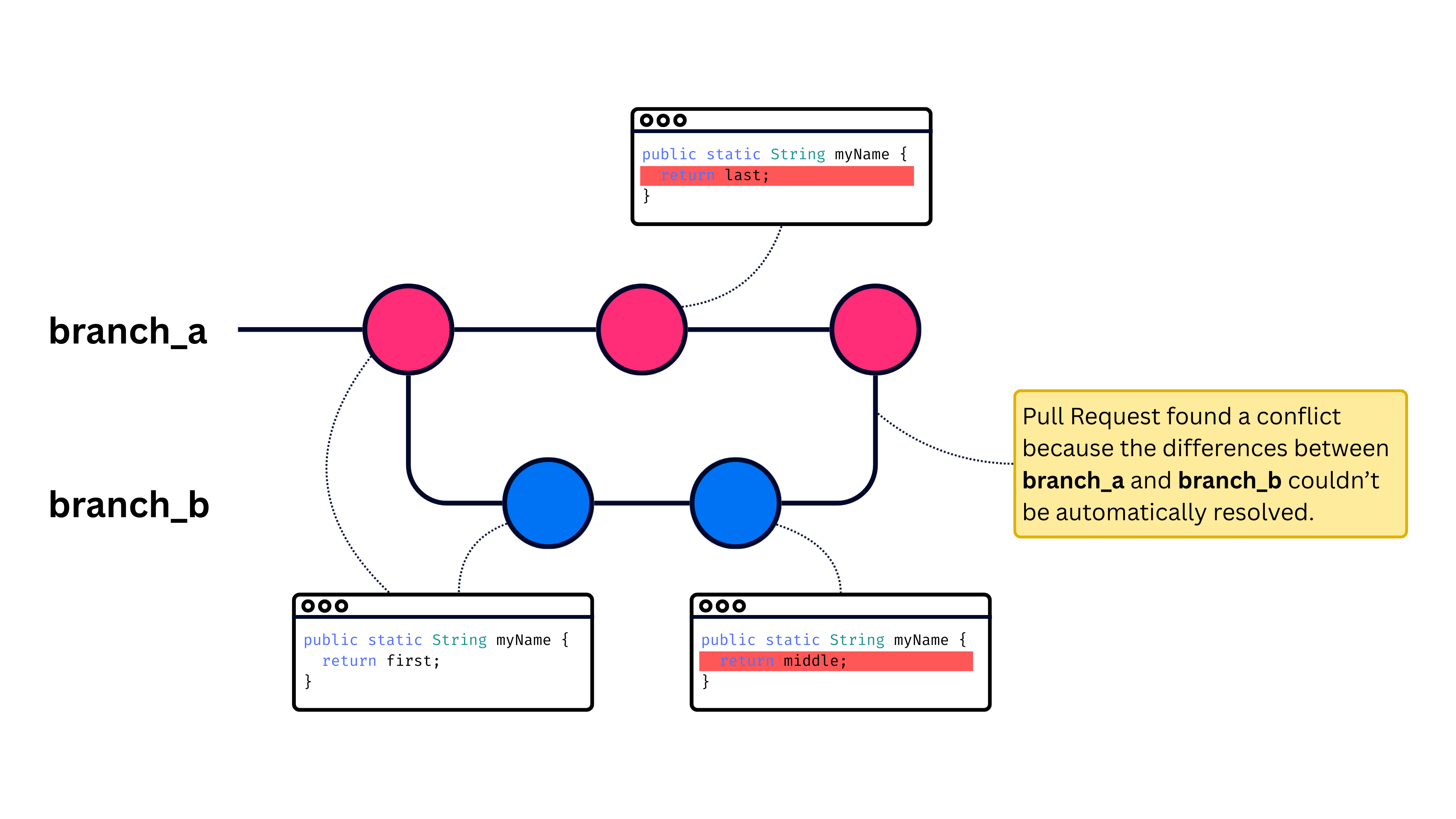
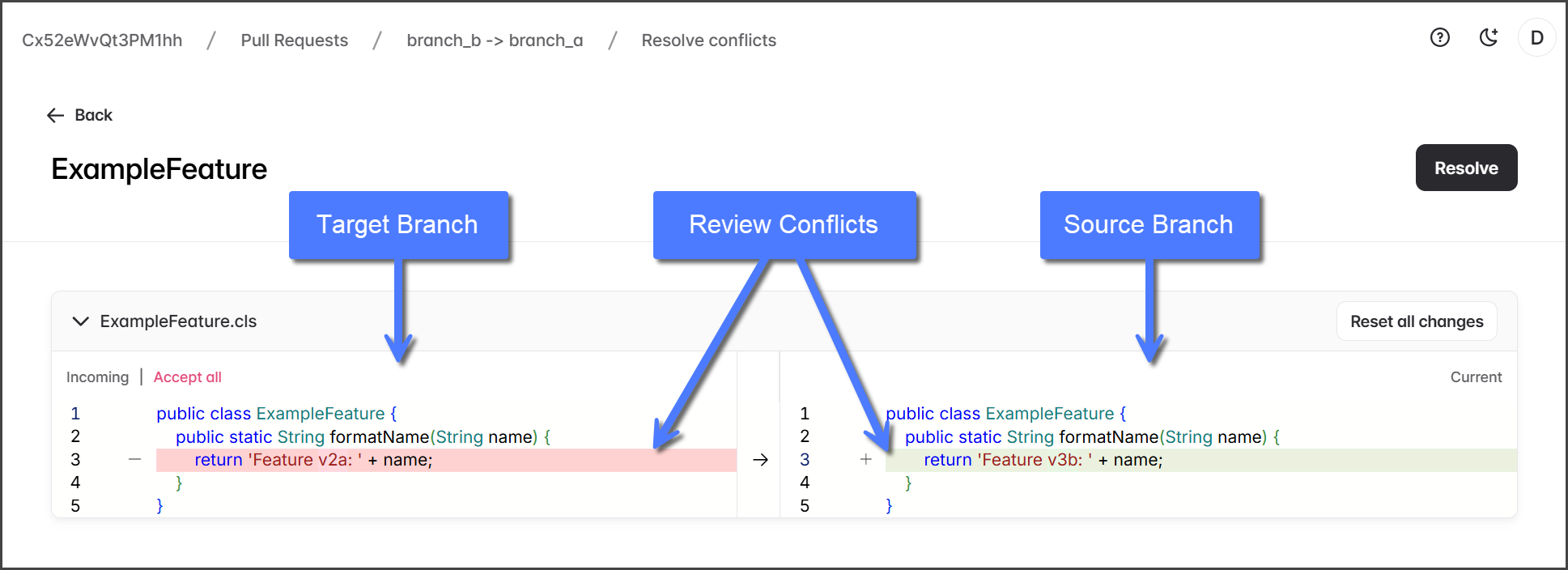
Pull Request の競合は、2つのブランチに同じコード行に影響するコミットがあり、どの行を保持するかを Pull Request が自動的に判断できない場合に発生します。これがどのように起こるかは、以下の図を参照してください。

<div align="left"><figure><img src="https://225042527-files.gitbook.io/~/files/v0/b/gitbook-x-prod.appspot.com/o/spaces%2FRpUu5iMlzMFAudyBvMOl%2Fuploads%2F3eIOztucBaSOKuGON5bV%2FPull%20Request%20Conflict%20-%20Figure%201.png?alt=media&amp;token=6e11e440-bc32-4289-86b2-e757c420a2e0" alt="" width="563"><figcaption></figcaption></figure></div>

この例では、 **branch\_b** は **branch\_a**から作成されます。次に、 *myName* 関数に影響する変更が **branch\_b**にコミットされ、関数への別の変更が **branch\_a**にコミットされます。Pull Request を作成して **branch\_b** を **branch\_a**にマージしようとすると、同じコード行が両方のブランチで変更されていることが検出され、競合が発生します。次のセクションでは、競合を解決するための2つの異なる方法を説明します。

### Pull Request の競合はどう解決しますか？

Pull Request で競合が発生した場合は、ターゲットの変更を保持するか上書きすることで解決できます。複数の競合がある場合は、最も適切な方法を使ってそれぞれ個別に対処してください。競合ごとに異なる方法を使っても問題ありません。

<details>

<summary>ターゲットの変更を保持</summary>

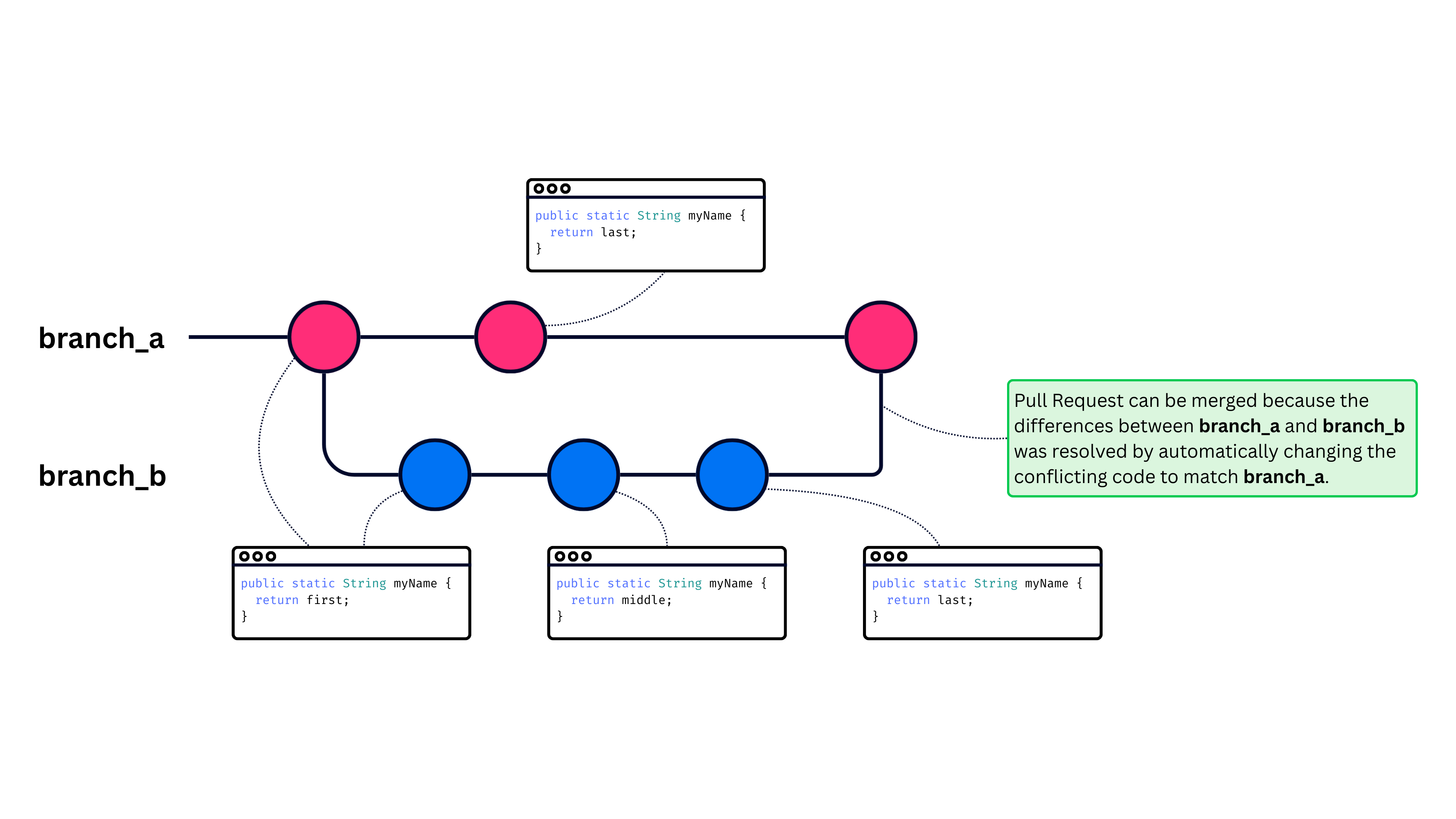
この方法で競合を解決するには、 **ターゲット** ブランチから **ソース** ブランチへ競合している行をコミットします。図を参照してイメージを確認し、下の [#retain-target-changes-1](#retain-target-changes-1 "mention") セクションにある手順に従ってください。

{% hint style="info" %}
この方法では、Pull Request に組み込まれている **競合を解決** 機能を使って、変更をソース ブランチへ自動的にコミットします。
{% endhint %}

<figure><img src="https://225042527-files.gitbook.io/~/files/v0/b/gitbook-x-prod.appspot.com/o/spaces%2FRpUu5iMlzMFAudyBvMOl%2Fuploads%2FfdBOyMKCsalcBawvM7ED%2FPull%20Request%20Conflict%20-%20Figure%202.png?alt=media&amp;token=6e3f9324-daa3-468b-9e27-8c0376830794" alt=""><figcaption></figcaption></figure>

</details>

<details>

<summary>ターゲットの変更を上書き</summary>

この方法で競合を解決するには、 **ソース** ブランチから **ターゲット** ブランチへ競合している行をコミットします。図を参照してイメージを確認し、下の [#overwrite-target-changes-1](#overwrite-target-changes-1 "mention") セクションにある手順に従ってください。

{% hint style="info" %}
この方法では、 **ソース** ブランチから **ターゲット** ブランチです。
{% endhint %}

<figure><img src="https://225042527-files.gitbook.io/~/files/v0/b/gitbook-x-prod.appspot.com/o/spaces%2FRpUu5iMlzMFAudyBvMOl%2Fuploads%2FVaZecNF0HTB21tlT1oKW%2FPull%20Request%20Conflict%20-%20Figure%203.png?alt=media&amp;token=1c8af0e0-97e7-46dd-a428-1f4b66e1e341" alt=""><figcaption></figcaption></figure>

</details>

## 競合の解決

{% stepper %}
{% step %}

### Pull Request の競合

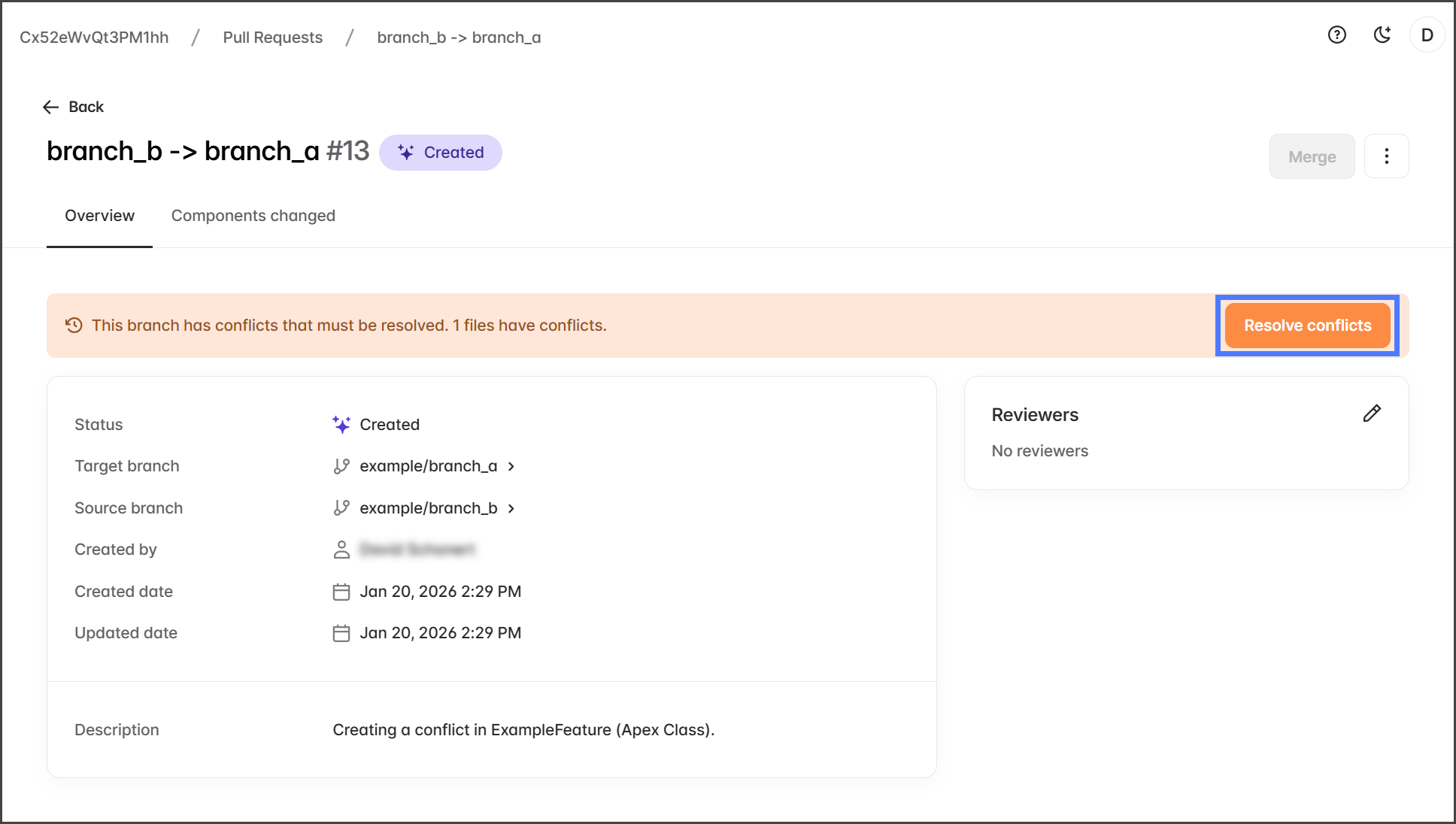
Pull Request が作成されると、最初に競合チェックが実行されます。 **対象** と **ソース** ブランチ間に競合が見つかると警告が表示され、Pull Request をマージする前に競合を解決する必要があります。

<div align="left"><figure><img src="https://225042527-files.gitbook.io/~/files/v0/b/gitbook-x-prod.appspot.com/o/spaces%2FRpUu5iMlzMFAudyBvMOl%2Fuploads%2FK9JALbdKadbvEFqPe00z%2FResolvingPullRequestConflicts-S01-01.png?alt=media&amp;token=4973d672-8444-46fe-8e35-150acd351ba8" alt=""><figcaption></figcaption></figure></div>
{% endstep %}

{% step %}

### 競合を確認

1. 次をクリックします **競合を解決**.

   <div align="left"><figure><img src="https://225042527-files.gitbook.io/~/files/v0/b/gitbook-x-prod.appspot.com/o/spaces%2FRpUu5iMlzMFAudyBvMOl%2Fuploads%2F8pYu7mdbTdXEXva8Zf23%2FResolvingPullRequestConflicts-S02-01.png?alt=media&amp;token=a13bbbd4-870d-4895-b5d7-17598f9f799b" alt="" width="563"><figcaption></figcaption></figure></div>
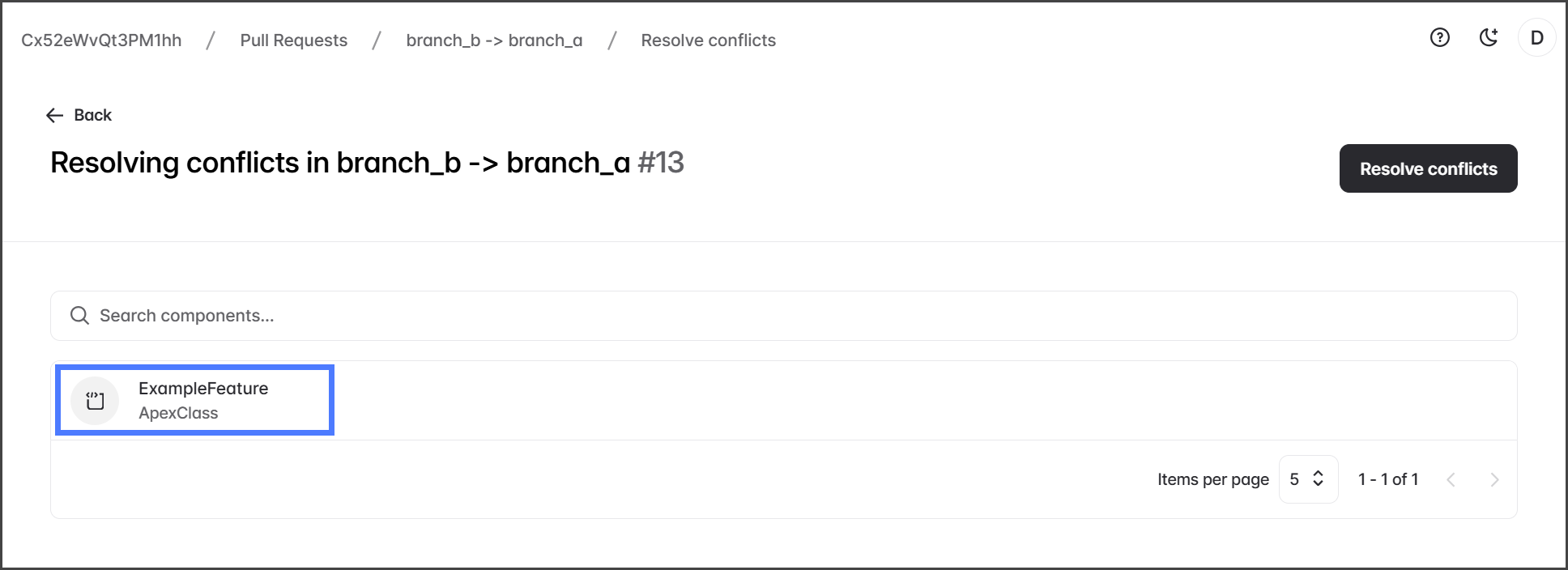
2. 競合を表示するにはコンポーネントをクリックします。

   <div align="left"><figure><img src="https://225042527-files.gitbook.io/~/files/v0/b/gitbook-x-prod.appspot.com/o/spaces%2FRpUu5iMlzMFAudyBvMOl%2Fuploads%2Fhd7mmwFjgbQRTVwIIkud%2FResolvingPullRequestConflicts-S02-02.png?alt=media&amp;token=c2864009-da37-4116-b9fa-4b2ffbbb46f1" alt="" width="563"><figcaption></figcaption></figure></div>

{% hint style="warning" %}
すべてのコンポーネントを確認し、解決する必要があります。
{% endhint %}

3. コンポーネント内の競合しているコードを確認し、競合をどのように解決するかを判断します。

   <div align="left"><figure><img src="https://225042527-files.gitbook.io/~/files/v0/b/gitbook-x-prod.appspot.com/o/spaces%2FRpUu5iMlzMFAudyBvMOl%2Fuploads%2FJOCmqXNWisObvgSQHKGr%2FResolvingPullRequestConflicts-S02-03.png?alt=media&amp;token=9b9f9a30-b3e2-40ea-948c-5dccc2b3fd54" alt="" width="563"><figcaption></figcaption></figure></div>

{% hint style="info" %}
以下の [#what-causes-a-pull-request-conflict](#what-causes-a-pull-request-conflict "mention") 上のセクションで、Pull Request の競合について説明しています。
{% endhint %}

4. Pull Request の競合を解決する方法は2つあります。各方法の実行手順は以下のセクションを参照してください。
   1. **ターゲットの変更を保持**：この方法では、 **ターゲット** ブランチから **ソース** ブランチです。
   2. **ターゲットの変更を上書き**：この方法では、 **ソース** ブランチからの競合している行をコミットすることでソースのコードを保持します。 **ターゲット** ブランチです。

{% hint style="info" %}
複数の競合がある場合は、最も適切な方法を使ってそれぞれ個別に対処してください。競合ごとに異なる方法を使っても問題ありません。
{% endhint %}
{% endstep %}

{% step %}

### ターゲットの変更を保持

この方法では、Pull Request に組み込まれている **競合を解決** Pull Request に組み込まれた機能です。

1. 競合のあるコンポーネントをクリックして解決します。

   <div align="left"><figure><img src="https://225042527-files.gitbook.io/~/files/v0/b/gitbook-x-prod.appspot.com/o/spaces%2FRpUu5iMlzMFAudyBvMOl%2Fuploads%2FnhVr1raQZTvAcw9WOc0C%2FResolvingPullRequestConflicts-S03-01.png?alt=media&amp;token=5b31efc1-49e1-440a-bc96-6b814a4b2486" alt="" width="563"><figcaption></figcaption></figure></div>
2. 次をクリックします **すべてを受け入れる** をクリックしてすべての行を保持するか、 **右** **矢印** を各行ごとにクリックして保持します。これにより、選択した行がターゲット ブランチからソース ブランチにコピーされます。

   <div align="left"><figure><img src="https://225042527-files.gitbook.io/~/files/v0/b/gitbook-x-prod.appspot.com/o/spaces%2FRpUu5iMlzMFAudyBvMOl%2Fuploads%2FBg7oBwXUrHGZ38xWlH0q%2FResolvingPullRequestConflicts-S03-02.png?alt=media&amp;token=9daa3a07-3fab-4016-b589-231f4b0e2143" alt="" width="563"><figcaption></figcaption></figure></div>
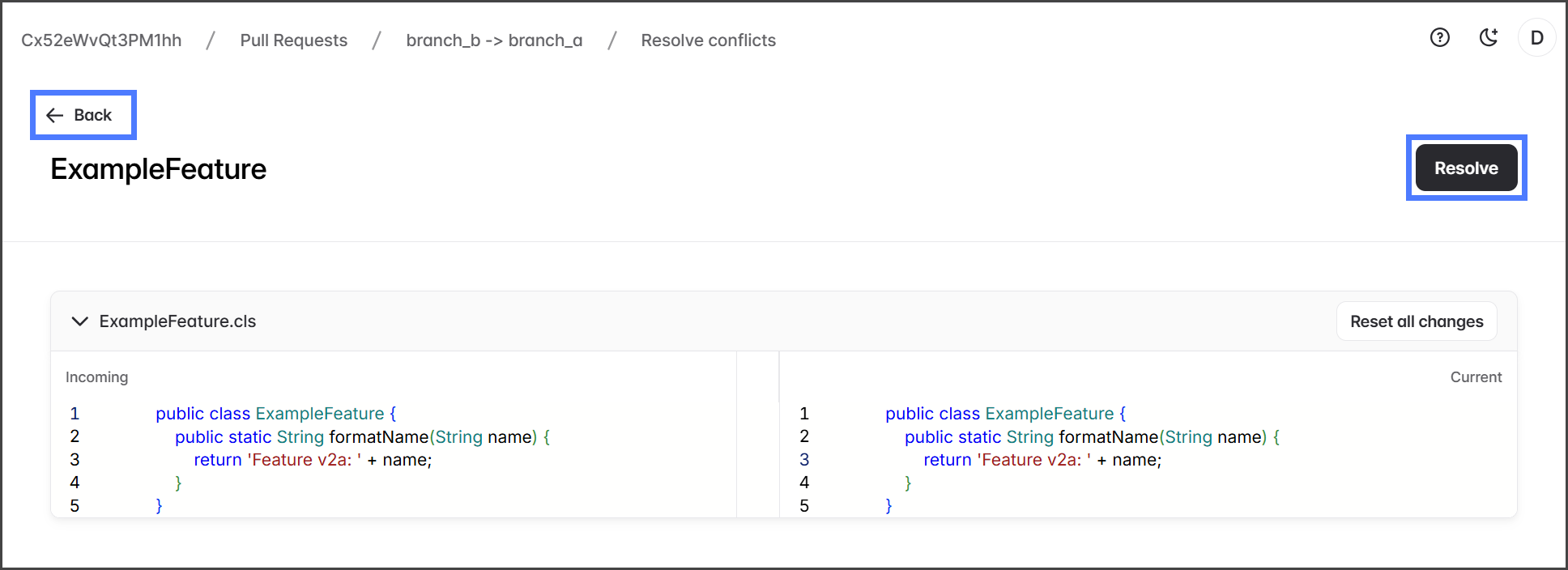
3. ソース ブランチに必要な変更をすべて加えたら、 **解決**をクリックします。これによりコンポーネントは **解決済み** としてマークされ、変更を追跡できます。
4. 次をクリックします **戻る**.

   <div align="left"><figure><img src="https://225042527-files.gitbook.io/~/files/v0/b/gitbook-x-prod.appspot.com/o/spaces%2FRpUu5iMlzMFAudyBvMOl%2Fuploads%2FaOEtG2UOuvfX4mfiHKPf%2FResolvingPullRequestConflicts-S03-03.png?alt=media&amp;token=d831374c-a137-4036-a4c3-ff853431d6e4" alt="" width="563"><figcaption></figcaption></figure></div>

{% hint style="info" %}
競合のあるすべてのコンポーネントに対して、この手順を繰り返します。
{% endhint %}

5. すべてのコンポーネントが **解決済み**としてマークされたら、 **競合を解決**.

   <div align="left"><figure><img src="https://225042527-files.gitbook.io/~/files/v0/b/gitbook-x-prod.appspot.com/o/spaces%2FRpUu5iMlzMFAudyBvMOl%2Fuploads%2FSmVZ0MxD4NguSwB7dtNl%2FResolvingPullRequestConflicts-S03-04.png?alt=media&amp;token=40f79012-9e17-4f74-b4aa-f8eeef229c93" alt="" width="563"><figcaption></figcaption></figure></div>
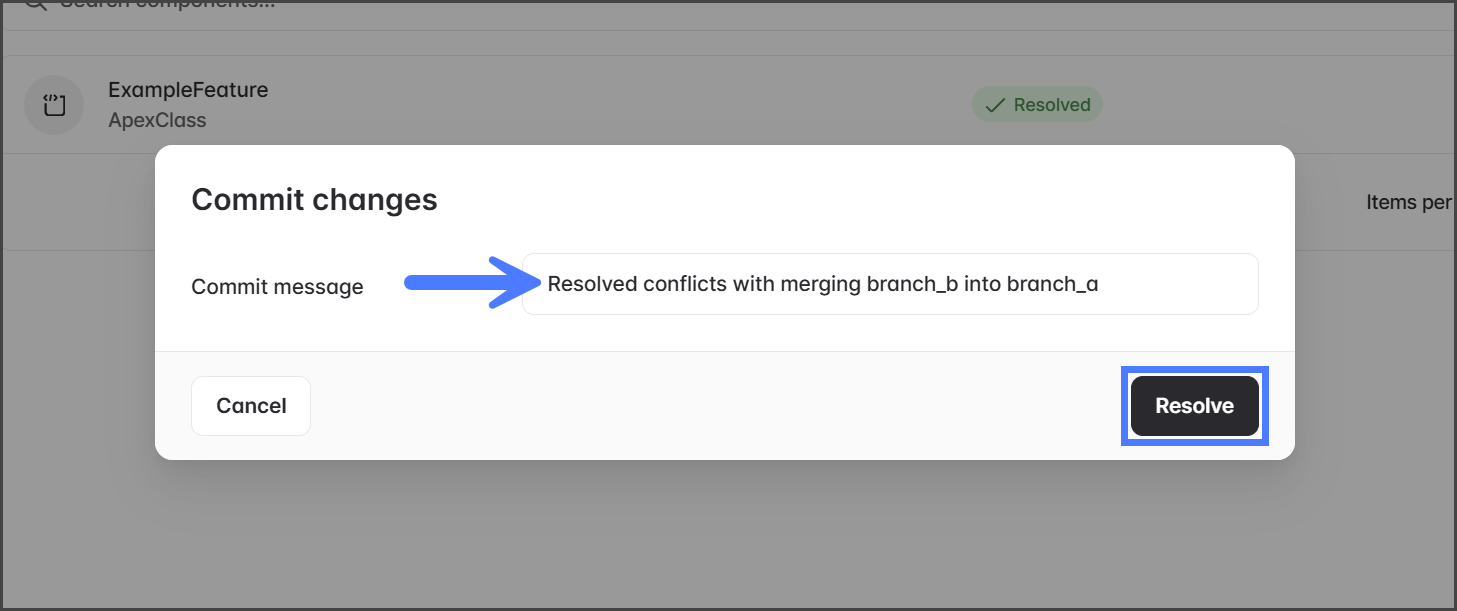
6. を入力してください。 **コミット メッセージ**.
7. 次をクリックします **解決**.

   <div align="left"><figure><img src="https://225042527-files.gitbook.io/~/files/v0/b/gitbook-x-prod.appspot.com/o/spaces%2FRpUu5iMlzMFAudyBvMOl%2Fuploads%2FaOXu8XK1s9ePPohbfp9D%2FResolvingPullRequestConflicts-S03-05.png?alt=media&amp;token=4ae6eb1f-e6b8-4bc9-81d1-00a5e20eb8d8" alt="" width="375"><figcaption></figcaption></figure></div>
8. 競合を解決した後、Pull Request で再度競合チェックが実行されます。
9. これ以上競合がなければ、Pull Request のメッセージは緑色になり、「このブランチはマージできます」と表示されます。

   <div align="left"><figure><img src="https://225042527-files.gitbook.io/~/files/v0/b/gitbook-x-prod.appspot.com/o/spaces%2FRpUu5iMlzMFAudyBvMOl%2Fuploads%2F4DbE815qPh7WKEA1uXtk%2FResolvingPullRequestConflicts-S03-06.png?alt=media&amp;token=99b78d90-5278-478b-8182-3c5ab325a9eb" alt="" width="563"><figcaption></figcaption></figure></div>

{% hint style="info" %}
Pull Request に競合が残っている場合は、確認して解決してください。すべての問題が解決されるまで繰り返します。
{% endhint %}
{% endstep %}

{% step %}

### ターゲットの変更を上書き

この方法では、ターゲット ブランチの変更を手動で編集してコミットする必要があります。

{% hint style="info" %}
ターゲット ブランチの変更を上書きして競合を解決しやすくするため、Pull Request を確認しながら競合の原因となっている具体的な行やコンポーネントを記録してください。
{% endhint %}

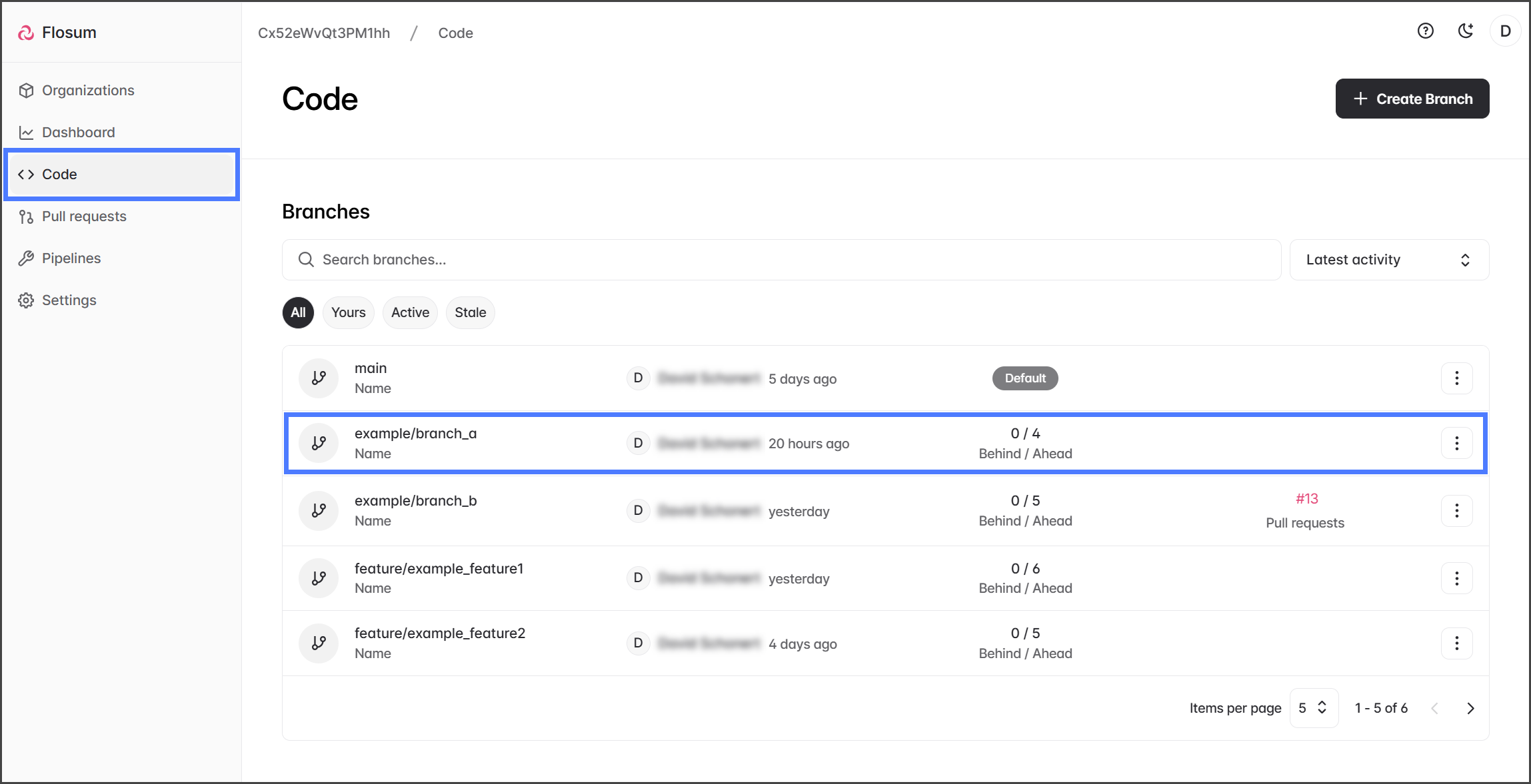
1. 次をクリックします **コード** を左側のサイドバー メニューから。
2. 次をクリックします **ターゲット** Pull Request のブランチ。

   <div align="left"><figure><img src="https://225042527-files.gitbook.io/~/files/v0/b/gitbook-x-prod.appspot.com/o/spaces%2FRpUu5iMlzMFAudyBvMOl%2Fuploads%2FVdGI0XqpcphJPuoqXMfn%2FResolvingPullRequestConflicts-S04-01.png?alt=media&amp;token=30f3e50f-f1aa-41fa-b814-9c109f8342b7" alt="" width="563"><figcaption></figcaption></figure></div>
3. 次をクリックします **3つの縦の** 点は、Pull Request で競合しているコンポーネントの右端にあります。
4. 次をクリックします **編集**.

   <div align="left"><figure><img src="https://225042527-files.gitbook.io/~/files/v0/b/gitbook-x-prod.appspot.com/o/spaces%2FRpUu5iMlzMFAudyBvMOl%2Fuploads%2F5g5ClKMeHBcegHcwiUOW%2FResolvingPullRequestConflicts-S04-02.png?alt=media&amp;token=c2446acd-0011-498a-aa3a-f5277d191ed5" alt="" width="563"><figcaption></figcaption></figure></div>
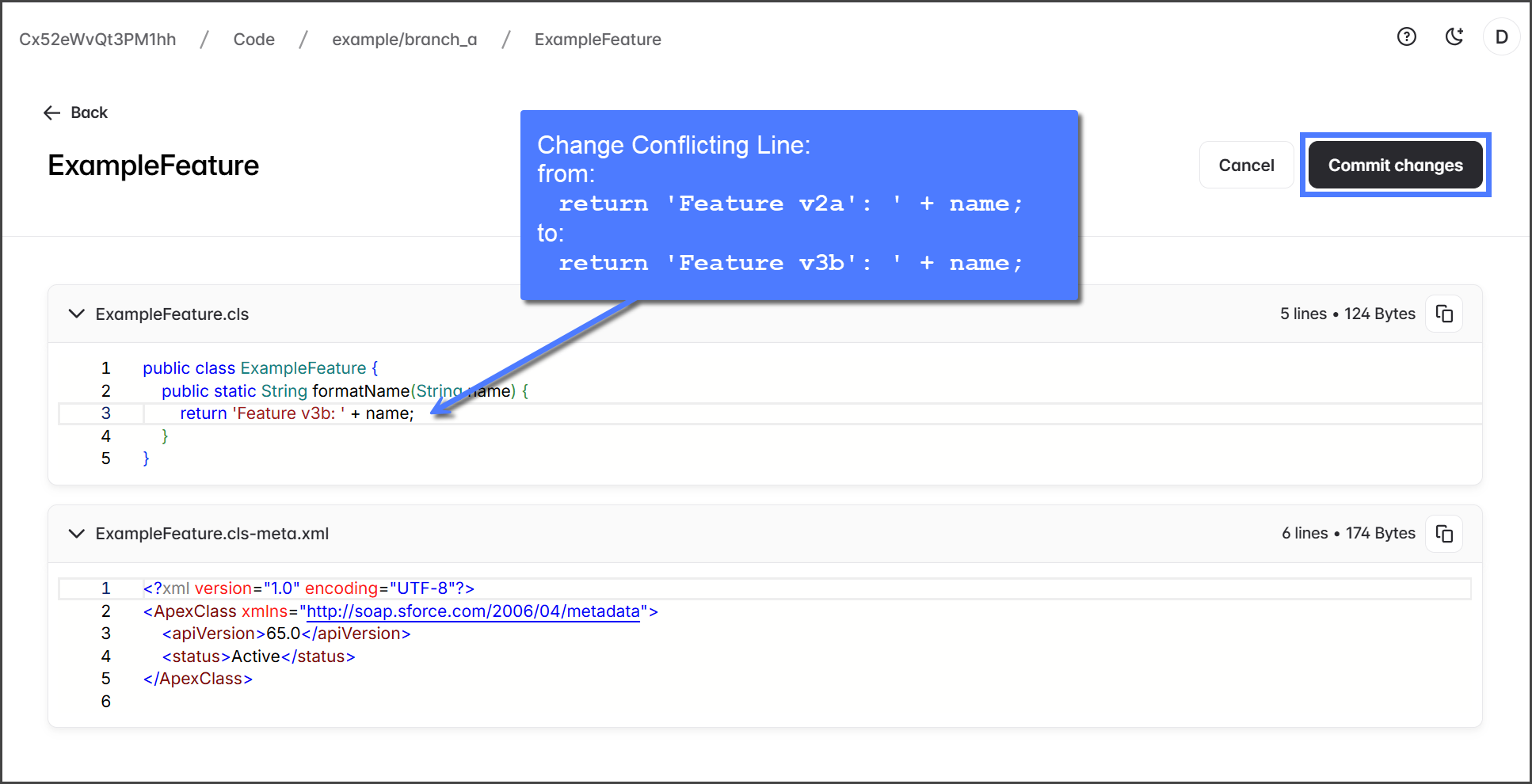
5. 競合しているコード行を、 **ソース** ブランチです。
6. 次をクリックします **変更をコミット**.

   <div align="left"><figure><img src="https://225042527-files.gitbook.io/~/files/v0/b/gitbook-x-prod.appspot.com/o/spaces%2FRpUu5iMlzMFAudyBvMOl%2Fuploads%2FwzKDv4loReHxkn6mJTem%2FResolvingPullRequestConflicts-S04-04.png?alt=media&amp;token=3e5c1d17-4228-478e-95e1-5823bd154d67" alt="" width="563"><figcaption></figcaption></figure></div>
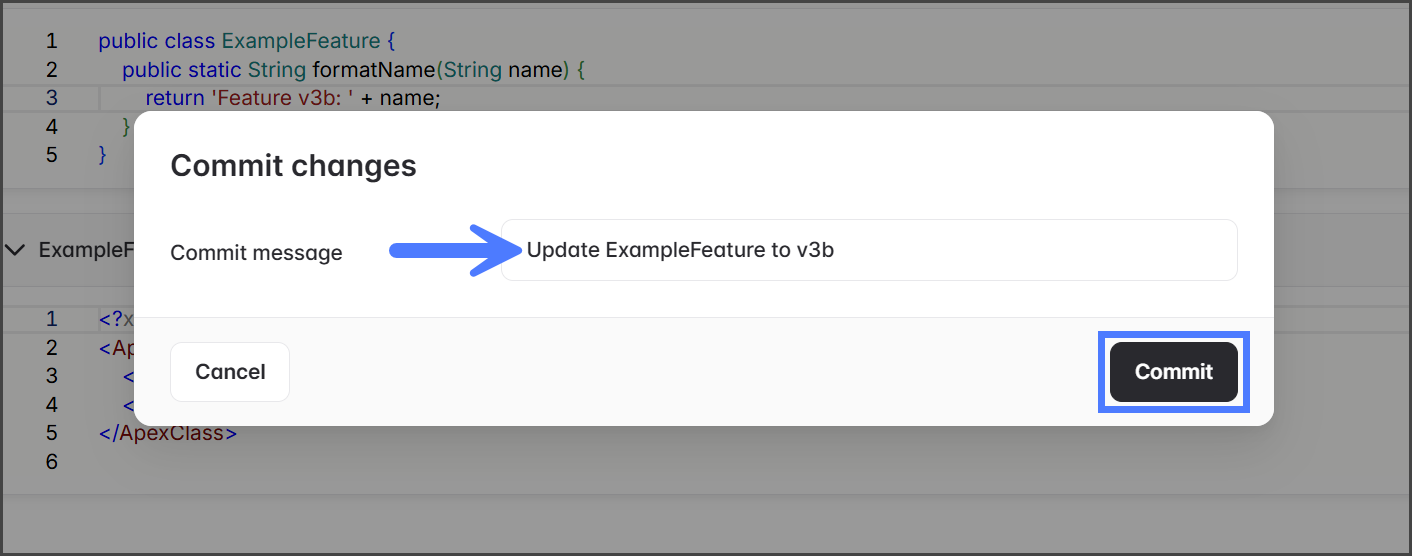
7. を入力してください。 **コミット メッセージ**.
8. 次をクリックします **コミット**.

   <div align="left"><figure><img src="https://225042527-files.gitbook.io/~/files/v0/b/gitbook-x-prod.appspot.com/o/spaces%2FRpUu5iMlzMFAudyBvMOl%2Fuploads%2Fs8v4c5oagdYwOQ7cMc86%2FResolvingPullRequestConflicts-S04-05.png?alt=media&amp;token=bb1bd0af-51f9-42e6-abf0-1ffb2ee13dbc" alt="" width="375"><figcaption></figcaption></figure></div>

{% hint style="info" %}
競合のあるすべてのコンポーネントに対して、この手順を繰り返します。
{% endhint %}

9. に一致するように編集したら、 **ソース** ブランチに戻って Pull Request を開きます。
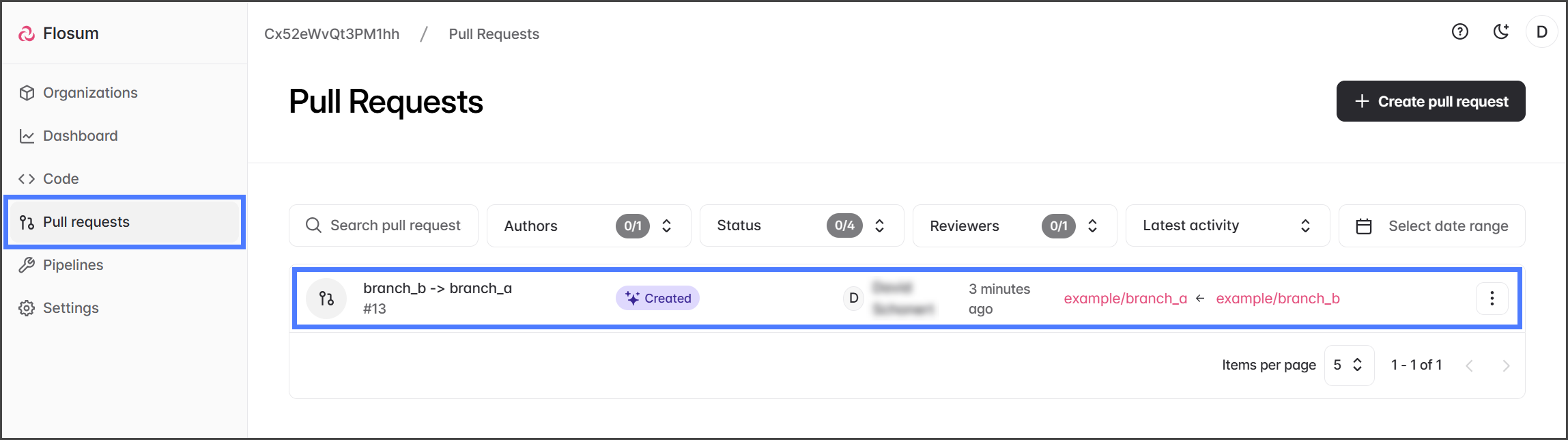
10. 次をクリックします **プルリクエスト** を左側のサイドバー メニューから。
11. Pull Request をクリックして、すべての競合が解決されているか確認します。

    <div align="left"><figure><img src="https://225042527-files.gitbook.io/~/files/v0/b/gitbook-x-prod.appspot.com/o/spaces%2FRpUu5iMlzMFAudyBvMOl%2Fuploads%2Fp64mN9HFNBOa33H6VsOs%2FResolvingPullRequestConflicts-S04-06.png?alt=media&amp;token=3866aa56-1b59-49de-b255-a48b7fb68f1a" alt="" width="563"><figcaption></figcaption></figure></div>
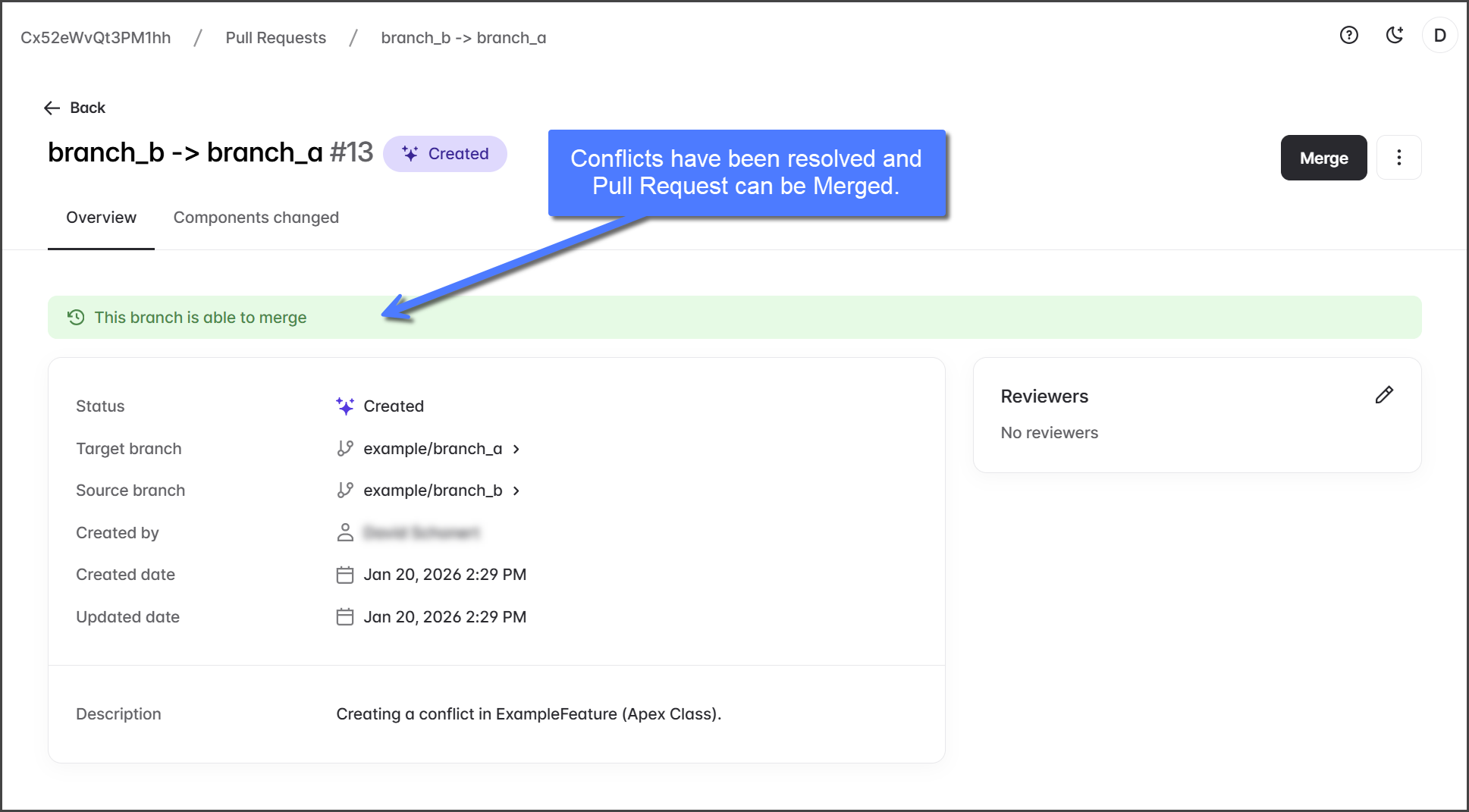
12. これ以上競合がなければ、Pull Request のメッセージは緑色になり、「このブランチはマージできます」と表示されます。

    <div align="left"><figure><img src="https://225042527-files.gitbook.io/~/files/v0/b/gitbook-x-prod.appspot.com/o/spaces%2FRpUu5iMlzMFAudyBvMOl%2Fuploads%2FPLcM3AH2yPcm2RXGsPDY%2FResolvingPullRequestConflicts-S04-07.png?alt=media&amp;token=857898d0-5d1b-4374-b540-6a7729b44b23" alt="" width="563"><figcaption></figcaption></figure></div>

{% hint style="info" %}
Pull Request に競合が残っている場合は、確認して解決してください。すべての問題が解決されるまで繰り返します。
{% endhint %}
{% endstep %}
{% endstepper %}


---

# Agent Instructions
This documentation is published with GitBook. GitBook is the documentation platform designed so that both humans and AI agents can read, navigate, and reason over technical content effectively. Learn more at gitbook.com.

## Querying This Documentation
If you need additional information that is not directly available in this page, you can query the documentation by asking a question.

Perform an HTTP GET request on the following URL with the `ask` and `goal` query parameters:

```
GET https://docs.flosum.com/devops/devops-ja/pururikuesuto/pururikuesutonopurosesu/pururikuesutonono.md?ask=<question>&goal=<user_goal>
```

`ask` is the immediate question: it should be specific, self-contained, and written in natural language.
`goal` is what the user is ultimately trying to achieve, the reason they need the answer. Sharing it helps GitBook give you a better, more relevant answer. A goal is most helpful when it describes the outcome the user wants rather than restating the question. For example, with `ask=how do I create an API token`, a goal like `automate deployments from our CI pipeline` lets GitBook tailor the answer to that use case.

The response will contain a direct answer to the question and relevant excerpts and sources from the documentation.

Use this mechanism when the answer is not explicitly present in the current page, you need clarification or additional context, or you want to retrieve related documentation sections.